
Create your BPMN models visually in Vani
Vani's BPMN Kit gives you everything you need to create clean, professional BPMN diagrams. Whether you're new to BPMN notation or already working with BPMN 2.0, you can easily model and visualize business processes on an intuitive visual canvas.
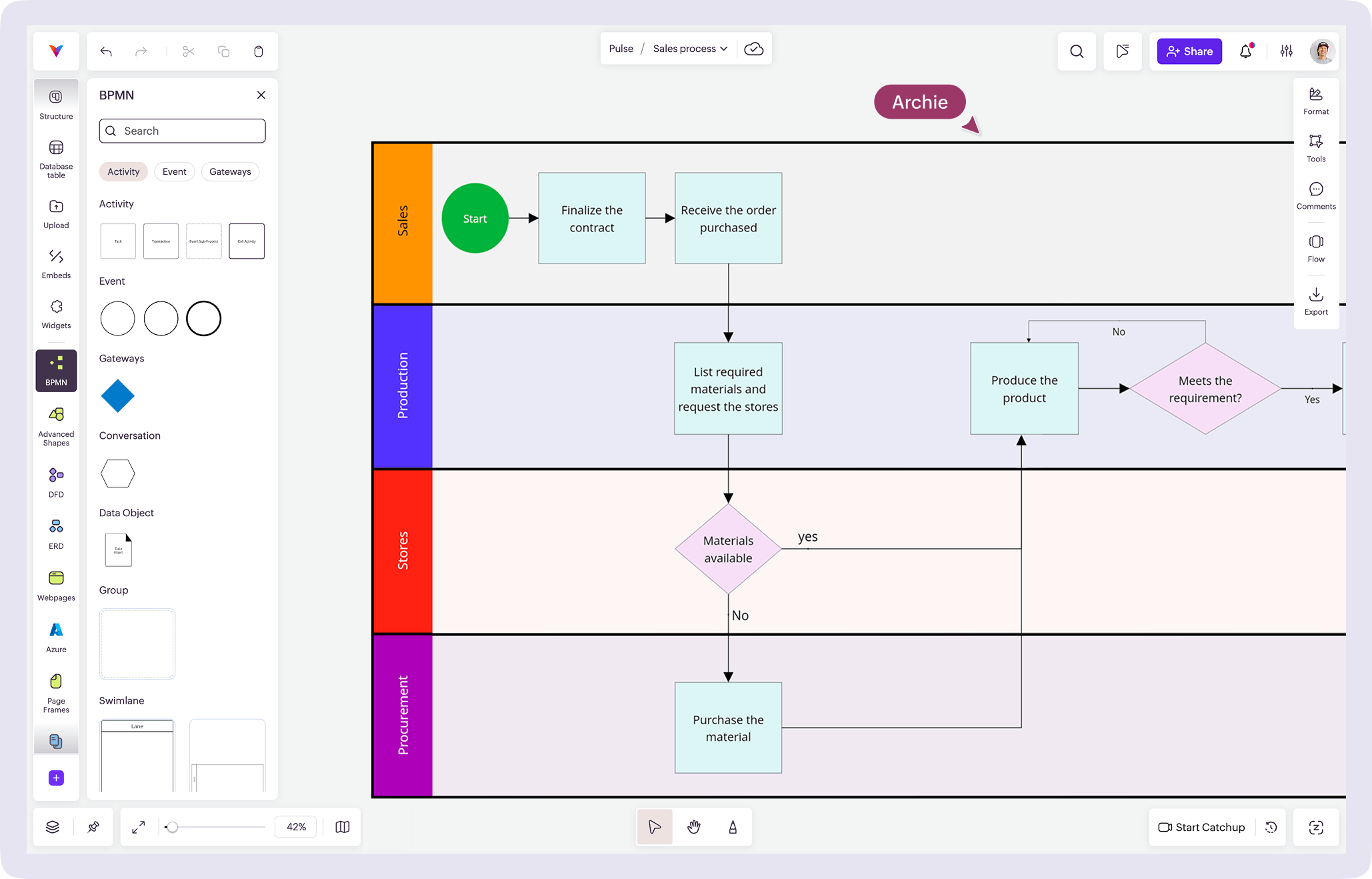
What is BPMN?
The universal language of business process
BPMN (Business Process Model and Notation) is a standard way to visualize how a business process works using a predefined set of symbols. A BPMN diagram is a kind of flowchart used by project managers, business analysts, and IT teams to show how a workflow moves from start to finish—including tasks, decisions, events, and responsibilities—so teams can understand the process without long documents.
Each BPMN notation has a specific meaning, making BPMN diagrams easy to read for both technical and non-technical stakeholders.
The latest standard, BPMN 2.0, allows teams to model even complex workflows with clarity and consistency, making it the most widely used format for process mapping today.
Why create a BPMN diagram in Vani?
Built for the way your team actually works
Visual and easy to understand
Vani gives you an infinite visual canvas to drag, connect, and organize BPMN notation naturally. With an intuitive workspace, you can create BPMN diagrams easily without struggling with complicated tools.
From conversations to BPMN—collaborate in real time or async
BPMN diagrams aren't just drawings—they're team documents. In Vani, your BPMN models live inside shared Spaces where multiple stakeholders can edit the same BPMN diagram, leave comments, and track changes together.
Not just the diagram—manage the whole workflow
With Vani, you can create BPMN diagrams that can be reviewed, updated, and iterated across multiple versions as your process evolves. With the help of versatile templates, Kits, and Vani AI, you can do more than just modelling—you can design workflows, assign tasks, track real-time updates, and share your diagrams with external stakeholders for review and validation.
What's in the BPMN Kit in Vani?
The BPMN Kit in Vani includes everything you need to create a complete BPMN diagram. It's more than just the shapes—it's a complete system of BPMN styles and assets built around BPMN 2.0 standards.
How to use the BPMN Kit in Vani
-
Open Vani and create a new Space where you want to design your business process.
-
Open the marketplace, search for the BPMN Kit, and add it to your toolbar. You will see a full set of standard BPMN notations on the left side of the canvas, ready to use.
-
Drag the BPMN symbols—like events, tasks, gateways, and flows—onto the canvas to build your BPMN diagram. Use connectors to show the sequence and the logic of the process.
-
Invite stakeholders to co-edit the Space. Collect feedback through comments or jump into a real-time video session to review and refine the diagram together. Iterate on the diagram without switching tools or losing context.
-
Once finalized, export your diagram as a PDF or PNG or share it using an external link. You can also embed the Vani Space into documents, spreadsheets, or presentations to keep your process documentation connected.
FAQs
Still have questions? Chat with us