
Design Cisco network diagrams faster, together
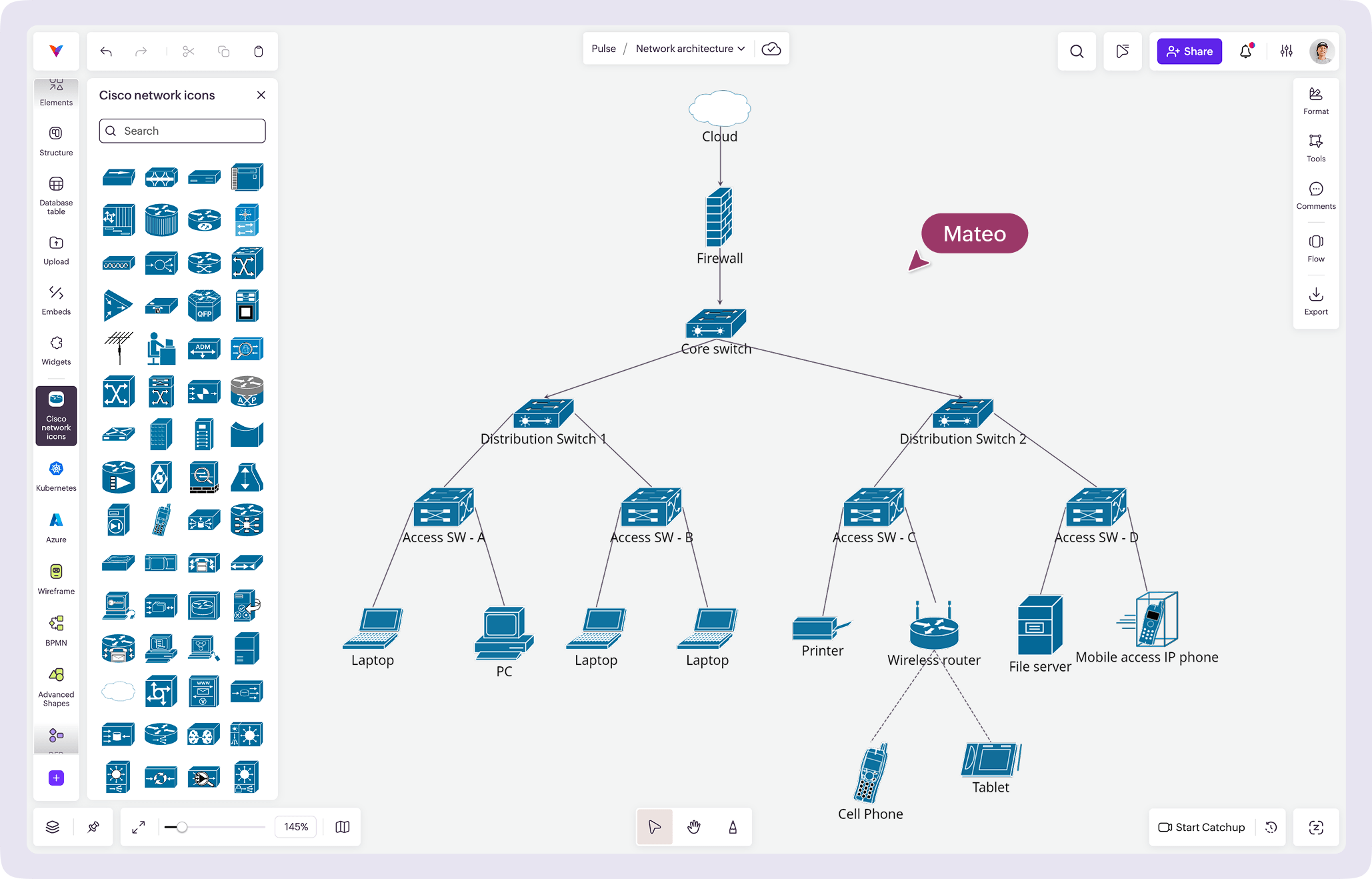
Vani's Cisco network icons Kit helps network engineers and IT teams plan, map, and build network architecture visually—without the usual friction.
What are Cisco network icons?
Cisco network icons are a standardized set of symbols used to represent network devices and components in network architecture diagrams. These icons provide a consistent visual language for illustrating how systems connect, communicate, and stay secure.
The Cisco network icons are widely used to build different types of network topologies—from small home networks to complex large enterprises—making it easy for non-technical stakeholders to understand the system architecture.
The Cisco network icons cover everything from routers, switches, and firewalls to WAN/LAN components, helping you map everything from high-level connectivity to granular-level hardware mapping.
Why engineers use Vani for laying network diagrams
Room to think visually
Vani's infinite canvas gives your diagrams the freedom to map everything. Brainstorm ideas and map your entire network without running out of room or losing context.
Design, iterate, repeat
Run multiple architecture versions side by side. Track how your design evolves from early concepts to production-ready diagrams—all in one place, with nothing lost between the feedback and design.
Collaborate without slowing down
Bring your team into the same workspace. Discuss designs over video, leave contextual feedback, vote on decisions, and make decisions faster—whether your stakeholders are technical or non-technical.
Access a complete network icon ecosystem
Vani's diagramming library doesn't stop at Cisco. Access icon Kits like AWS, Azure, Google Cloud, and more to design hybrid and multi-cloud architectures within the same canvas.
What is included in the Vani Cisco network icons Kit?
The Vani Cisco network icons Kit includes a comprehensive set of standardized Cisco symbols to start instantly, enabling you to quickly build accurate and professional network diagrams. No setup. No manual importing.
How to design network topology in Vani
-
Open Vani and create a new Space for your network topology. Rename the zone with your architecture or project name and structure your workspace.
-
Open the Marketplace, search for the Cisco network icons Kit, and add it to your toolbar to instantly access the ready-to-use standardized icons.
-
Drag and drop the Cisco network icons onto the infinite canvas. Add desktops, routers, firewalls, LAN components, load balancers, and more to visually build your network.
-
Invite your technical and non-technical project members to your Space. Collect feedback through comments or jump into a real-time video session to review and refine the architecture together.
-
Once finalized, export your diagram as a PDF or PNG or share it using an external link. You can also embed the Vani Space into documents or presentations for seamless documentation.