
Design and collaborate on Google Cloud (GCP) architecture diagrams online
Create Google Cloud architecture diagrams visually in Vani. Plan systems, collaborate with your team, and keep discussions connected in one shared Space.
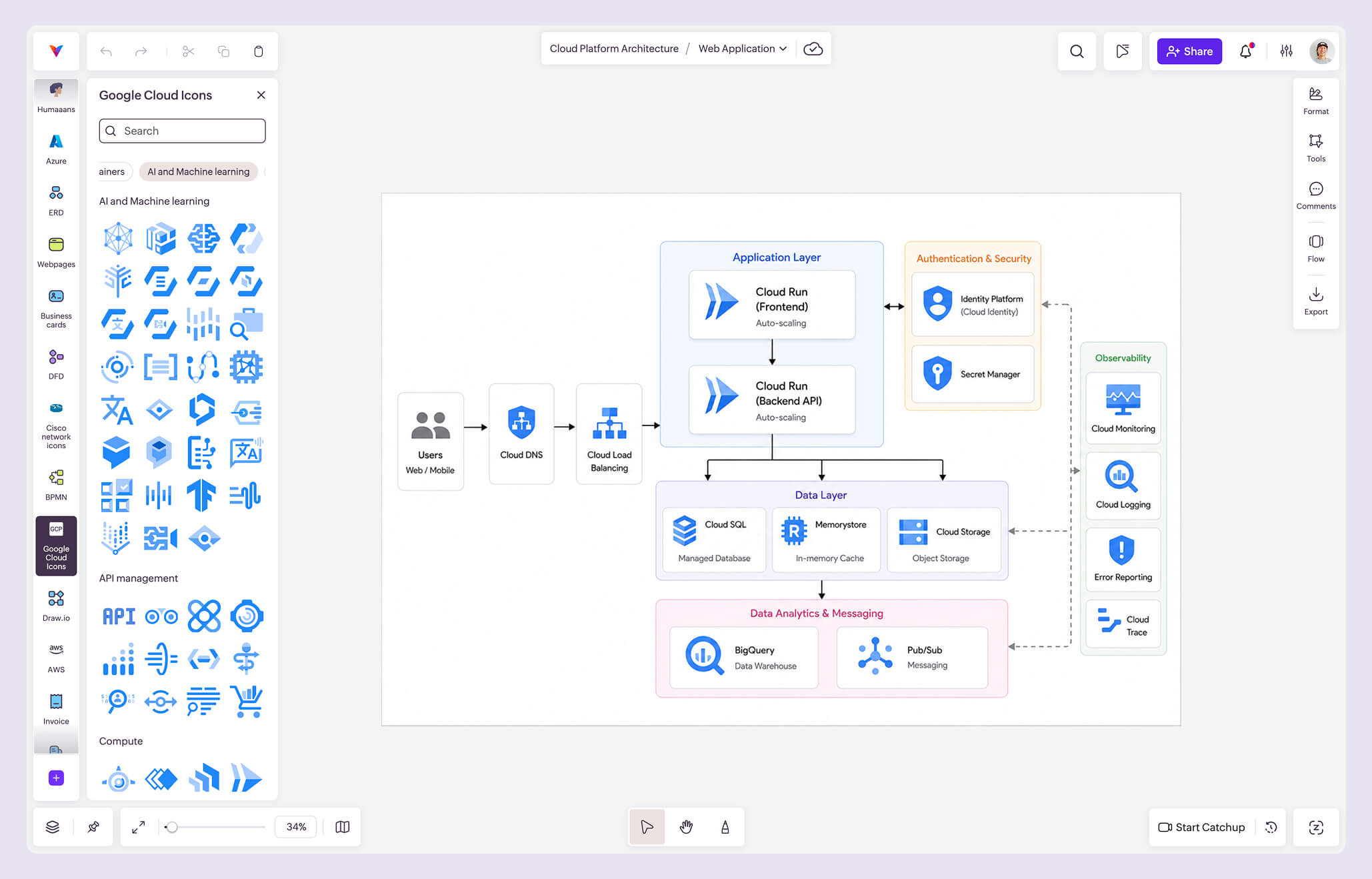
What is Google Cloud architecture diagramming?
A Google Cloud architecture diagram is a visual representation of how applications, services, infrastructure, and data systems are built and connected within Google Cloud Platform (GCP).
These diagrams help teams plan cloud infrastructure, communicate system architecture clearly, document deployments, and understand how different Google Cloud services interact with each other. They are commonly used for cloud infrastructure planning, system architecture documentation, AI and analytics workflows, networking and deployment design, cloud migration planning, and engineering collaboration and reviews.
With Vani's Google Cloud Kit, teams can create structured cloud architecture diagrams using GCP icons, service cards, product cards, and infrastructure symbols on a collaborative visual canvas.
Why use the Google Cloud Kit in Vani
Design cloud architecture visually
Use GCP icons, service cards, product cards, and infrastructure symbols to create structured cloud architecture diagrams that are easy to understand, present, and document.
Plan and communicate systems clearly
Map services, APIs, storage, networking, and AI workflows visually to help engineering and cross-functional teams understand system relationships and align on architecture decisions faster.
Collaborate on architecture in real time
Work on Google Cloud architecture diagrams together in a shared Space. Start a video Catchup, gather feedback through comments, review system changes, and keep architecture discussions connected to your work.
What's included in the Google Cloud Kit
The Google Cloud Kit includes a wide range of architecture components and service symbols for building professional cloud infrastructure diagrams, including:
- Google Cloud containers, compute, and networking components
- AI and machine learning, data analytics, and database services
- API management, security, storage, and migration symbols
- Developer tools, management tools, and internet of things components
- User & device cards, service cards, and product cards
- Expanded product cards and card modifiers for structured architecture layouts
This makes it easier to plan, present, and collaborate on cloud architecture visually.
How to create a Google Cloud architecture diagram in Vani
-
Start a new Space or choose an existing Space for your cloud infrastructure planning.
-
Add the Google Cloud Kit from the marketplace.
-
Open the Kit to access GCP icons and architecture components.
-
Drag and arrange services to map your cloud architecture visually.
-
Use connectors, labels, and containers to organize systems and workflows clearly.
-
Invite teammates to review the architecture, discuss changes, and collaborate in real time.
-
Export or share your architecture diagram for documentation and presentations.