
Build a visual Stage-Gate Process for confident project decisions
Visualize and manage a Stage-Gate Process for product development and project planning. Whether you're launching a new product or managing a complex project, the Stage-Gate Process Kit in Vani helps you evaluate ideas, reduce risk, control costs, and make confident decisions from concept to completion.
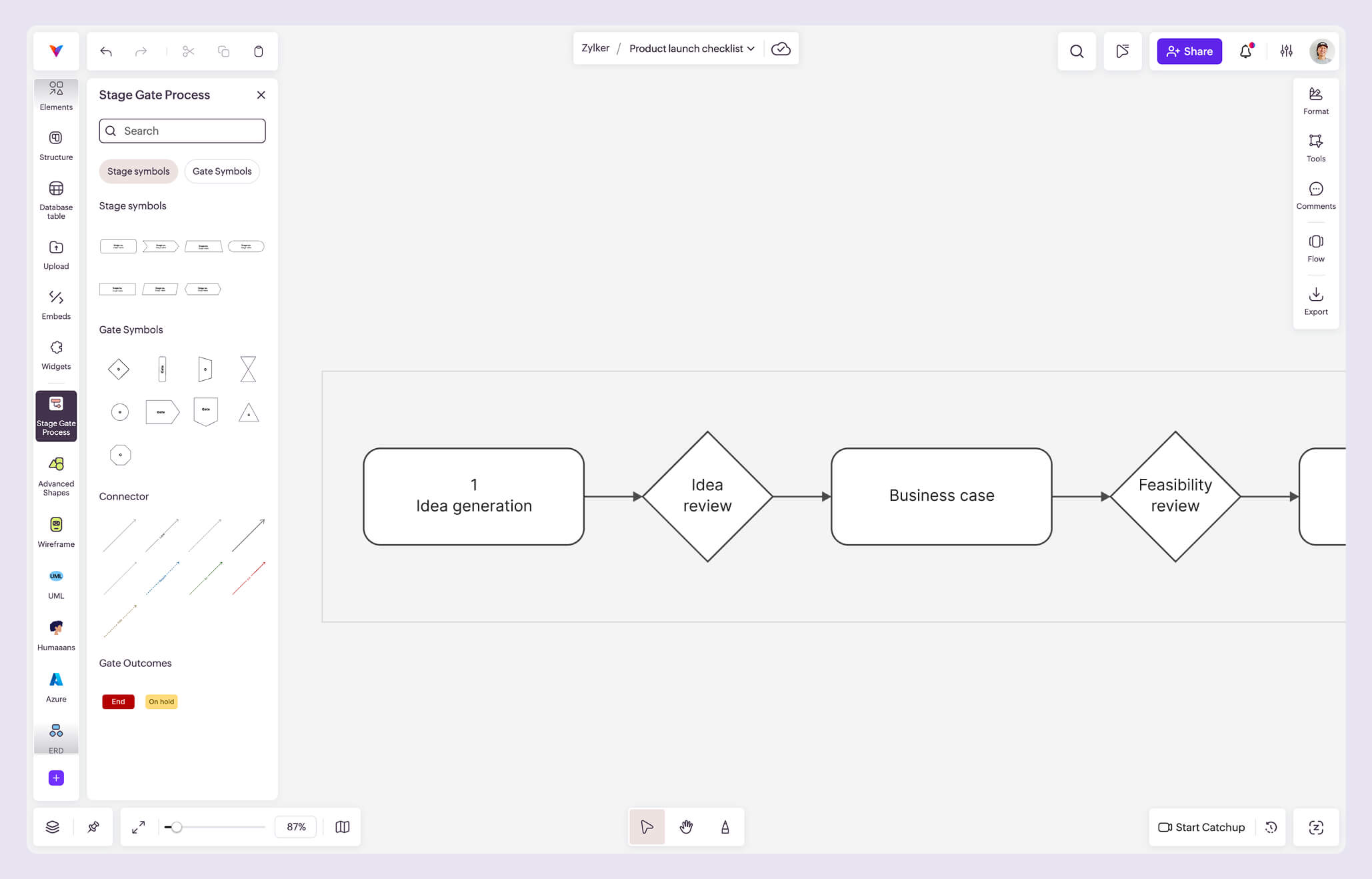
What is a Stage-Gate Process?
A Stage-Gate Process (also called a Phase Gate Process) is a structured framework used to guide projects through a series of planned stages separated by review checkpoints called gates.
Each stage represents a phase of work, such as discovery, planning, development, testing, or launch. At the end of every stage, the project reaches a gate, where stakeholders evaluate progress against predefined criteria before deciding the next step.
Originally developed by Dr. Robert G. Cooper, the Stage-Gate methodology is widely used by product managers, engineering teams, R&D organizations, manufacturers, and innovation teams to improve decision-making while minimizing project risk.
Instead of managing research, planning, reviews, and documentation across multiple tools, you can run your entire Stage-Gate Process on a single infinite canvas. Map every stage visually, collaborate with your team in real time, collect feedback, review decisions, and keep all supporting information in one shared workspace that evolves alongside your project.
Why project teams use the Stage-Gate Process Kit in Vani
Plan, collaborate, and execute from one workspace
Build your workflow while keeping everything your team needs in the same place. Brainstorm ideas, compare competitors, document research, create process diagrams, organize project data, assign work with Kanban boards, and connect information.
Make better decisions at every gate
Every stage is clearly visualized on an infinite canvas, giving stakeholders complete visibility into the project's progress. With the full context available, reviewing gates and deciding whether to move forward, revisit, or stop a project becomes faster and more objective.
Review together and present with confidence
Gather feedback using comments and video meetings directly inside your Vani canvas. When it's time to present progress, use Vani's Flow presentation mode to walk stakeholders through every stage, decision, and outcome without rebuilding slides.
What's inside the Stage-Gate Process Kit?
The Stage-Gate Process Kit in Vani includes everything you need to build a structured evaluation workflow for your project on an infinite canvas:
- Stage symbols to represent each phase of your project
- Gate symbols to define review checkpoints
- Gate outcome elements for decisions like Go, Hold, Rework, or Kill
- Connectors to map the complete project flow between stages
Using these building blocks, you can create a repeatable framework that helps your team evaluate progress consistently, identify risks early, improve decision-making, and maintain quality throughout the project lifecycle.
How to create a Stage-Gate Process in Vani
-
Open a Vani Space for your project and invite your team members.
-
Open the marketplace and add the Stage-Gate Process Kit to your toolbar.
-
Drag the stage and gate symbols onto the infinite canvas to map your project workflow.
-
Add research, documents, diagrams, notes, and supporting data alongside each stage to provide complete context.
-
Collaborate with stakeholders using comments, meetings, and discussions before every gate review.
-
Record Go, Hold, Rework, or Kill decisions and update project progress.
-
Use Vani AI to summarize your canvas to capture key insights, and share those findings with stakeholders.