
Business Model Canvas template
A visual framework that outlines how a business creates, delivers, and captures value.
Use this template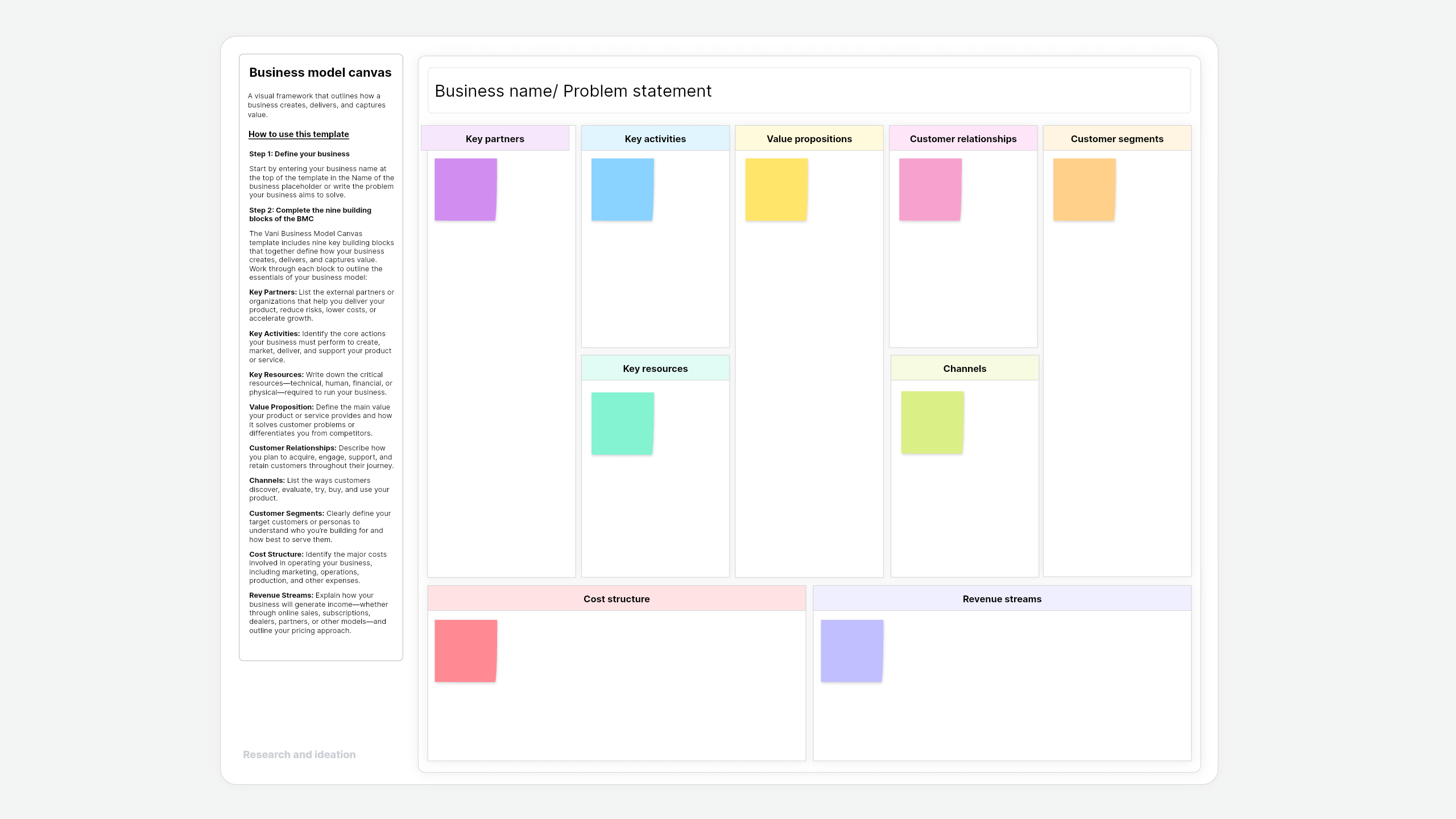
What is a Business Model Canvas template?
A Business Model Canvas template is a one-page strategic framework that lets you map your business using nine key building blocks. It helps your team see how everything connects, from your customers to your value proposition, and understand the business model quickly.
About this Vani Business Model Canvas template
The Business Model Canvas template in Vani gives you a ready-to-use layout so you don't have to start it from scratch. Just add your details, map your ideas, and shape your business model in minutes.
How to use this template
- Define your business
- Complete the nine building blocks of the BMC
- Key partners: List the external partners or organizations that help you deliver your product, reduce risks, lower costs, or accelerate growth.
- Key activities: Identify the core actions your business must perform to create, market, deliver, and support your product or service.
- Key resources: Write down the critical resources—technical, human, financial, or physical—required to run your business.
- Value proposition: Define the main value your product or service provides and how it solves customer problems or differentiates you from competitors.
- Channels: List the ways customers discover, evaluate, try, buy, and use your product.
- Customer segments: Clearly define your target customers or personas to understand who you’re building for and how best to serve them.
- Cost structure: Identify the major costs involved in operating your business, including marketing, operations, production, and other expenses.
- Revenue streams: Explain how your business will generate income—whether through online sales, subscriptions, dealers, partners, or other models—and outline your pricing approach.
When to use this Business Model Canvas template
The Business Model Canvas template can be used in any situation whenever you need to visualize, strategize, design, or communicate how your business works. This template is widely used by startups, product teams, and business leaders to bring clarity, alignment, and a simple structure to understand complex business ideas.
Here are some common use cases where a Business Model Canvas template can be used:
- Strategic planning: Map out the operations and strategies for growth in your existing business by revisiting the assumptions, identifying gaps, and pivoting your approach.
- Developing a new business: When starting a new business or startup, use this template to map out your ideas, understand the market, and see how all the functions of the business would fit together.
- Exploring new market opportunities: Identify new product or feature opportunities by comparing your model with competitors and spotting areas for improvement.
- Communicate better: Share your business model in a simple, visual way so everyone stays aligned and understands the core idea quickly.
- Documenting your business: Track how your business model evolves over time, and understand how changes like mergers or expansion may impact it.
Why use this Business Model Canvas template in Vani?
- Real-time collaboration: With a built-in video meeting tool in Vani, share ideas, add comments, react with emojis, and contribute together—whether you’re online at the same time or not.
- Vani AI: Generate ideas, summarize discussions, and turn notes into structured insights. Pick up right where you left off and move faster with AI support.
- Drag-and-drop shapes: Use advanced shapes in Vani to build workflows, map processes, assign tasks, and align all your teams in one place.
- Layers: Zoom in, edit, and tweak any part of your document to keep things organized.
- Version history: Track your changes in the business model and revert them if needed.