
Example mapping template
What is an example mapping template?
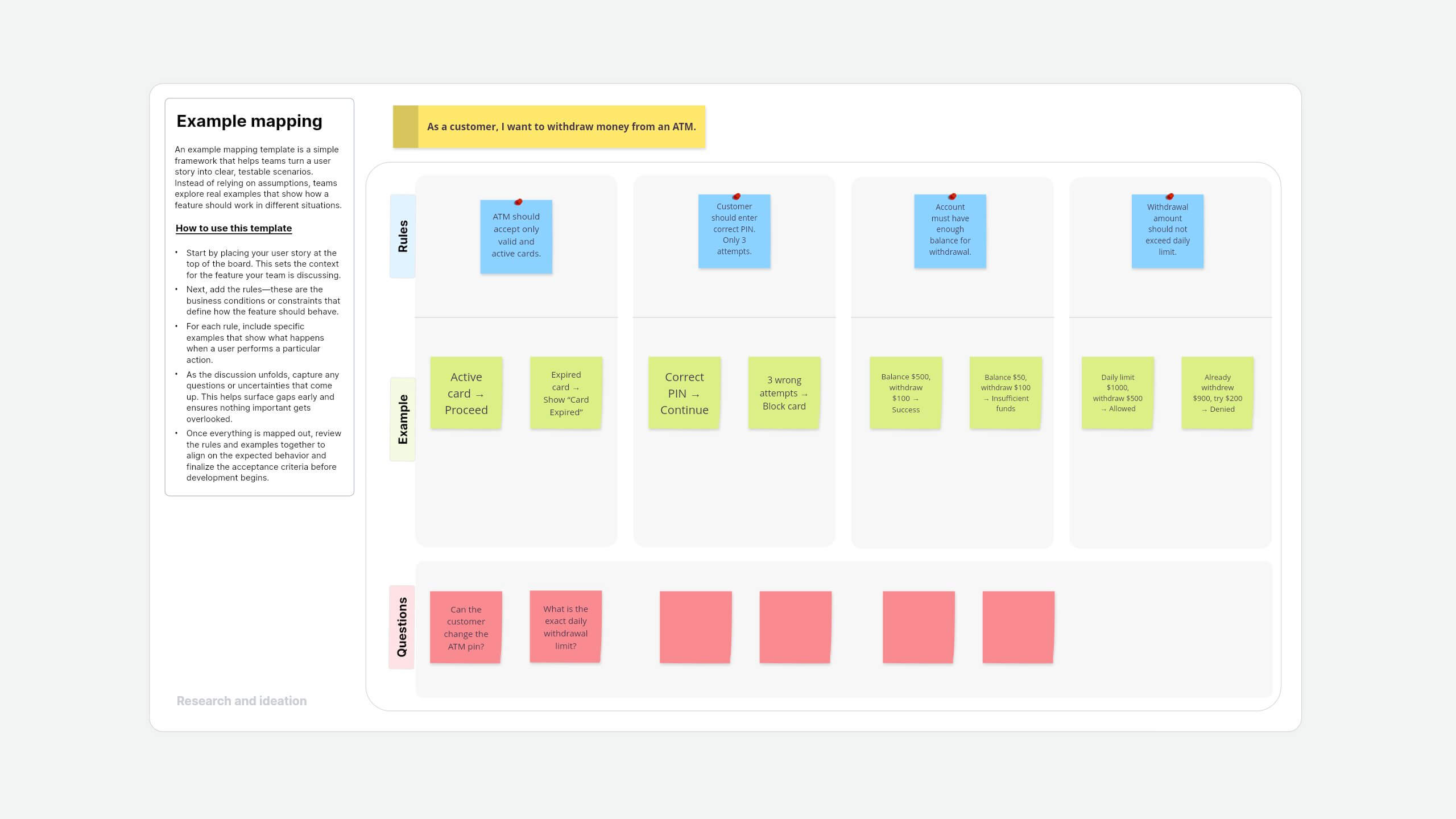
An example mapping template is a simple framework that helps teams turn a user story into clear, testable scenarios. Instead of relying on assumptions, teams explore real examples that show how a feature should work in different situations. You don't just say that it should work—you define exactly how.
The four building blocks of example mapping are:
- User story: The feature you're discussing
- Rules: Conditions that define behavior
- Examples: Real scenarios that show how it works
- Questions: Gaps or uncertainties to clarify
About this Vani example mapping template
Vani's example mapping template gives you a ready-to-use, visual layout to map user stories with clarity.
It's a shared space where your team can:
- Break down features into clear use cases.
- Add and connect ideas visually.
- Collaborate in real time (or async).
- Scale across multiple scenarios with an infinite canvas.
How to use this template
- Add the example mapping template to your Vani Space Find the example mapping template in the template library and click the Use template button to add it to your Space.
- Start with your user story Start by placing your user story at the top of the board. This sets the context for the feature your team is discussing.
- Define the rules Next, add the rules. These are the business conditions or constraints that define how the feature should behave.
- Add real examples for each rule For each rule, include specific examples that show what happens when a user performs a particular action.
- Capture open questions As the discussion unfolds, capture any questions or uncertainties that come up. This helps surface gaps early and ensures nothing important gets overlooked.
- Review and turn your stories into action Once everything is mapped out, review the rules and examples together to align on the expected behavior and finalize the acceptance criteria before development begins.
When to use this example mapping template
The example mapping template in Vani is a collaborative approach that helps teams better connect with a concept by understanding user behavior through concrete, real-world scenarios. It's flexible enough to be used across multiple use cases, whether you're refining a feature or exploring a new idea. With this template, you can easily visualize scenarios, recall decisions, and stay in control of how a feature should behave—even before working through an abstract or complex concept.
- Before starting anything newWhen a feature or product idea feels abstract, or when you're building something from scratch, example mapping helps you ground your thinking. By mapping ideas to real user scenarios, your team can quickly understand the direction, connect the dots faster, and move forward with more clarity and confidence.
- Showing how a rule worksInstead of relying on long explanations or assumptions, the example mapping template lets you visually demonstrate how rules behave in real situations. It answers practical questions clearly, like what actually happens when a user clicks on a "Pay Now" button, where they're redirected, and what the system does next.
- Improving clarity in thinking and writingThe example mapping template helps you move from idea to execution with better clarity. It breaks down complex concepts into smaller, structured pieces, making it easier to think through scenarios and write well-defined user stories from the first interaction to the final outcome.
- Giving your team a shared understandingWhen everything is laid out visually and the logic flows naturally, it becomes easier for everyone to stay aligned. The template creates a shared understanding across the team, helping product managers, designers, and developers stay on the same page without losing context.
Why use Vani's example mapping template?
Vani's example mapping template comes with a pre-designed structure, so you don't have to start from scratch. More importantly, Vani goes beyond just mapping—it's an intelligent visual collaboration tool that helps you think, create, and refine ideas in one place.
Here are a few things that make Vani stand out:
- Built for speed, not setup: Start instantly with a pre-structured template. There's no need to create frameworks from scratch.
- Drag, drop, and think visually: Add sticky notes, shapes, and connections effortlessly. Move ideas around as your thinking evolves.
- Real-time collaboration that actually works: Jump on calls, leave contextual comments, and build together without losing context.
- Vani AI, built into your workflow: Generate ideas, structure flows, or expand scenarios instantly so your momentum never slows down.
- Share your work, your way: Export your work as a PNG or PDF, or share your Space with stakeholders in just a few clicks.