
Software development concept map
Bring structure to your development workflow so every phase is clear, connected, and ready for action. Use this template
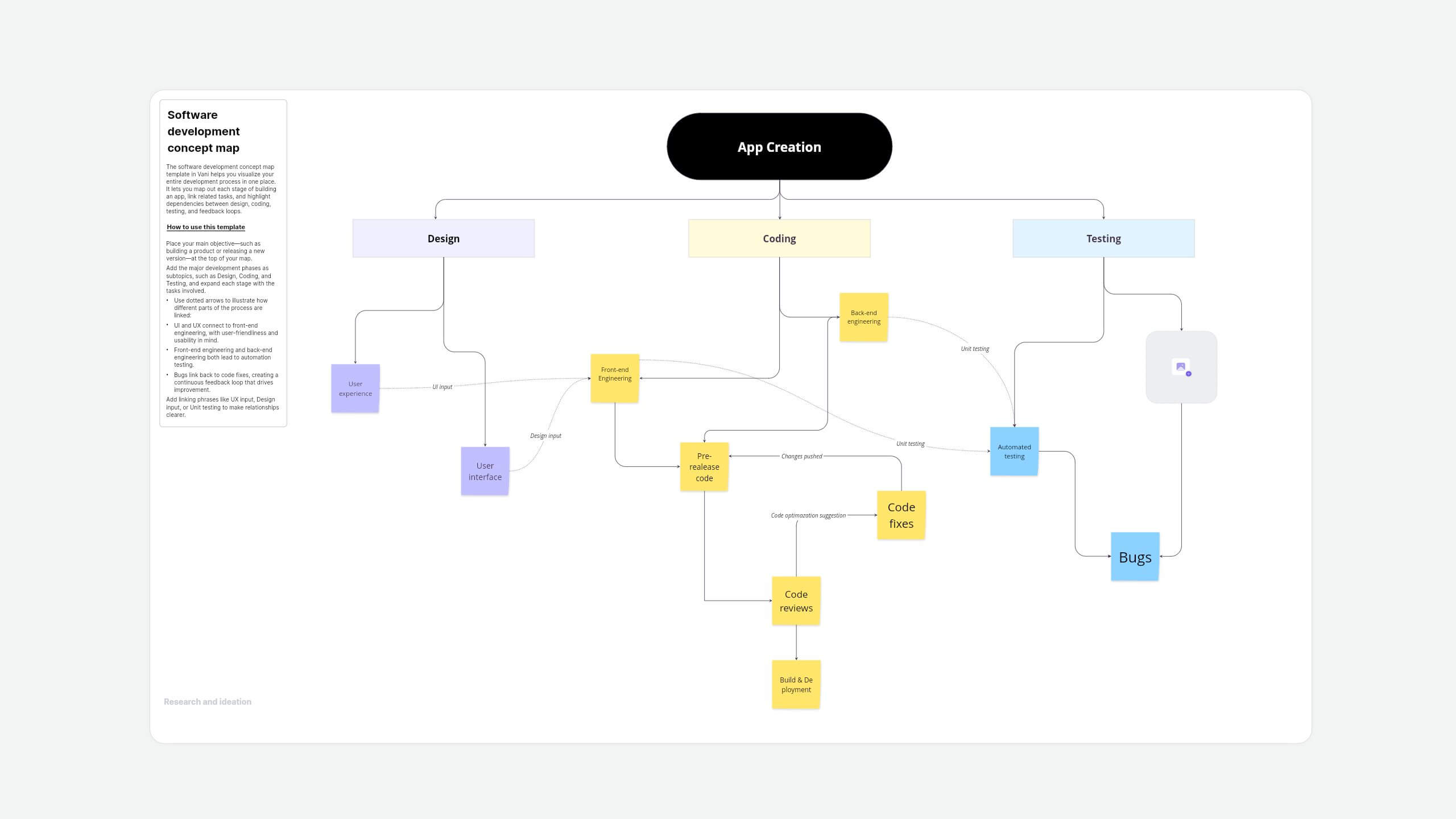
About this software development concept map template
From initial design to final testing, software development involves many interconnected steps. This concept map template in Vani helps you outline your app creation process, link development tasks, and show dependencies between design, coding, testing, and feedback.
Whether you're onboarding new team members or planning a sprint, this template brings clarity to your software lifecycle.
How to use this template
- Place your main objective—such as building a product or releasing a new version—at the top of your map.
- Add the major development phases as subtopics, such as Design, Coding, and Testing, and expand each stage with the tasks involved.
- Use dotted arrows to illustrate how different parts of the process are linked:
- UI and UX connect to front-end engineering, with user-friendliness and usability in mind.
- Front-end engineering and back-end engineering both lead to automation testing.
- Bugs link back to code fixes, creating a continuous feedback loop that drives improvement.
- Add linking phrases like UX input, Design input, or Unit testing to make relationships clearer.
When to use this software development concept map
- Planning new apps or features: Map out each stage and understand how tasks connect before you start.
- Running sprint meetings: Visualize progress, spot dependencies, and align your team around what's next.
- Onboarding new developers or designers: Quickly show how your team works, from interface planning to debugging and deployment.
- Doing a retrospective: Use the map to review what worked, what caused delays, and where feedback improved outcomes.
Why use this concept map template in Vani
- Drag and drop advanced shapes and sticky notes or upload media files.
- Customize fonts, colors, and sizes for a polished, clear layout.
- Use the mini-map to easily navigate your infinite canvas.
- Track real-time updates with live personality cursors.
- Comment, @mention teammates, react with emojis, or catch up instantly with video and audio calls.
- Share external links for anyone to access.
- Export your concept map as a PDF or image to share with clients, decks, and reports.
- Present with Flow for walkthroughs or demos.
FAQs
It's a visual tool that lays out the stages, tasks, and dependencies involved in building a software product—from design through delivery.
Developers, designers, product managers, QA teams, and educators—anyone involved in or teaching software development workflows.
Yes! You can add columns for sprints, roles (e.g., product owner, dev, or QA), or backlogs to align with your agile process.