
Workflow diagram
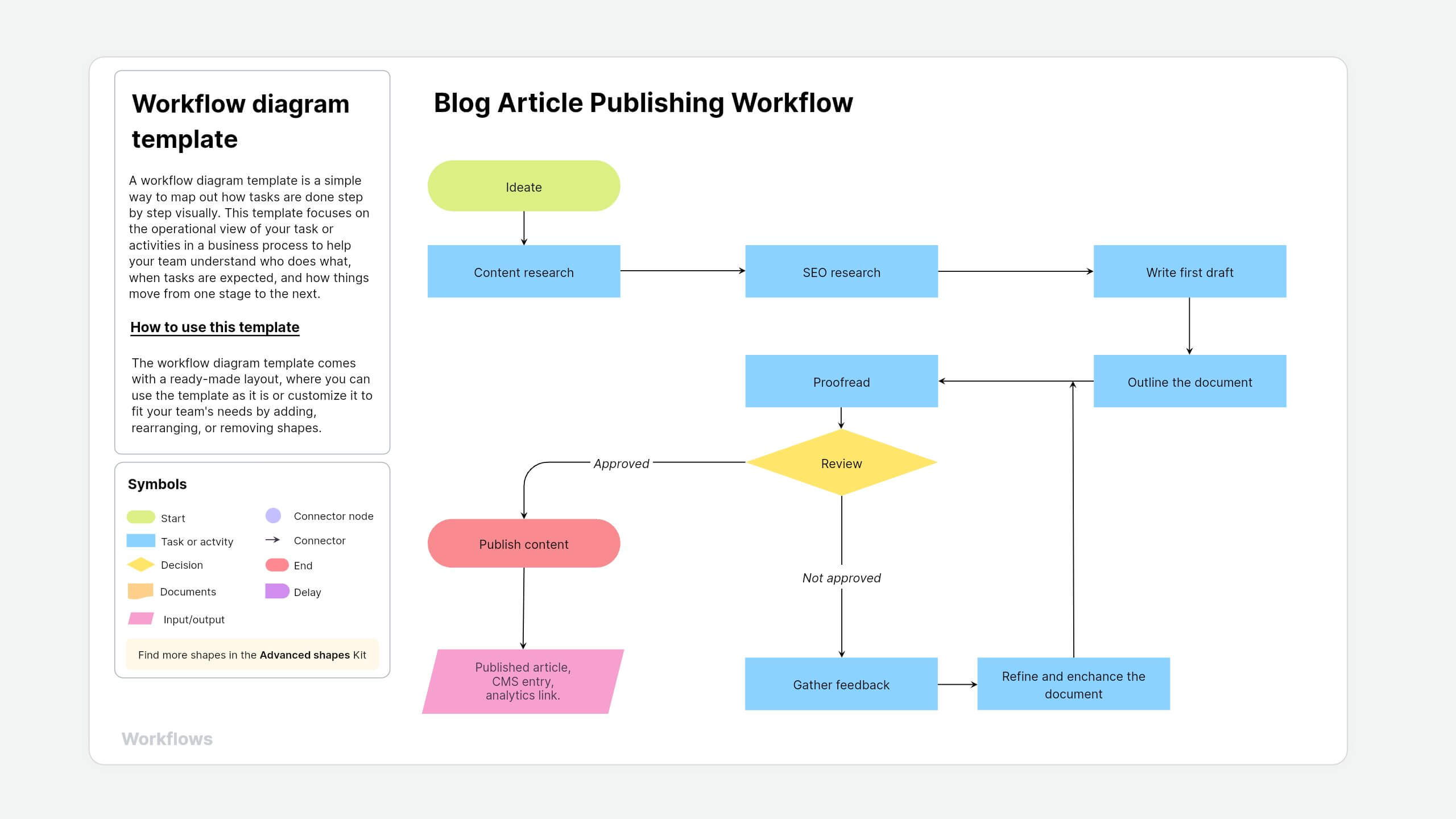
What is a workflow diagram template?
A workflow diagram template is a simple way to map out how tasks are done step by step visually. This template focuses on the operational view of your task or activities in a business process to help your team understand who does what, when tasks are expected, and how things move from one stage to the next.
Example: Think of it like a blueprint for your process, whether that's handling a customer support ticket, reviewing content, or managing approvals within your team.
About Vani's workflow diagram template
With Vani, you can document your entire process, from brainstorming tasks to mapping each step, all in one infinite canvas. The workflow diagram template in Vani gives you a ready-made structure to start planning the flow right away without starting from scratch.
How to use this template
- Add the template to your Vani SpaceStart by finding the workflow diagram template in the templates library and click Use template to add it to your Vani Space.
- Build your workflowThe template comes with a ready-made layout, where you can use the template as it is or customize it to fit your team's needs by adding, rearranging, or removing shapes. Here are some standardized shapes that you'll be working with:
- Circles for highlighting the start or end of the workflow
- Rectangles for tasks or activity
- Diamonds for decision points
- Connectors to show the flow between tasks
- Add more contextBring your workflow to life by adding charts, images, voice notes, or embedded documents for visual references. It helps clarify why each task matters by making it easier for your stakeholders to follow along with the logic behind it.
- Collaborate and share the workflowInvite your teammates to the Space and walk them through the workflow. Use @mentions to highlight tasks and add comments or sticky notes for feedback to refine the workflow. Once your workflow is finalized, share it with your team or external stakeholders using a public link or export it as a PNG or PDF.
When to use this workflow diagram template
Use the workflow diagram template when you need to map out how your team handles the tasks step by step. It gives everyone a shared view of the process, making it easier to understand, improve, and collaborate on.
- Task automation: Use this template to visualize and plan a process clearly before you deploy it in an automation tool—whether it's a project, marketing, customer support ticket, or anything else.
- SOPs: Turn your team's workflow into a clear, visual standard operating procedure document. Everyone can see who is responsible for what, which helps improve consistency and keeps your team aligned.
- Improving efficiency: Not sure where things are slowing down? Use this template to spot where your process stalls, remove repetitive steps, and streamline your workflow across your team.
- Onboarding or scaling: As your team grows, this template helps you keep your processes consistent and allows you to onboard teammates or scale operations without losing structure.
- Project planning: This template makes it easier for project managers to visualize workflows, map out tasks, allocate resources, and track progress without switching between the tabs.
Why use this workflow diagram template in Vani?
- Drag-and-drop shapes: Use advanced shapes to build even complex workflows without the clutter of heavy text documents.
- Real-time collaboration: Whether your team works remotely or hybrid, they can see instant updates in real time, embed links, upload media files, and add comments without switching tabs.
- Layers: Zoom in, edit, and tweak any part of your diagram to keep things organized and easy to follow.
- Version history: Track your changes in the process and revert them if needed.