- HOME
- Work culture
- Standard operating procedure (SOP): How to document and run processes visually
Standard operating procedure (SOP): How to document and run processes visually
- Last Updated : February 5, 2026
- 285 Views
- 8 Min Read

Think back to the first electronic gadget you ever owned. You probably didn’t read the manual right away. Instead, you pressed buttons, explored menus, made a few mistakes, and slowly figured things out. For a while, you felt like a scientist, experimenting, guessing, and hoping nothing would break. Eventually, though, you reached for the manual, and suddenly, everything made sense.
That simple experience says a lot about how humans learn and operate. Even for a small gadget, clear instructions matter. Now imagine running a CNC machine, managing a conveyor system, or operating a business with hundreds of employees. Guesswork doesn’t scale. Trial and error becomes expensive. That’s where structured guidance becomes essential.
This is exactly why standard operating procedures, commonly known as SOPs, exist. An SOP is the documented “manual” for how work gets done inside an organization. Leading companies rely on SOPs to ensure work is performed consistently, safely, and efficiently.
Creating an SOP removes ambiguity. It captures critical knowledge, reduces dependency on individuals, and helps teams deliver the same quality outcome every time. Whether you’re onboarding new employees, handling customer requests, or running complex operational processes, SOPs act as a reliable blueprint for execution.
In this article, you'll get to know what SOP really means in a business context, why it matters, best practices for writing one, and how visual tools like Vani can make SOPs easier to understand, maintain, and actually use.
What is an SOP?
An SOP is a strategic tool and a documented set of step-by-step instructions that explains how to perform a recurring task or process correctly and consistently. It acts as a reference point for how work should be done every time, helping organizations improve efficiency, maintain quality, and meet compliance requirements.
In early-stage startups or medium-sized businesses, decisions and processes often live in the founder’s or leader’s head. As the organization grows, this approach quickly breaks down. Responsibilities are delegated, teams expand, and work becomes distributed. SOPs step in as a shared playbook for all the guidelines, ensuring that processes remain consistent even when people, roles, or managers change.
The format of SOPs and the level of detail vary based on the nature of the work, the complexity of the process, and the needs of the organization. They may take the form of written steps, checklists, flowcharts, or visual workflows. Regardless of format, their purpose remains the same: to make work repeatable, reliable, and easy to follow.

Benefits of writing an SOP
At a basic level, SOPs provide clear instructions for recurring tasks, but their value goes far beyond that. Here are some of the most impactful benefits SOPs bring to organizations:
Consistency and quality control
SOPs ensure tasks are performed the same way every time. This consistency reduces variation in outcomes and helps maintain a reliable level of quality—something customers and stakeholders depend on. When everyone follows the same process, errors decrease and brand trust improves.
Improved efficiency and productivity
By clearly outlining each step of a process, SOPs help teams identify unnecessary or duplicate actions. This makes workflows leaner and faster by achieving a consistent quality of output. With fewer questions and less guesswork, employees can complete tasks more efficiently and focus on higher-value work.
Organizational growth
SOPs make scaling easier. As teams grow or operations expand, SOPs ensure quality and efficiency don’t suffer. They also clearly define roles and responsibilities, making onboarding smoother for new hires and reducing dependency on senior members to learn the process.
Continuous improvement
An SOP provides a baseline for measuring performance. Once a process is documented, it becomes easier to identify bottlenecks, gaps, or opportunities for improvement. SOPs can be updated over time as processes evolve, supporting continuous optimization.
Fewer errors and better compliance
Documented processes reduce mistakes, accidents, and operational risks. SOPs also serve as critical documentation for audits and regulatory compliance, helping organizations meet standards such as ISO, OSHA, or FDA requirements where applicable.
Knowledge transfer
SOPs capture institutional knowledge that might otherwise be lost when employees leave or are transferred internally. They make expertise accessible to the entire team, enabling smoother knowledge transfer and helping organizations remain resilient as teams change.
Best practices for writing an SOP
Writing an effective SOP is about clarity, usability, and relevance. Here are the best practices to keep in mind:
Be clear about the purpose
Start by defining why the SOP exists and what outcome it should achieve. For example, an SOP for operating a CNC machine should clearly state its goal, such as ensuring safe operation and consistent output.
Know your audience
Involve the people who will actually use the SOP. They understand the real workflow and can help identify gaps, inefficiencies, or unclear steps.
Choose an effective structure
Different processes require different formats:
Checklists for simple, repetitive tasks
Step-by-step instructions for linear processes
Flowcharts for decision-based workflows
Hierarchical steps for complex procedures
A standard SOP structure usually includes a title, purpose, scope, roles and responsibilities, procedures, and references. It's a simple and effective structure that can be used by any organization. For better clarity, you could combine multiple formats for one SOP.
Break down complex processes
Avoid cramming too much into one document. Create separate SOPs for distinct processes to keep each one focused and easy to follow.
Use simple, direct language
Write your SOP in short, clear sentences and in an active voice. For example, say “Upload the report” instead of “The report should be uploaded.” Avoid ambiguous terms like “as soon as possible.”
Attach visuals like screenshots, flowcharts, photos, or videos to illustrate the complex steps that can dramatically improve understanding.
Test the SOP
To review the SOP, ask someone unfamiliar with the process to follow the draft SOP. If they struggle or are confused, revise the steps. Assign a clear owner responsible for maintaining and updating the SOP.
Implement and maintain the SOP
Before implementing the SOP, make sure it’s reviewed and approved by the concerned manager and shared digitally so teams always access the latest version. Remove outdated versions to prevent confusion and review SOPs regularly as processes change.
How Vani is perfect for transforming SOPs
Traditional SOPs are often long text documents that rely on readers to visualize the process. This slows understanding and increases the risk of misinterpretation. Vani changes this by turning SOPs into visual, collaborative, and actionable workflows.
With Vani, SOPs live on an infinite canvas where teams can ideate plans, design workflows, assign responsibilities, collaborate in real time, and execute directly from the same Space.
Here's how your teams can use Vani to handle SOPs.
SOPs become easier to understand
Instead of writing lengthy text documents, teams can represent SOPs using diagrams, flowcharts, and mind maps. Visual workflows make even complex processes easier to grasp at a glance.
From abstract ideas to clear steps
The visual tools in Vani help teams map decisions, dependencies, and handoffs clearly. Abstract procedures turn into clear, intuitive flows, reducing confusion and execution errors.
SOPs becoming living documents
Vani supports real-time and asynchronous collaboration, so teams can update SOPs in real time, leave comments, share feedback, and discuss changes using built-in collaboration features. SOPs evolve with the process on the infinite canvas in Vani without switching tools.
How to write an SOP in Vani
Define the process
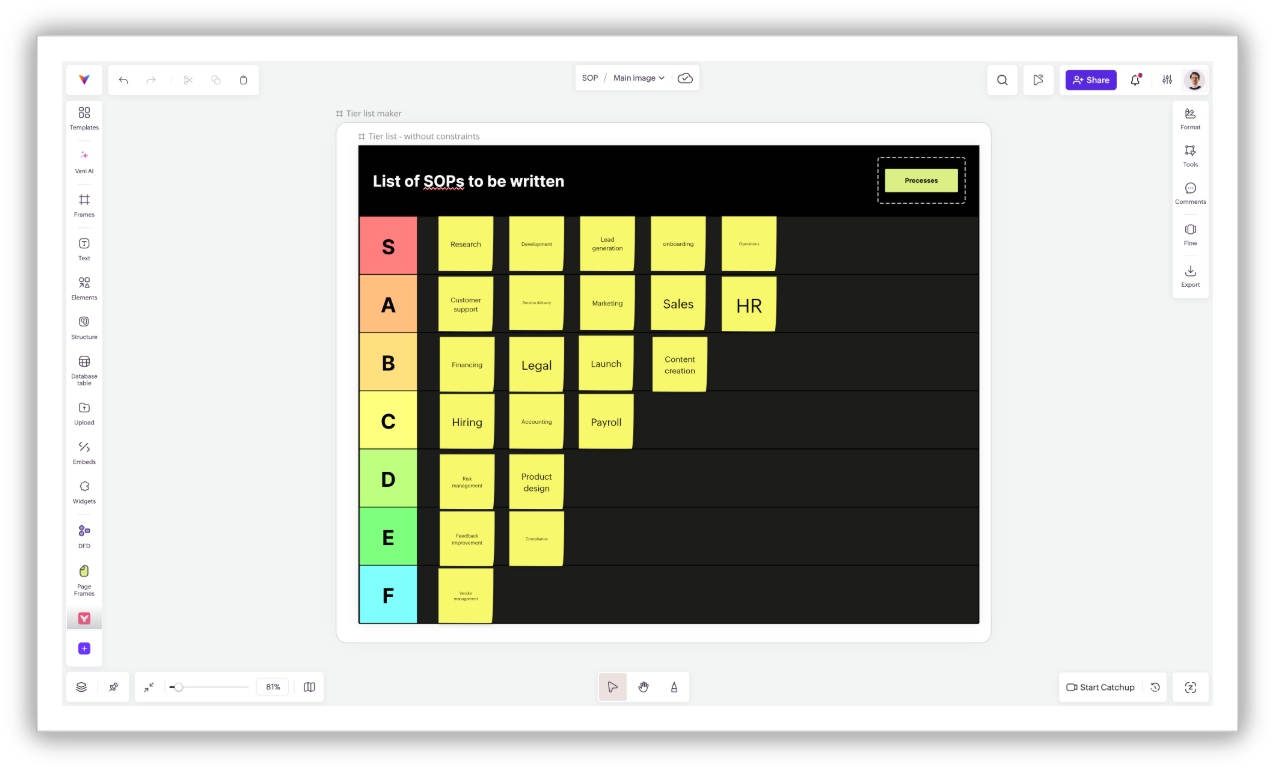
Start by identifying which processes need SOPs. Use brainstorming templates from Vani to brainstorm processes with your team, and use prioritization templates like an impact–effort matrix or tier list maker templates in Vani to decide what to document first. Clearly define the SOP’s name and objective on the canvas.
Map your process visually
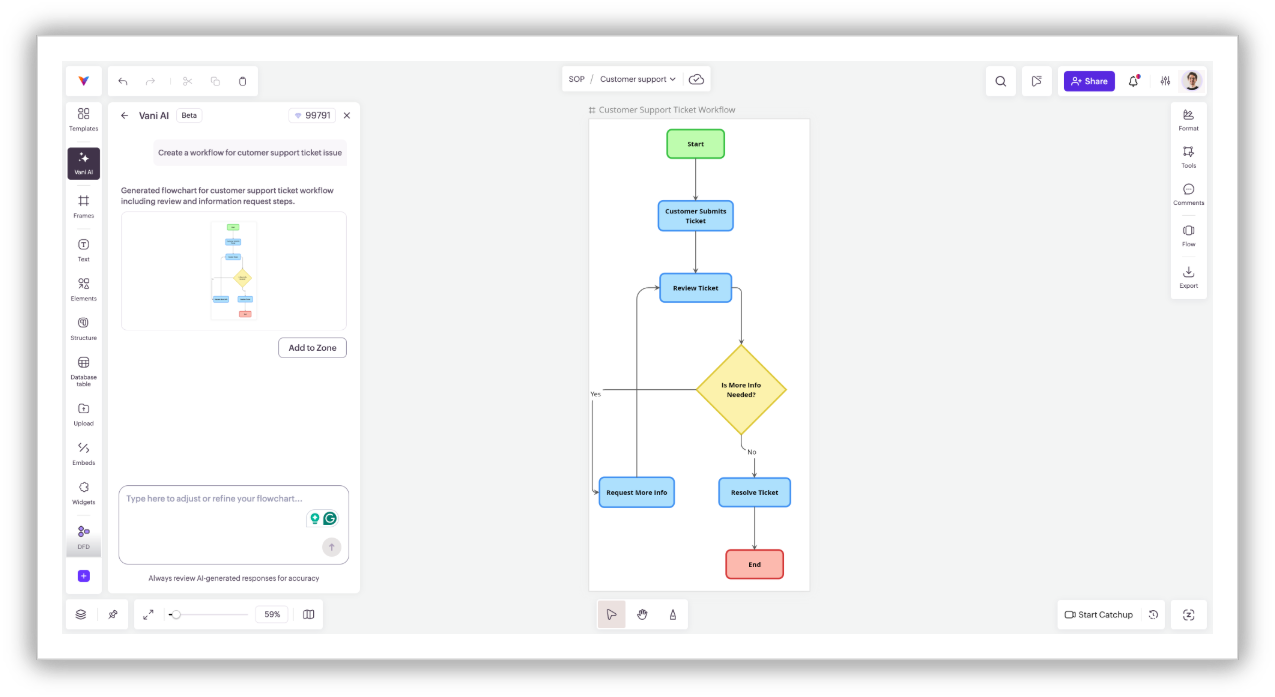
Use shapes and connectors to build a process diagram or flowchart. With Vani AI, you can even generate diagrams instantly to save time. Add short action labels near each step to clarify what needs to be done. For example, for a step "Review ticket priority," you could place a short action label as a sticky like "Check SLA, issue, and customer tier.”
Assign roles visually
Assign ownership directly on the canvas using @ mentions, comment, or database tables. This makes responsibilities and handoffs visible and eliminates any confusion caused by switching between tools.
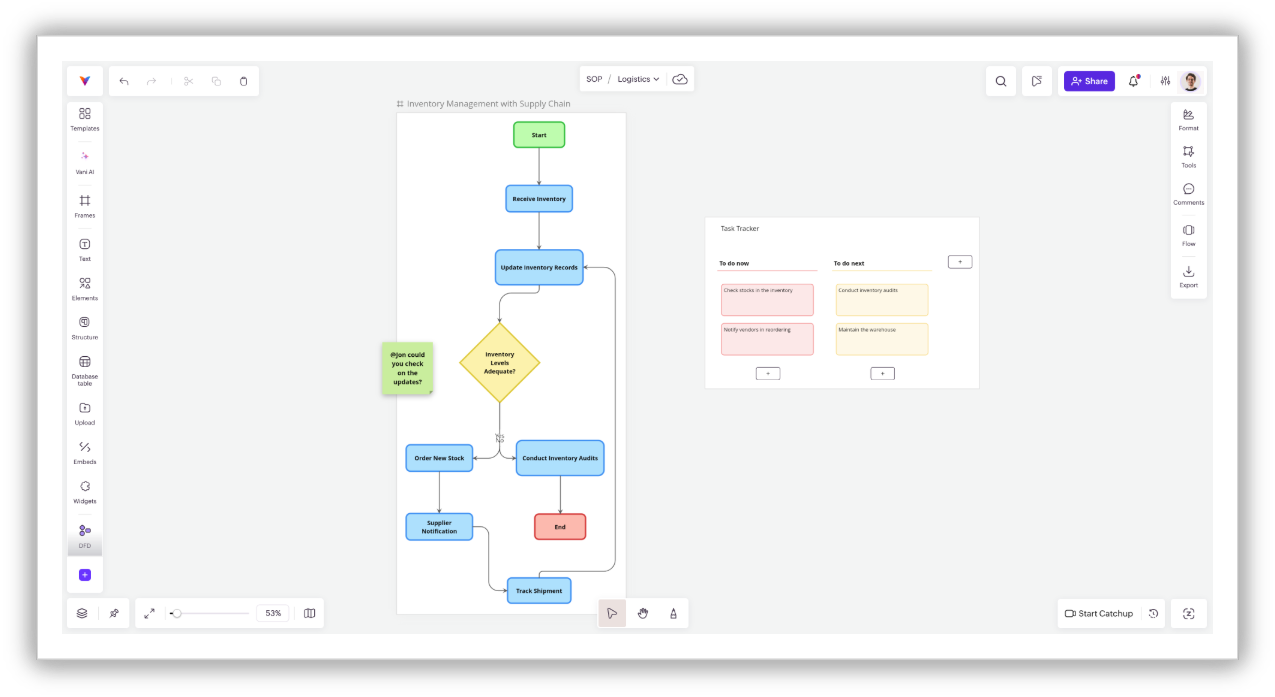
Add more context to the SOP
Enhance each step with brief explanations and attach supporting materials such as images, videos, or documents. Callout boxes can highlight exceptions or conditional actions, improving clarity. For example, a box stating "If SLA breach risk happens, notify the concerned manager" lets everyone know what to do in the next steps.
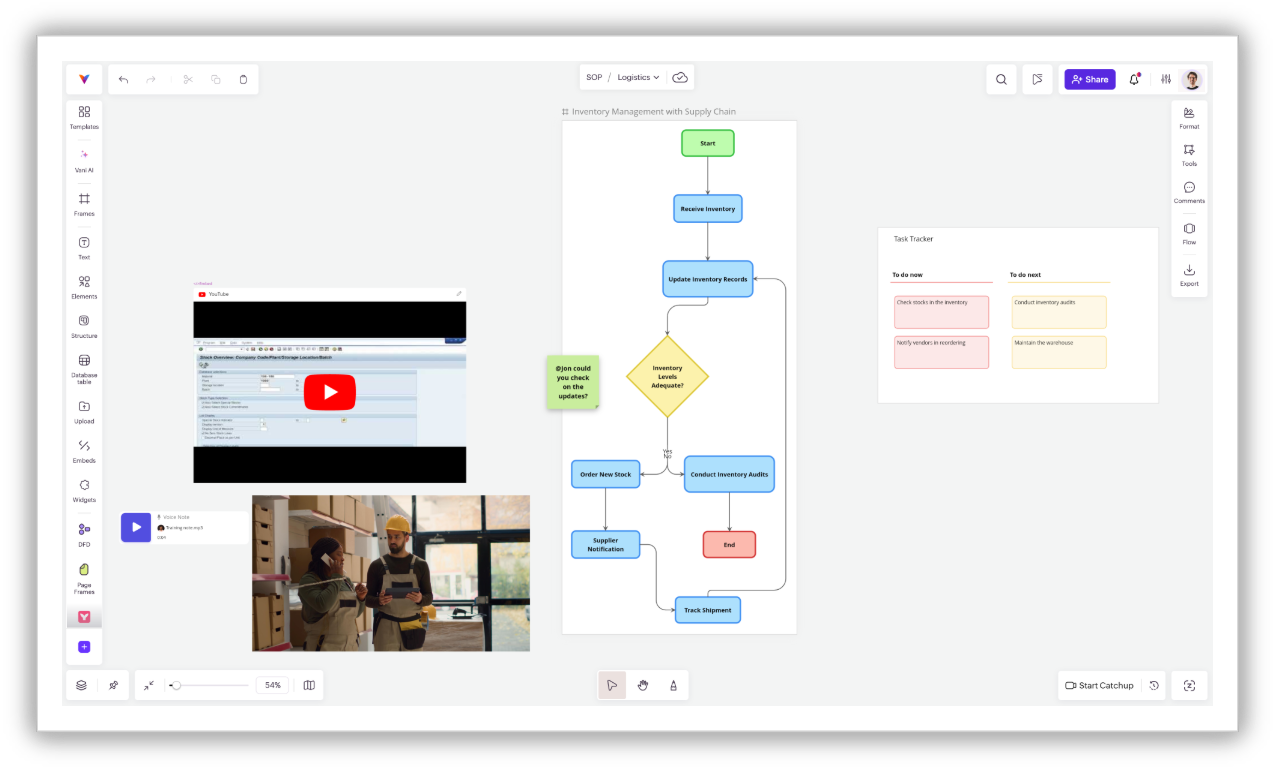
Test, review, and implement on the same canvas
Once the SOP is created, invite team members to the Vani Space and walk them through the SOP using Vani’s built-in video Catchup feature. Collect feedback through comments, refine the workflow, and test it with real users. Even teammates who missed the meeting can flow with the context using the presentation feature (Flow) in Vani. Version history also allows you to track changes and revert when needed. With Vani's "Space+Zone" structure, you can manage multiple SOPs in a single place.
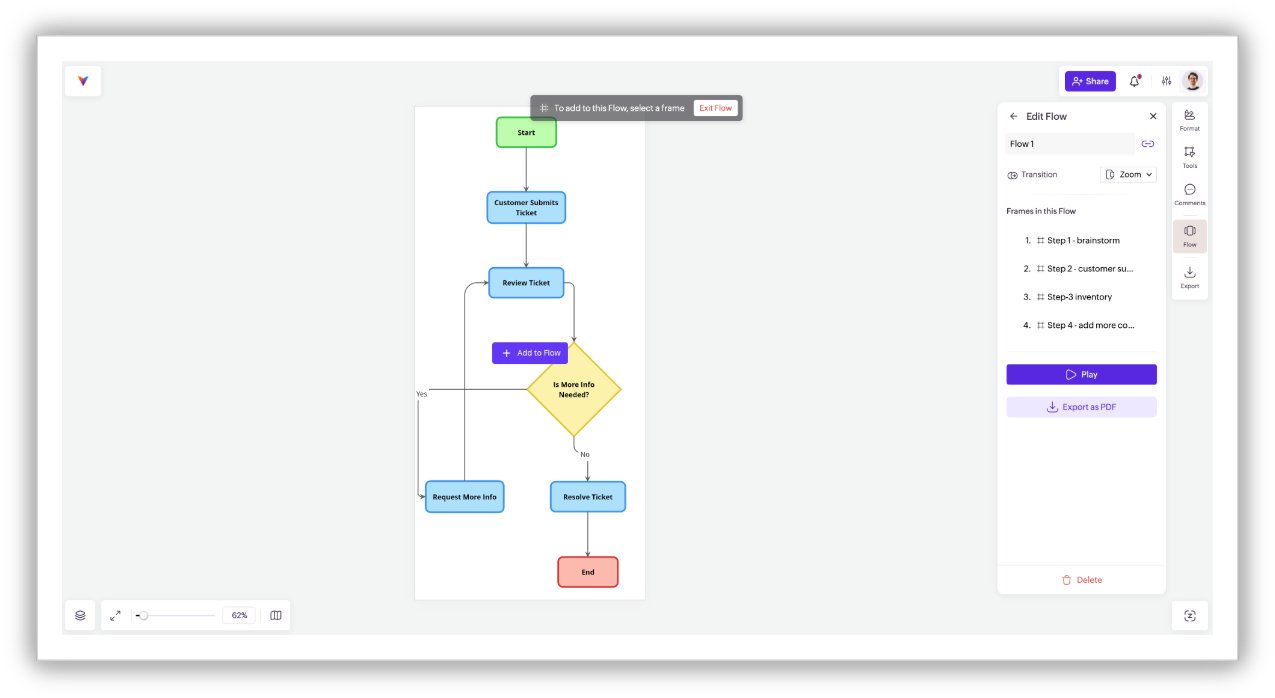
Publish and share your SOP
Control access with granular permissions. Share SOPs internally or externally using export options or shareable links, ensuring the right people always have the right level of access when they create in Vani.
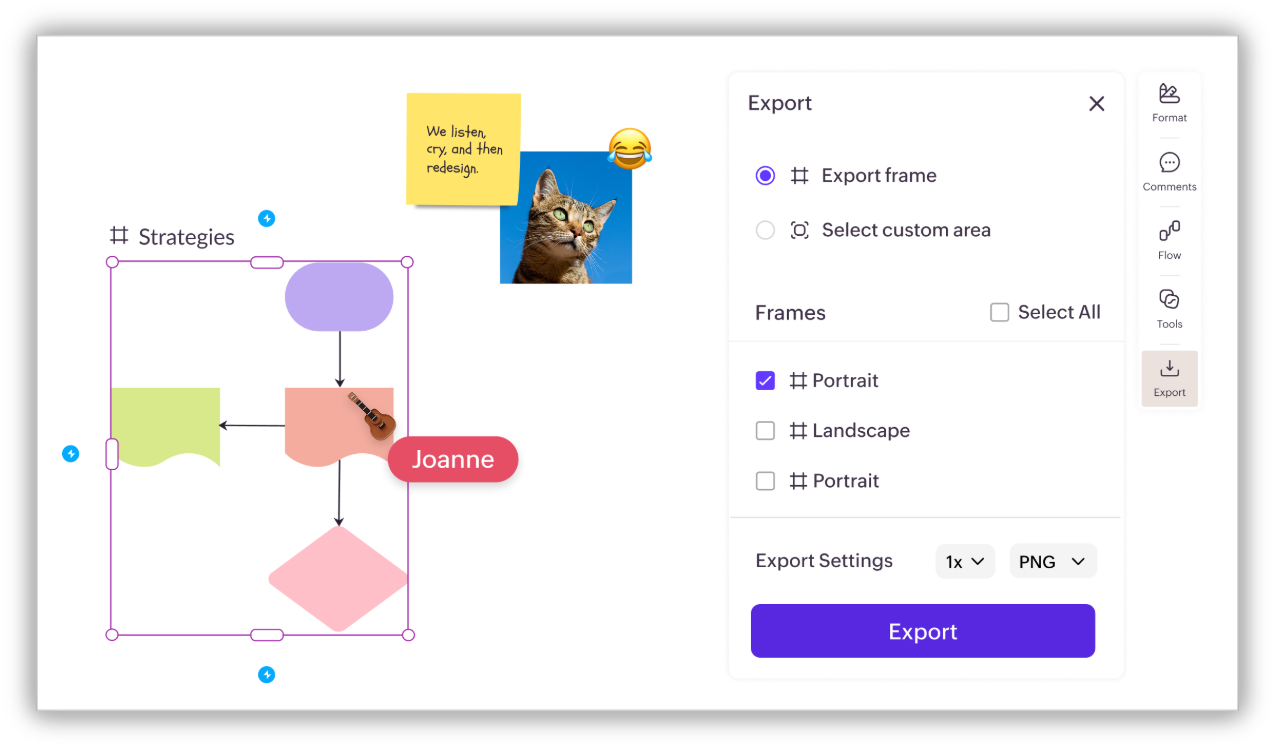
SOP use cases across teams
SOPs can be widely used across many teams, but here are practical and high-impact cases that everyone can relate to.
Employee onboarding
Visual onboarding SOPs help new hires understand their journey, responsibilities, and reporting structure from day one. Managers can create clear checklists using Kanban stacks or Vani templates and share reference materials on the same Space.
Customer support
Document ticket-handling workflows with clear escalation paths, priorities, and ownership. This reduces response times, improves consistency, and enhances customer experience. With visual project management tools like database tables, Kanban stacks, and templates, it's easier to manage and track in one place.
Operations
From procurement and finance to manufacturing, SOPs in Vani help teams document processes, manage exceptions, and prepare audit-ready documentation with clarity.
Knowledge management
Capture and preserve institutional knowledge so teams aren’t dependent on individuals. Visual SOPs become a single source of truth for how work gets done.
Product development
Map the entire product lifecycle—from ideation to release—with decision points and approvals clearly visible. This aligns teams and speeds up execution.
Lead management process
Document lead qualification, follow-ups, deal stages, and handoffs on a single canvas—making sales processes easier to manage and optimize. Use Vani AI to get insights on the deal, right there on the same canvas.
The bottom line
As organizations continue to grow and digital transformation accelerates, relying on long, static text documents is no longer enough. Teams need clarity, shared understanding, and processes that are easy to follow and adapt. This is where a visual-first approach to documentation makes a real difference.
By turning SOPs into living, visual workflows, teams can understand processes faster, collaborate more effectively, and execute with confidence. Instead of reading instructions and imagining the process, people can see it, discuss it, and improve it together. Tools like Vani enable this shift, helping organizations move from documentation that exists on paper to processes that actually drive action.
In the end, a good SOP isn’t just about standardization—it’s about enabling people to do their best work, consistently and at scale.