- HOME
- Work culture
- 15 flowchart examples to help you get started quickly
15 flowchart examples to help you get started quickly
- Last Updated : October 7, 2026
- 21 Views
- 9 Min Read

A process can make perfect sense in your head. Then you try explaining it to someone else: “First, we do this. Then we check that. Oh, and if that happens, we go back a step.” By the time you’ve finished, you’re drawing arrows in the air.
That’s usually a good sign it’s time for a flowchart. Putting the steps where you can see them makes the process easier to explain, follow, and share. It also helps you notice the little steps you do automatically.
In this blog, we’ll look at 15 examples of flowcharts in action, from solving a problem and explaining an algorithm to handling customer requests and onboarding new employees.
1. Decision-making flowchart
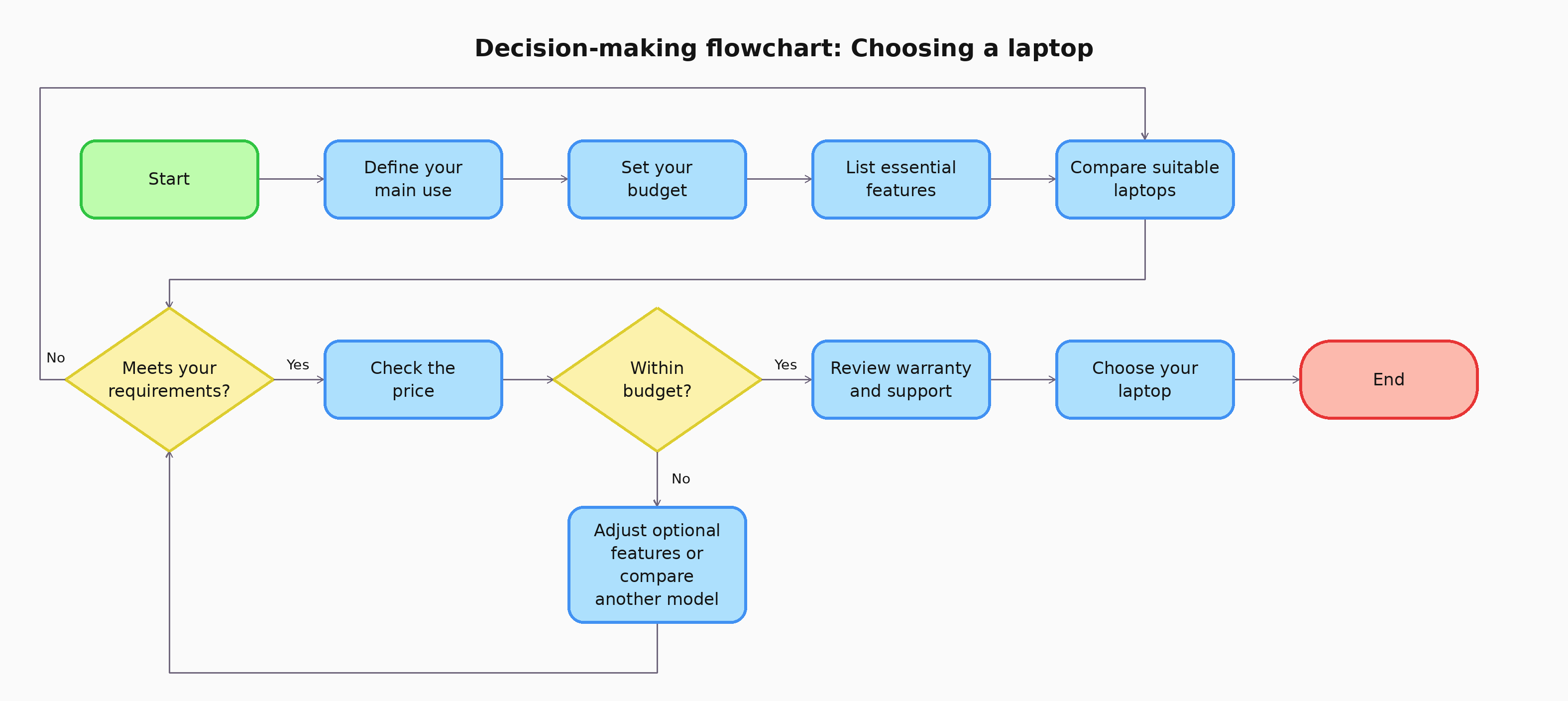
When you're weighing a decision, start with the outcome you want. Then, consider your options, the factors that matter most, and any limits you need to work within. A flowchart helps you see how those factors lead to different outcomes so you can make a choice based on what matters to you.
If you're buying a laptop, your criteria might include how you'll use it, your budget, and the features you need. For another decision, simply replace those criteria with ones that fit the situation.
2. Algorithm flowchart
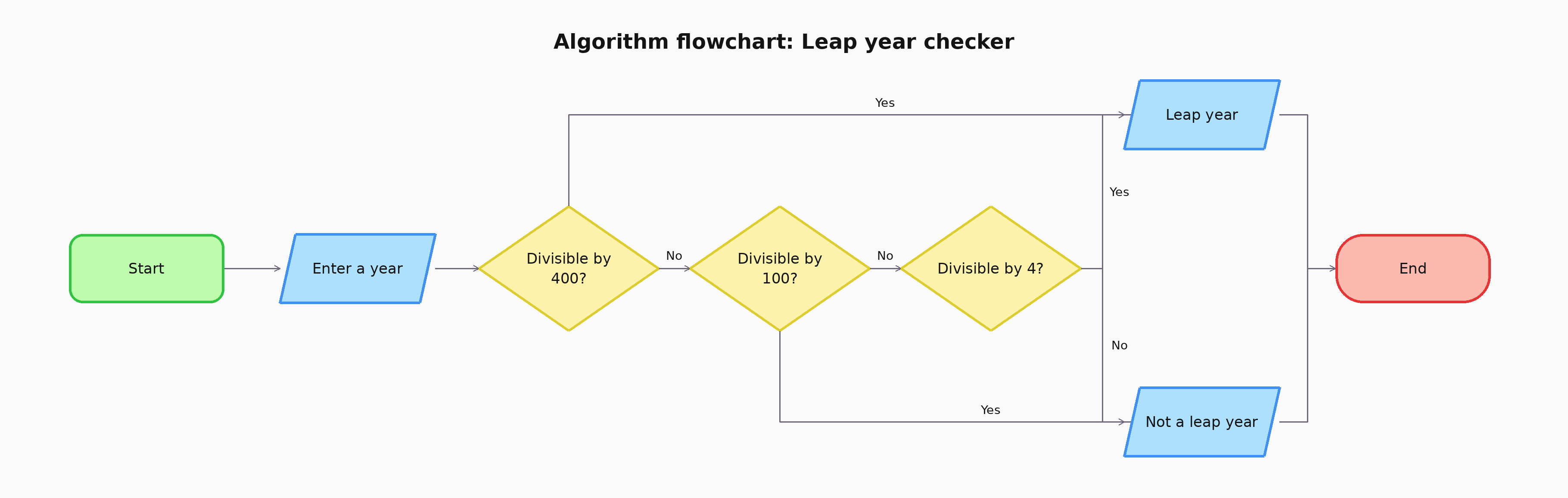
Think of an algorithm flowchart as a set of instructions with the reasoning laid out. It shows the steps a process follows to produce an answer, and it's most useful when the order of checks matters because readers can trace how the same instructions handle different inputs.
A leap year checker is a good example. Enter a year, follow the checks in the flowchart, and arrive at either "leap year" or "not a leap year." Try tracing 2024, 1900, and 2000 through the diagram to see why they produce different results.
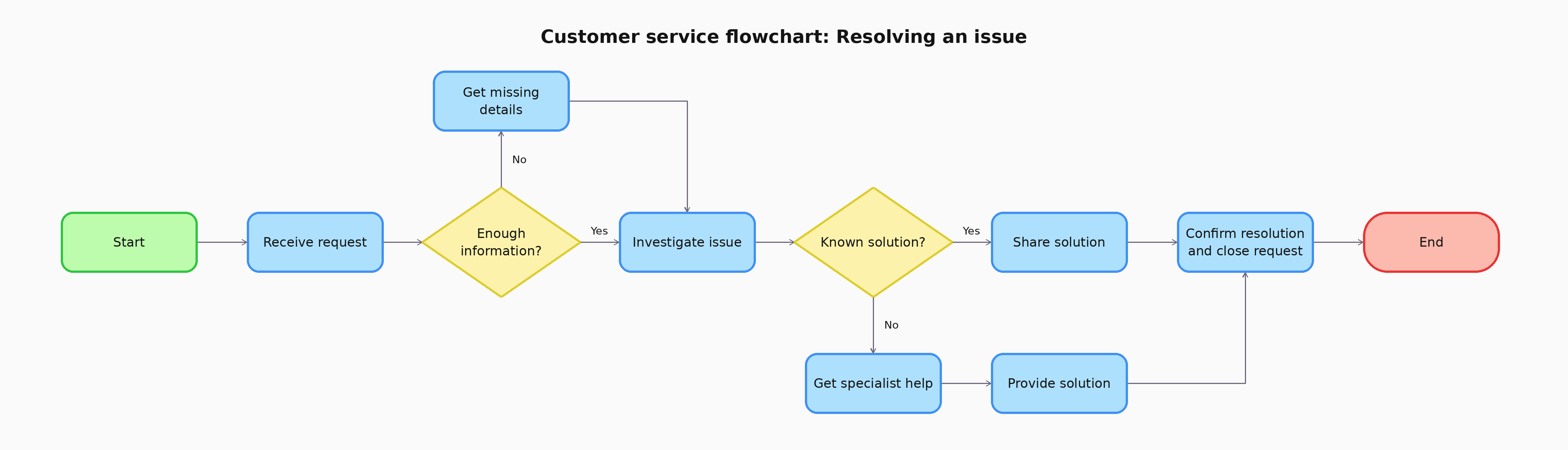
3. Customer service flowchart
Here, the goal is to show how a request moves from the first message to a resolution. It's especially useful when the next step depends on the type of issue or whether the support team can resolve it directly.
For example, a customer reporting that a feature isn't working may need to share a few details before the team can investigate. The flowchart can show when to use a known solution, when to involve a specialist, and when to check back with the customer.
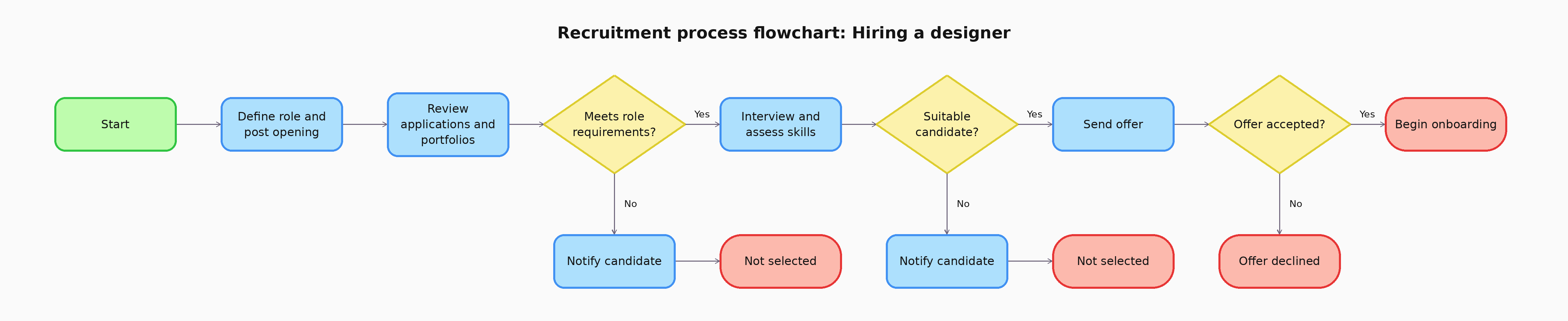
4. Recruitment process flowchart
Hiring involves several people and stages, from reviewing applications to making an offer. A recruitment flowchart shows how candidates move through those stages, who makes each decision, and what happens after it.
A team hiring a designer could map its portfolio review, interview, practical task, and final approval. The chart gives recruiters and interviewers a shared view of the process and helps them keep candidates informed along the way.
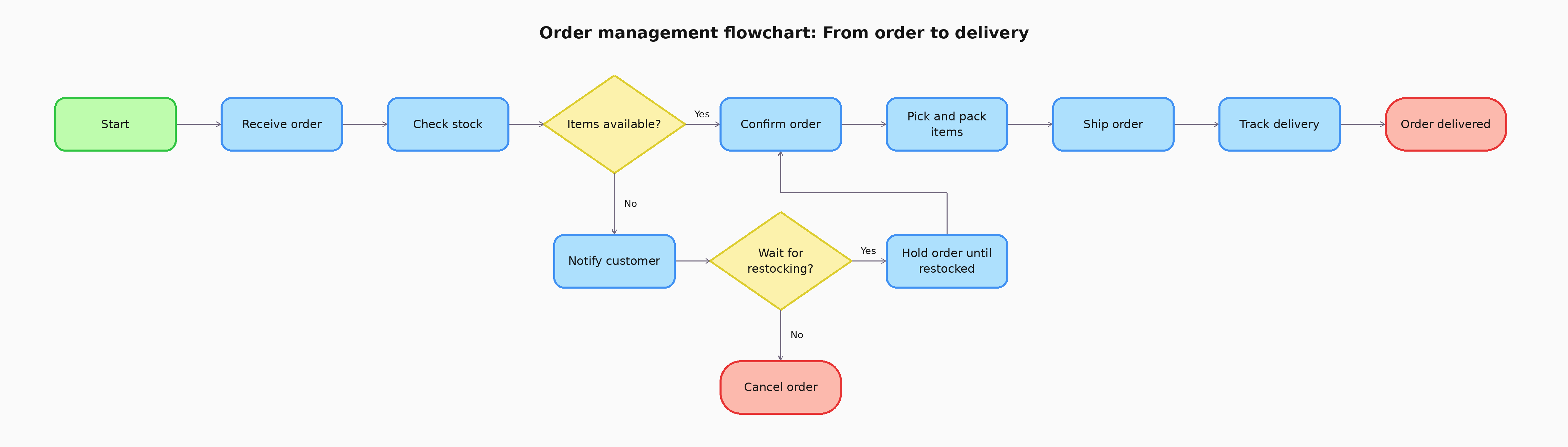
5. Order management flowchart
Once a customer places an order, it passes through several teams before it arrives. This flowchart follows the order itself, showing how sales, inventory, and fulfillment move it from confirmation to delivery, including what happens when stock or delivery needs attention.
For an online store, the chart could begin when an order arrives and follow it through stock checks, packing, shipping, and delivery. It gives each team a clear view of when they take over and what information they need to pass along.
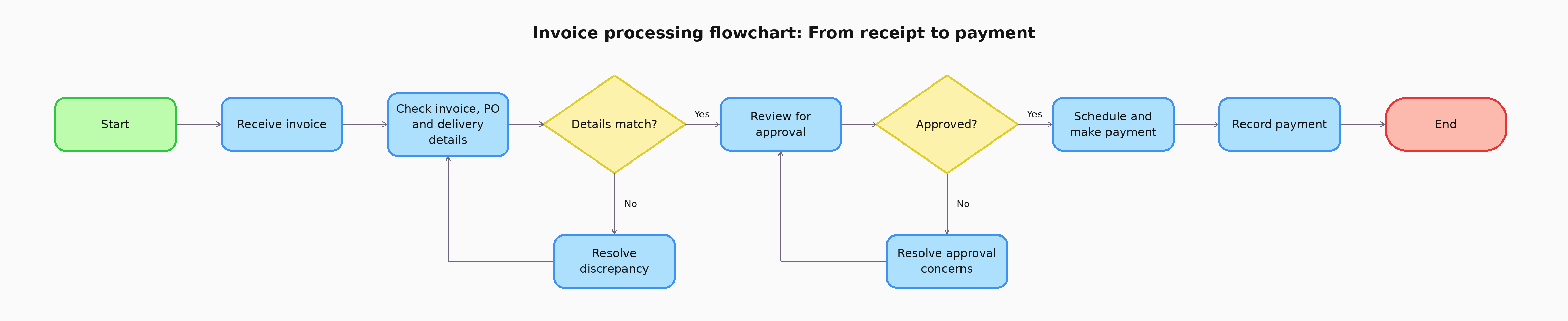
6. Invoice processing flowchart
Where the order flowchart follows a product, the invoice processing flowchart follows a bill. It shows what happens between receiving an invoice and paying it. The invoice may need to be checked against a purchase order and proof of delivery, approved by the right person, and recorded by the finance team.
If the invoiced amount differs from the purchase order, for instance, the flowchart shows who reviews the discrepancy before payment continues. This makes the handoffs between procurement, the requester, and finance easier to follow.
7. Product development flowchart
Ideas rarely go straight from a whiteboard to launch. A product development flowchart shows how an idea moves through research, design, testing, and launch, and it helps everyone see what needs to be learned or approved before the product moves forward.
A team developing a new app feature might validate the need, create a prototype, test it with users, and revise it based on what they learn. The flowchart makes that testing loop visible, so feedback becomes part of the process rather than a final step.

8. Sales process flowchart
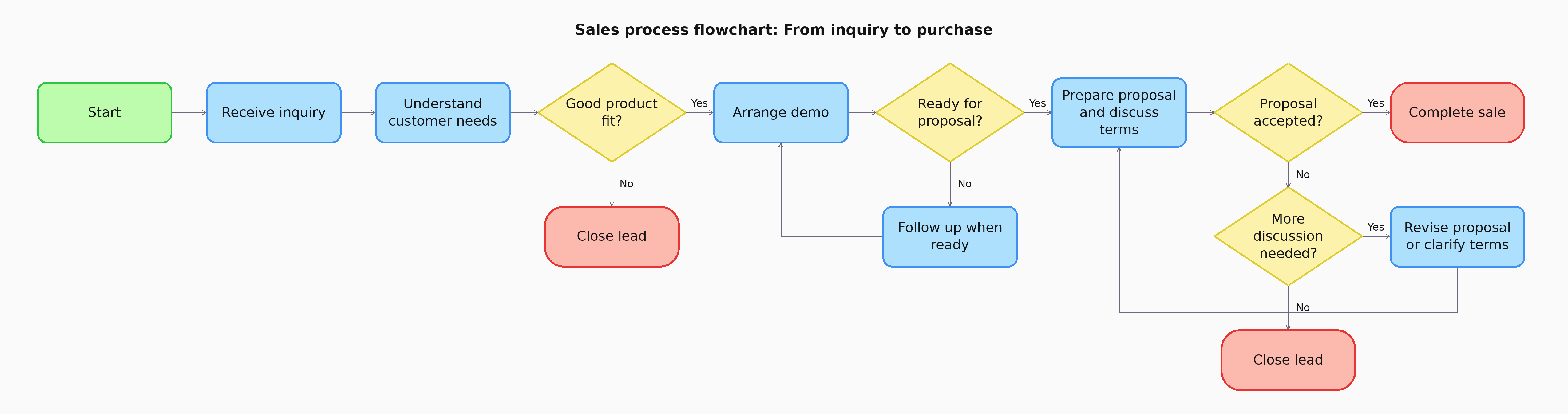
A sales process flowchart shows how a potential customer moves from an initial inquiry to a purchase decision. It helps a team agree on what information to gather, when to schedule a conversation, and when a lead is ready for a proposal.
For instance, a software sales team might begin by understanding the customer's needs, arrange a demo, and prepare a proposal if the product is a good fit. The flowchart can also show when to follow up with someone who needs more time.
9. Quality control flowchart
Quality checks can happen at several points in production, from inspecting materials to reviewing the finished product. A quality control flowchart shows what is checked at each stage, what qualifies an item to move forward, and where it goes if it needs correction.
In chair manufacturing, that could mean inspecting the wood and components, checking the assembled frame, and reviewing the finish before packaging. The chart also shows how a corrected chair returns for inspection.

10. Employee onboarding flowchart
An employee's first few weeks involve more than a welcome meeting. Documents, equipment, account access, introductions, and training all need to come together. An onboarding flowchart shows the order of these steps and who is responsible for each one.
Once a new hire accepts an offer, HR can begin the paperwork while IT prepares access and the manager plans their first assignments. The chart helps everyone see what must be ready before day one and what continues after the employee joins.

11. Scientific method flowchart
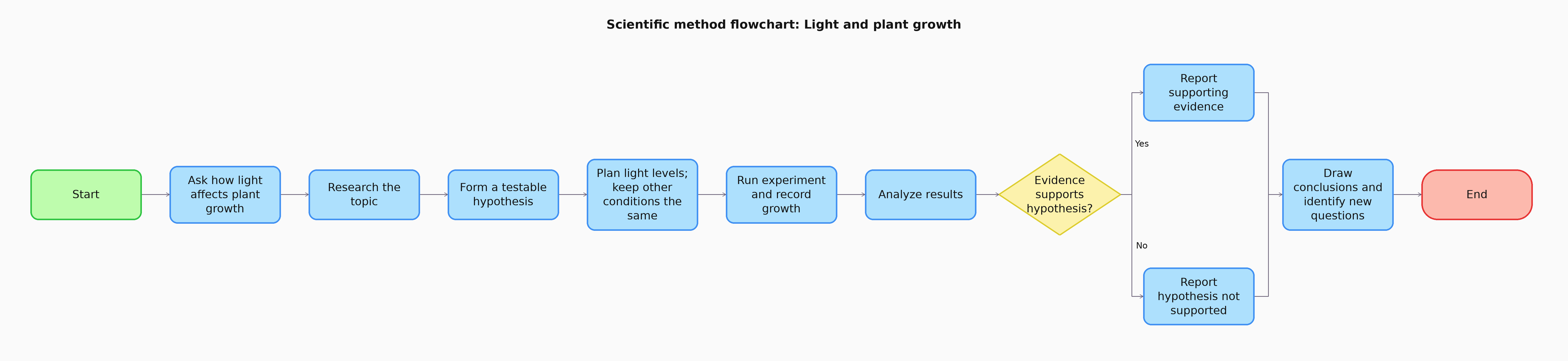
This flowchart shows how an investigation moves from a question to a conclusion. It can include forming a hypothesis, planning a test, recording observations, and deciding what the results suggest. It also shows how a new question or another test can follow from what you learn.
A student investigating whether light affects plant growth could use the chart to plan the experiment and keep each stage connected to the original question. The diagram would show the method; the observations and results would supply the answer.
12. Programming flowchart
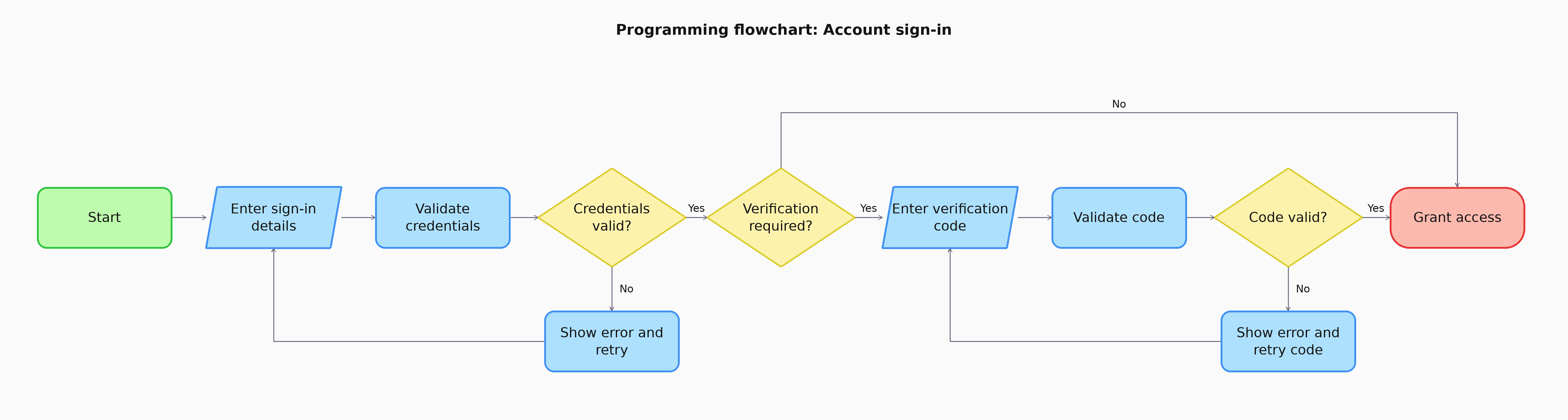
Before writing code, a programming flowchart lets developers map what a program should do with different inputs and outcomes. They can work through the logic of a feature first, including the paths that appear when a check fails.
Consider an account sign-in feature. The program checks the submitted details, handles an incorrect password, and may ask for a verification code before granting access. Putting those paths in a flowchart helps the team review the full behavior, including what the user sees at each step.
13. Troubleshooting flowchart
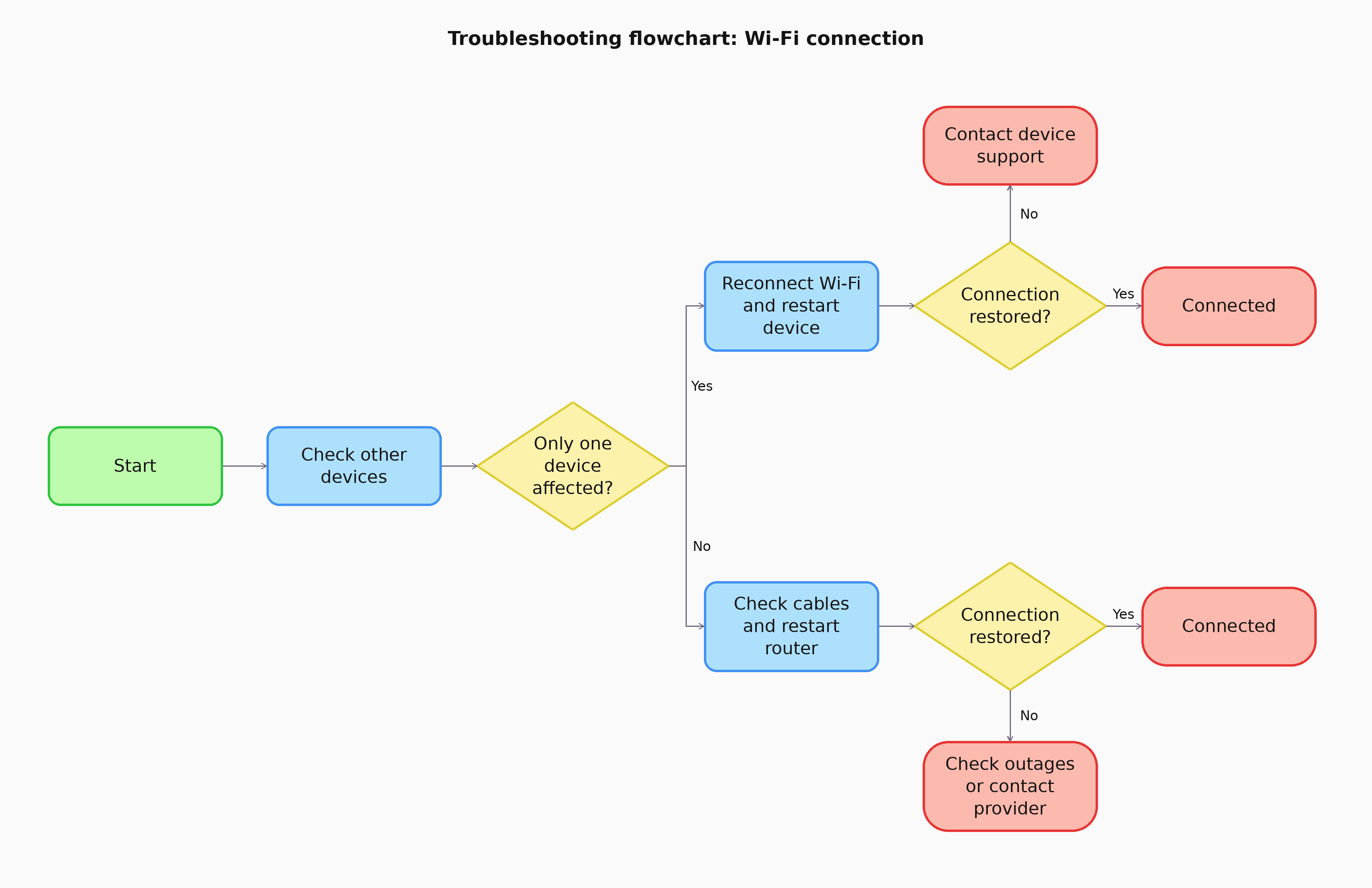
A troubleshooting flowchart guides someone through checks in a useful order. Each result points to the next action, helping them narrow down what is causing an issue.
A Wi-Fi connection problem makes this easy to see. Checking whether one device or several devices are affected leads to different next steps. The chart can continue through connection settings, the router, and service status, ending when the connection works or the issue needs further support.
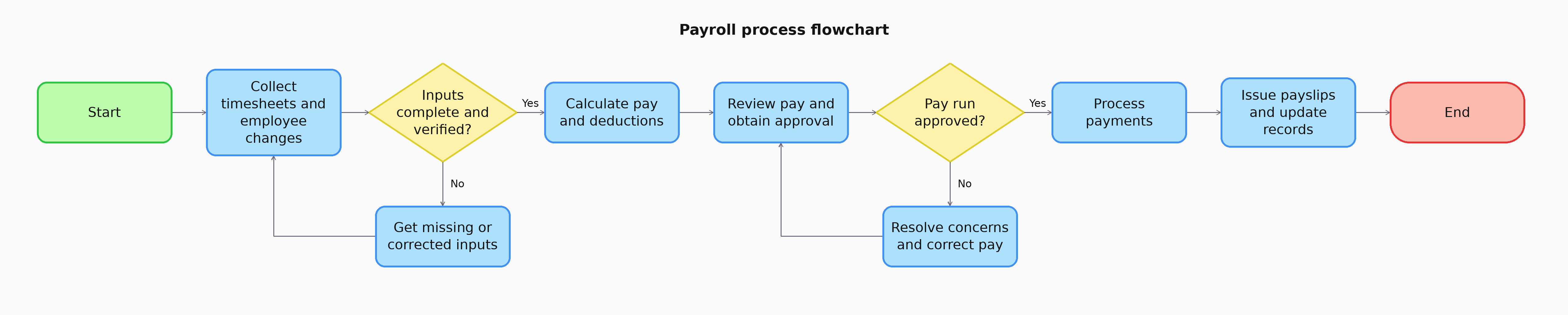
14. Payroll process flowchart
Payroll brings together employee details, recorded hours, pay calculations, approvals, and payment. A payroll process flowchart shows when each input is checked and who is responsible before the pay run moves forward.
Take a pay period with missing timesheets or a change in an employee's details as an example. The chart can show where those items are resolved, when the calculated pay is reviewed, and how the process moves from approval to payment and record keeping. The exact checks and deductions should follow the employer's local requirements.
15. Event planning flowchart
Planning an event means juggling dates, venues, guest lists, and budgets, and many of those choices depend on each other. An event planning flowchart shows the order in which decisions need to be made and what each one unlocks, so nothing gets booked before it should.
Take a team offsite as an example. The chart could begin with confirming the budget and headcount, then move to choosing a date and venue. If the venue isn't available, the flowchart sends the team back to pick another date or location. Once the venue is confirmed, the process can branch into catering, travel, and the agenda, and end with a final check-in with attendees before the day.

Final thoughts
By now, you may have a process of your own in mind. It might be one you often explain, one that involves several people, or one you’ve worked out so well that the steps feel almost automatic. That’s a good place to start.
Think about the person who will encounter that process next. They could be a new teammate, someone taking over your work, or even you returning to it months later. A flowchart gives them more than a set of instructions. It lets them see the thinking that connects each step and understand where they can contribute.
Here's an easy way to begin. Pick one process you've explained more than twice this month. Write down where it starts and what a finished outcome looks like, then map it in Vani. Invite the people who do each step to add what they know, and run one real example through the chart to see if it holds up. As the work changes, update the chart so it stays useful.
FAQs
What are the most common uses of a flowchart?
Flowcharts are used to explain processes, guide decisions, document workflows, and work through the logic of an algorithm. A team might use one to train a new employee, handle a customer request, or show how an order is fulfilled. The steps and branches change with the process being mapped.
What are the basic symbols in a flowchart?
An oval marks the start or end, a rectangle shows an action, a diamond marks a decision, and arrows show the direction of the flow. These four elements are enough for many simple flowcharts. You can add other symbols when a process needs more detail.
Can I add notes or explanations to a flowchart?
Yes. Short labels keep a flowchart easy to scan, while notes provide context for steps that need more explanation. In your Vani Space, you can add supporting information on the canvas so people can understand the chart without crowding its shapes.
Does every flowchart need a decision point?
No. Some processes follow one sequence from start to finish. A decision diamond is useful when the next step depends on an answer, such as whether an application is approved or an item passes inspection. Add branches only where the process actually changes direction.
What is the difference between a flowchart and a process map?
Both show how work gets done. A flowchart usually focuses on the order of steps and the paths between them. A process map may show more context, such as who owns each step, what information is needed, and where handoffs happen. The terms can overlap in everyday use.
How detailed should a flowchart be?
Include enough detail for someone to follow the process and understand what happens at each decision. Keep the labels short, and put longer instructions in supporting notes. If the chart becomes difficult to scan, divide it into an overview and smaller flowcharts for specific stages.
How do you make a flowchart for a process?
Start by writing down where the process begins and what counts as a completed outcome. List the main steps in order, add the points where the path changes, and connect them with arrows. Then, follow the chart using a real scenario to check that every path leads somewhere clear.
What tools can I use to make a flowchart?
You can use a pen and paper, a whiteboard, or a digital tool. Paper works for a quick draft, but digital tools like Vani make it easier to edit, share, and update the chart with the people involved in the process.
Can I use a flowchart template instead of starting from scratch?
Yes. A template gives you a starting layout that you can adapt to your own steps and decisions. Vani offers flowchart templates you can customize, which is useful when you know what you want to map but need help getting the chart onto the canvas.
Can I add a flowchart to an existing project plan?
Yes. A flowchart can sit alongside a project plan to show how a particular task or approval moves forward. In visual collaboration tools like Vani, you can place a flowchart on the same canvas as your planning materials, making it easier for teammates to see how the work fits together.