- HOME
- Work culture
- ERDs: Types, symbols, cardinality, examples, and best practices
ERDs: Types, symbols, cardinality, examples, and best practices
- Last Updated : July 15, 2026
- 160 Views
- 8 Min Read

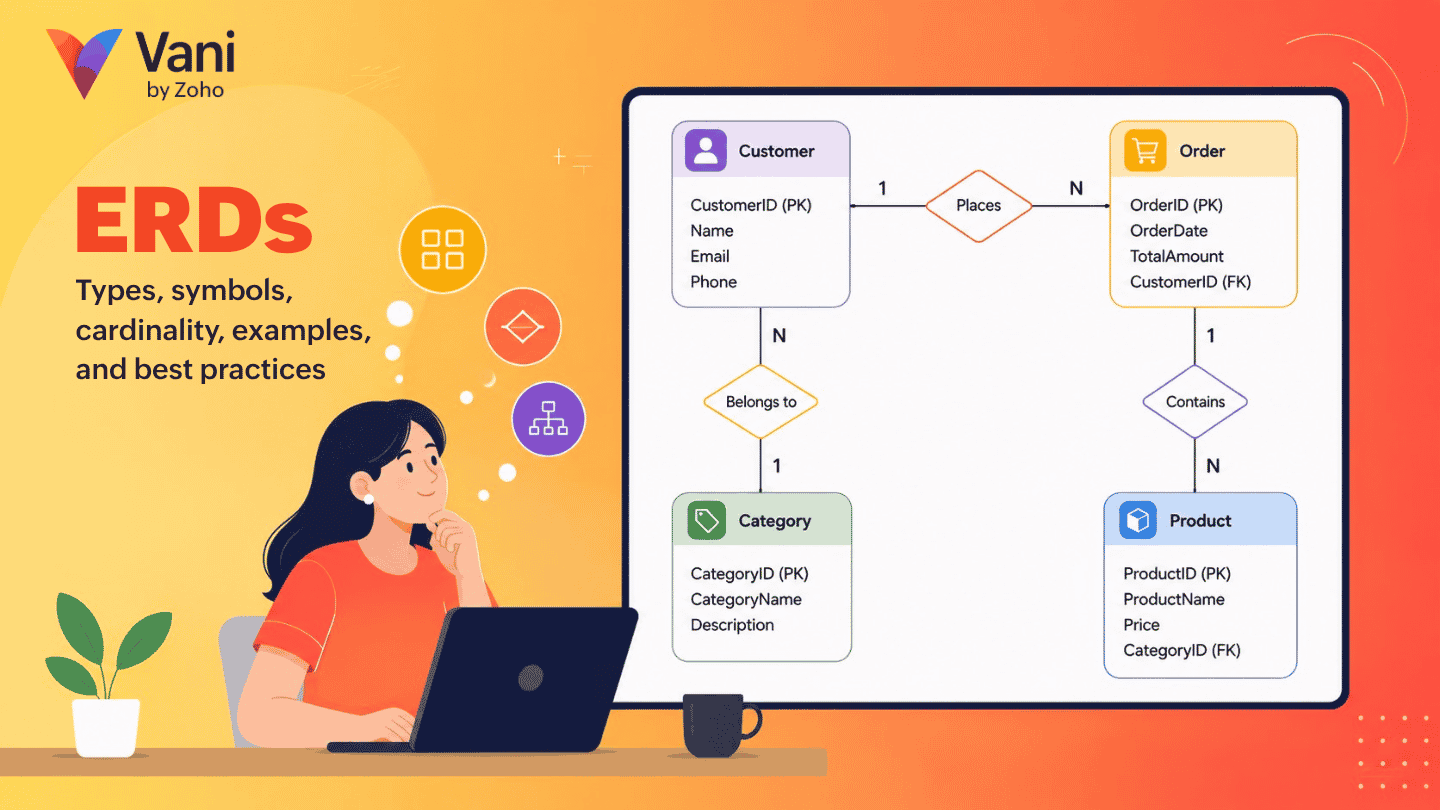
Modern applications run on data. Whether you're building an ecommerce platform, a CRM system, or a food delivery application, your database determines how efficiently your software stores, retrieves, and manages information.
Databases and data are the heart of any application, and, to design those, you need a specialized diagram—that's where ERDs (entity relationship diagrams) come in.
An ERD helps engineers visualize database structures, understand how data entities interact, and create scalable systems before writing a single line of SQL. The ER diagrams are scalable components that can be expanded as the module grows in your application.
In this guide, you'll learn everything about ERDs, from their components and types to examples, best practices, and the modern ways to create them.
What is an ERD?
An entity relationship diagram (ERD) is a visual representation of entities within a system and the relationships between them. Visualize ERDs as blueprints for your databases. Instead of looking at the database tables, columns, and foreign keys in raw code, an ER diagram presents them in a way that's easy to understand.
For example, in an online shopping application:
Customers place orders —> Orders contain products —> Products belong to categories —> Payments are associated with orders
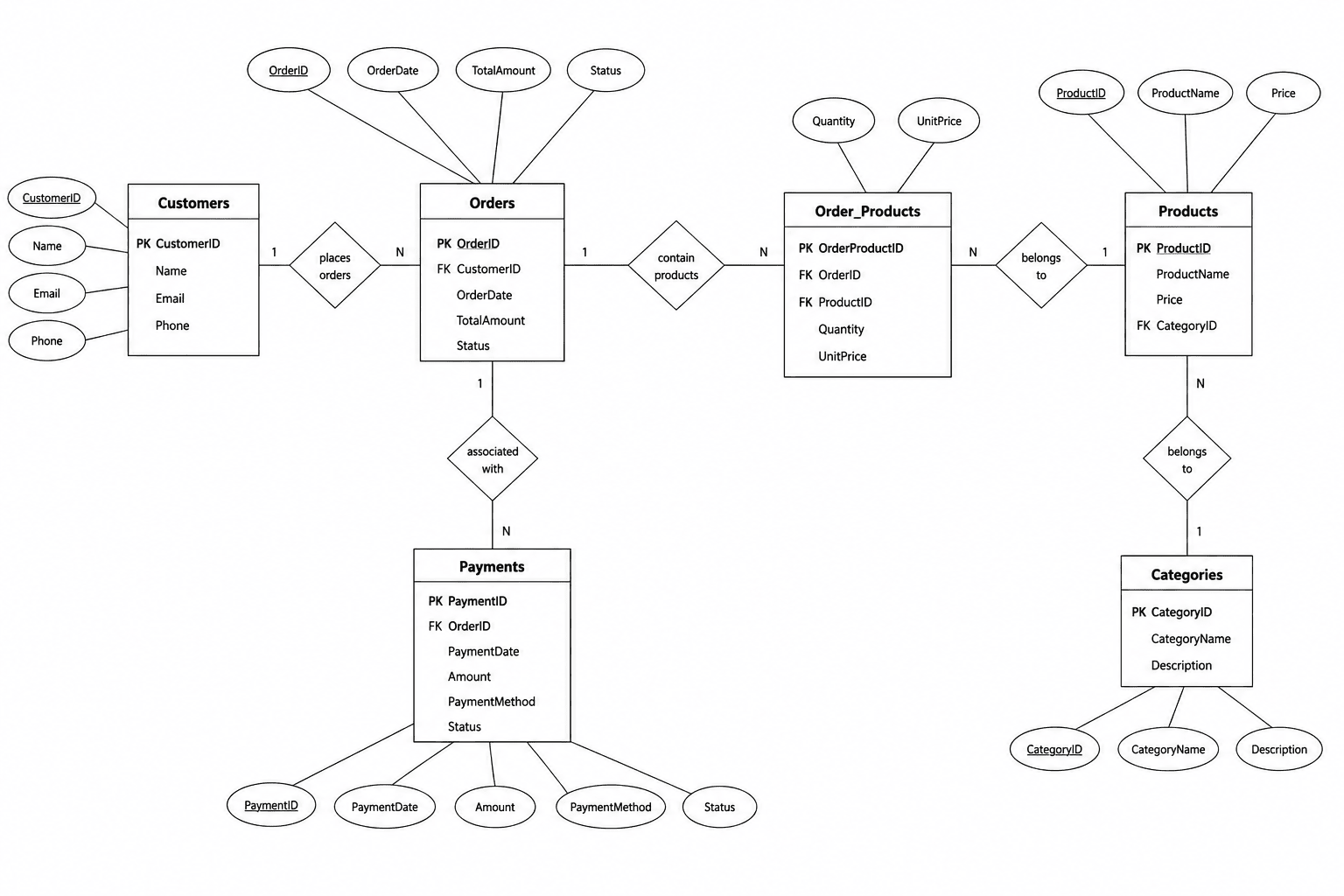
Strip away the jargon, and an ERD is really just answering three questions about your system:
What are the "things" in this system? (entities: Customer, Order, Product)
What do we need to know about each thing? (attributes: name, email, price)
How do these things relate to each other? (relationships: a Customer places an Order)
Why are ERDs important?
A poorly designed database not only makes the application prone to errors but also leads to data duplication, data loss, scalability issues, wrong information, and maintenance difficulty. That's why ERDs are important in designing a database: they help you provide a clear structure before you implement it. If you need an easy diagramming tool to design on an infinite collaborative canvas, then Vani is for you.
Try Vani with your team to design ERDs!
A few highlights of why ERDs are important for your database design:
Easy to understand: ERDs offer a visual representation of a complex system. It helps the stakeholders and others understand the data flow in a system.
Improves database design: ERDs help identify redundant data, missing entities, and inefficient relationships by mapping out functions early in the design process.
Improves documentation: ERDs serve as a lifelong document for your project. When a new employee is hired to your team, they can easily look into the ERD and understand the structure.
Easier debugging: Before implementing the database system, ERDs help identify the bottlenecks or errors that could affect it.
Core components of an ERD
There are three primary components in an ERD:
1. Entity
An entity represents a person, object, place, event, or concept that stores data. They're typically nouns.
Example: For an online shopping application, there are many entities like customer, product, order, and category.
In database design, the entity becomes a table, and, for each entity, there is an associated table.
2. Attributes
Attributes describe the characteristics of an entity.
Example: For a customer entity, attributes may include:
Customer ID
Customer name
Email address
Phone number
Date of birth
There are a few attributes types you should know before designing an ERD:
Simple attributes: Cannot be divided further
Example: Age and gender
Composite attributes: Can be broken into smaller parts
Example: Address (can be broken into street, city, state, and postal code)
Multi-valued attributes: Contains multiple values
Example: Phone number
Derived attributes: Calculated from other data
Example: Age derived from date of birth
3. Relationships
Relationships define how entities interact with each other, and this gives an understanding of how data flows between the systems (usually expressed as a verb).
Example: Customer places Order
Without relationships, a database would simply be a collection of isolated tables.
4. Cardinality
Cardinality defines the numeric nature of a relationship—how many instances of one entity can relate to how many instances of another. This is the single most misunderstood part of ERDs for beginners, and it gets its own section below.
5. Keys (Primary & foreign)
Primary key (PK): A unique identifier for each record in an entity (e.g., customer_id). No two rows can share one.
Foreign key (FK): A field in one entity that references the primary key of another, which is what actually creates the relationship at the database level.
If entities are the nouns and relationships are the verbs, keys are the grammar that makes the sentence actually work in a real database.
Cardinality, explained simply
Cardinality trips up more people than any other part of ERDs because most explanations jump straight to symbols before explaining the idea. So here's the idea first.
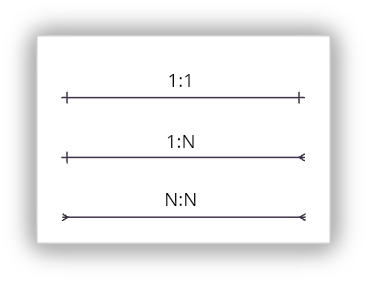
Cardinality answers one question: for each record in Entity A, how many records can it relate to in Entity B? There are three core patterns:
One-to-one (1:1)
Each record in Entity A relates to exactly one record in Entity B, and vice versa. Example: one Employee has one Company Laptop.
One-to-many (1:N)
One record in Entity A can relate to many records in Entity B, but each record in Entity B relates back to only one in Entity A. Example: one Customer can place many Orders, but each Order belongs to exactly one Customer. This is by far the most common relationship type you'll model.
Many-to-many (N:N)
Records in Entity A can relate to multiple records in Entity B, and vice versa. Example: a Student can enroll in many Courses, and each Course has many Students. Many-to-many relationships are typically implemented using a junction (or "join") table that breaks the N:N relationship into two 1:N relationships.
Types of ERD: Conceptual vs. logical vs. physical
Not every ERD needs the same level of detail. Which type you draw depends on where you are in the design process and who's going to look at it.
Type | Detail level | Audience | What it shows |
Conceptual ERD | Low | Business stakeholders, early planning | Just entities and relationships—no attributes, no data types, no keys |
Logical ERD | Medium | Analysts, architects, technical leads | Entities, attributes, relationships, and cardinality, but still platform-agnostic |
Physical ERD | High | Database administrators, developers | Everything in the logical ERD plus actual column data types, constraints, indexes, and naming conventions specific to your database engine |
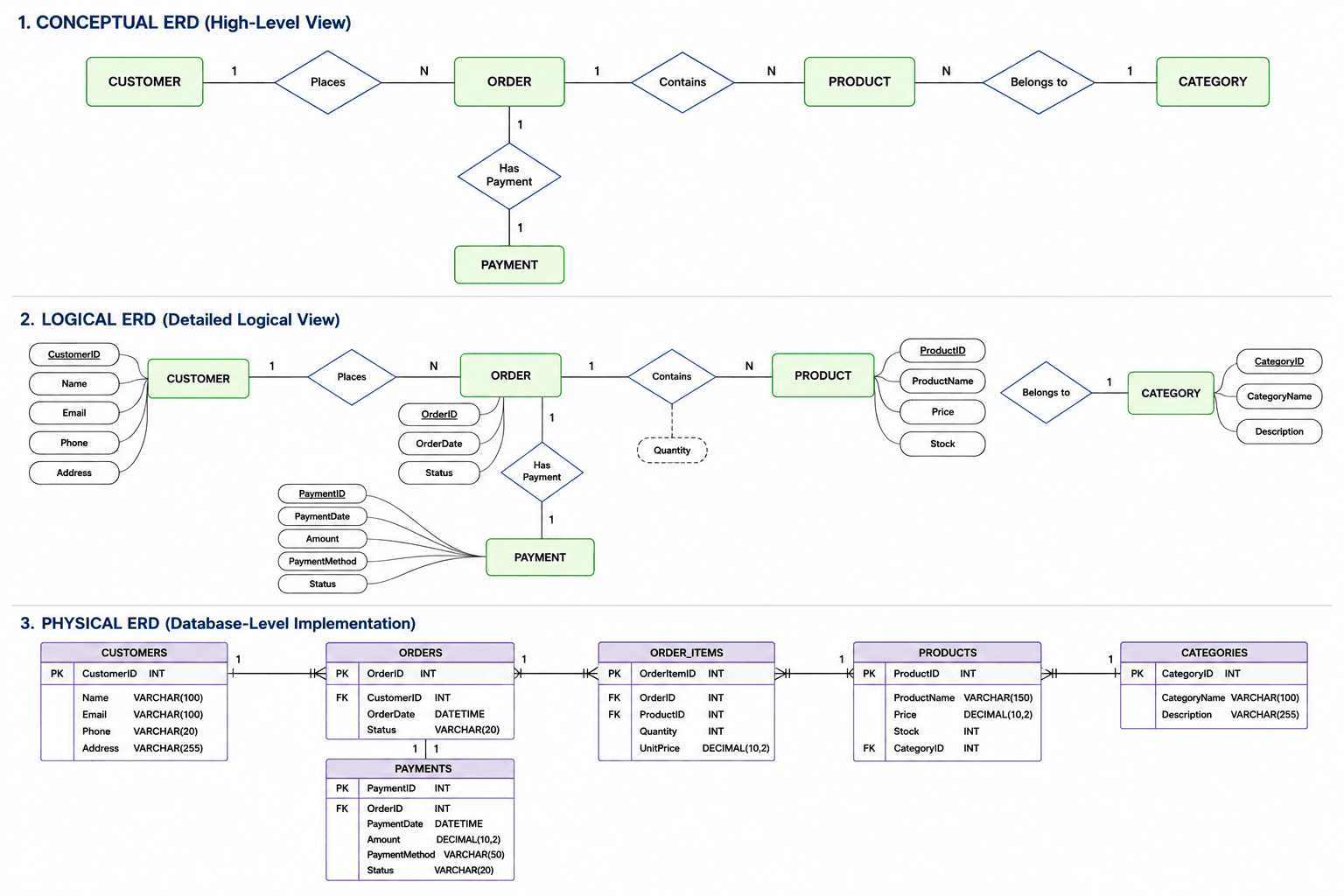
A useful way to think about it is that a conceptual ERD is the conversation, a logical ERD is the agreement, and a physical ERD is the contract your database engine actually enforces. Most projects move through all three stages, even if only the physical one ever gets fully documented.
How to read an ERD
Most ERD content explains how to build a diagram but assumes you'll never need to read one someone else made. In practice, that's most of what you'll actually do: inheriting a diagram from a previous team, a legacy system, or a vendor's documentation. Here's a repeatable process.
Step 1: Find the anchor entities.
Look for the entities that sit at the center of the business domain—usually the ones with the most connecting lines. For example, in an e-commerce system, that's typically Customer, Order, and Product. Start there before getting lost in lookup tables and edge cases.
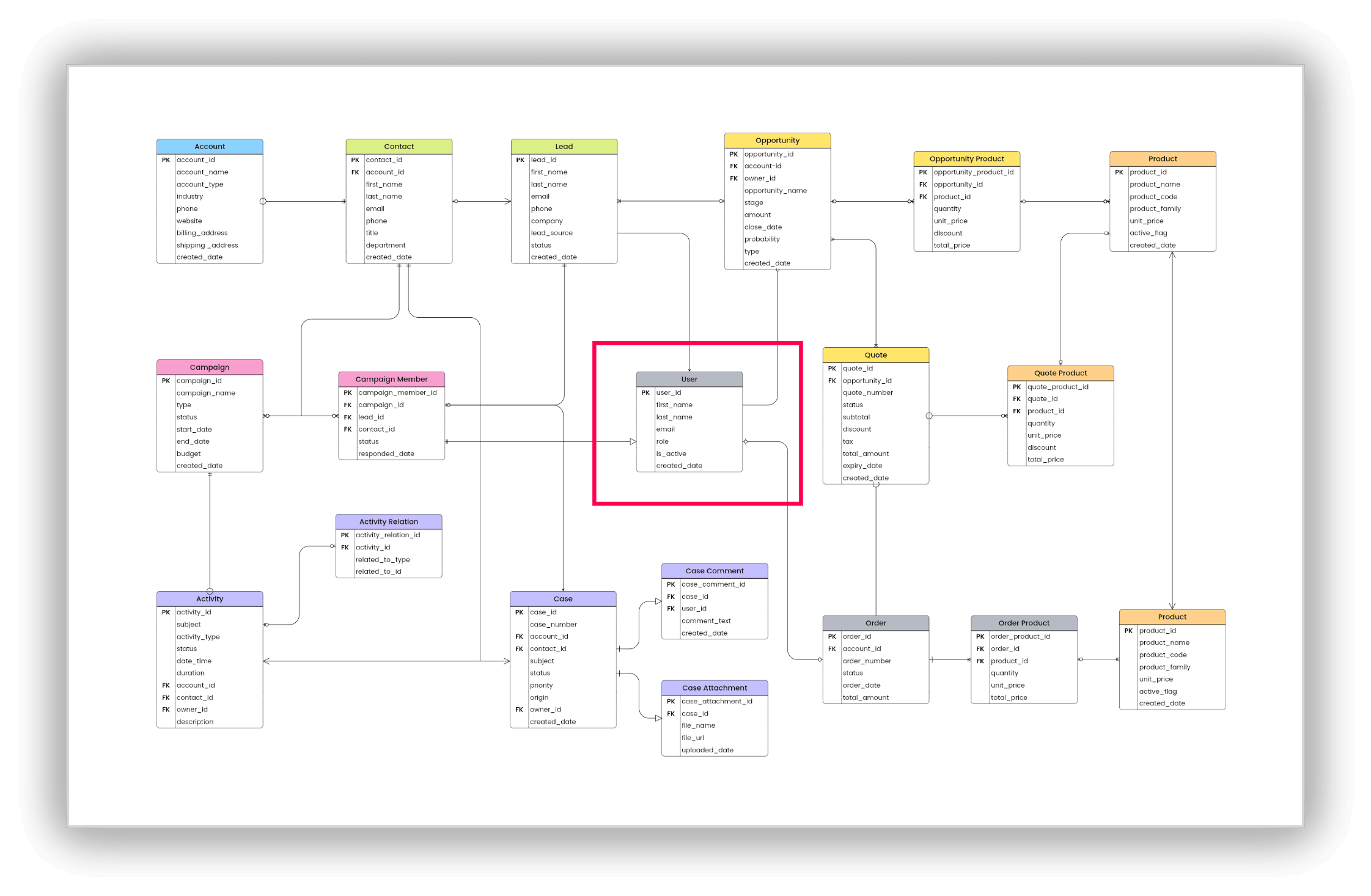
Step 2: Trace relationships outward.
From each anchor entity, follow the connecting lines to see what it's directly related to. Read the relationship like a sentence: "Customer places Order," "Order contains Product."
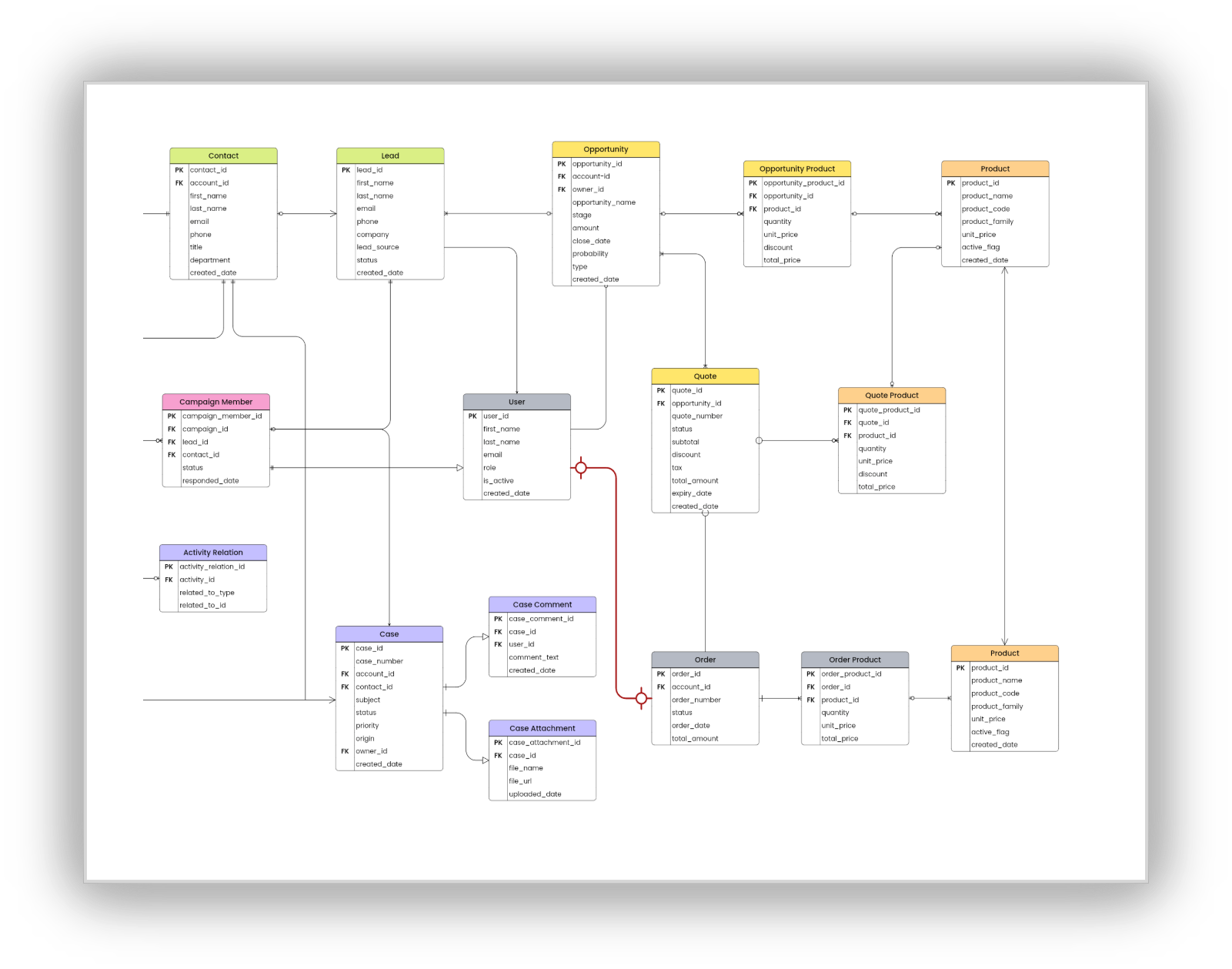
Step 3: Check the cardinality on each line.
This is where the actual business rules live. A line between Customer and Order showing "one Customer to many Orders" tells you customers can have order history; a 1:1 relationship would tell you something very different about the business.
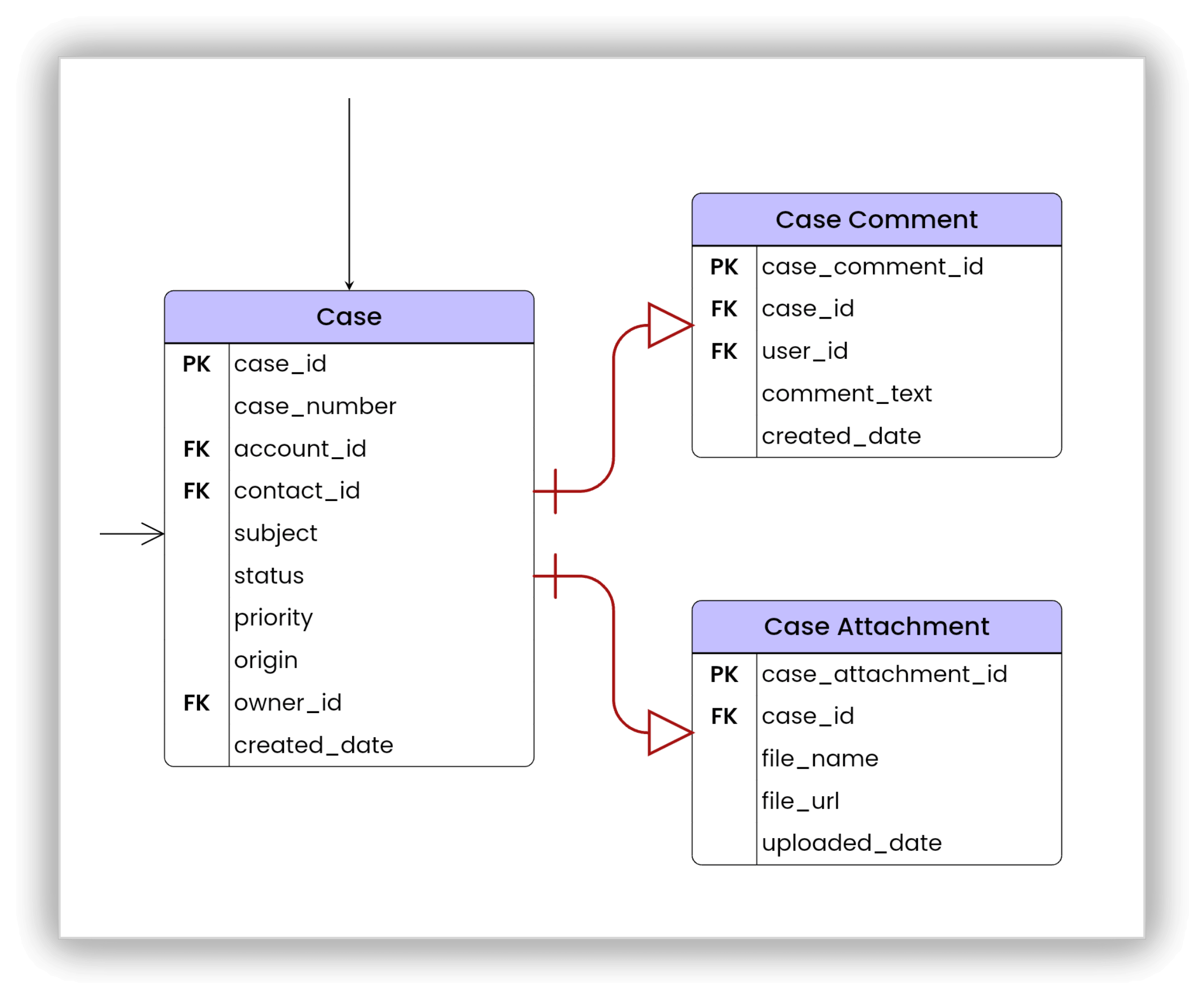
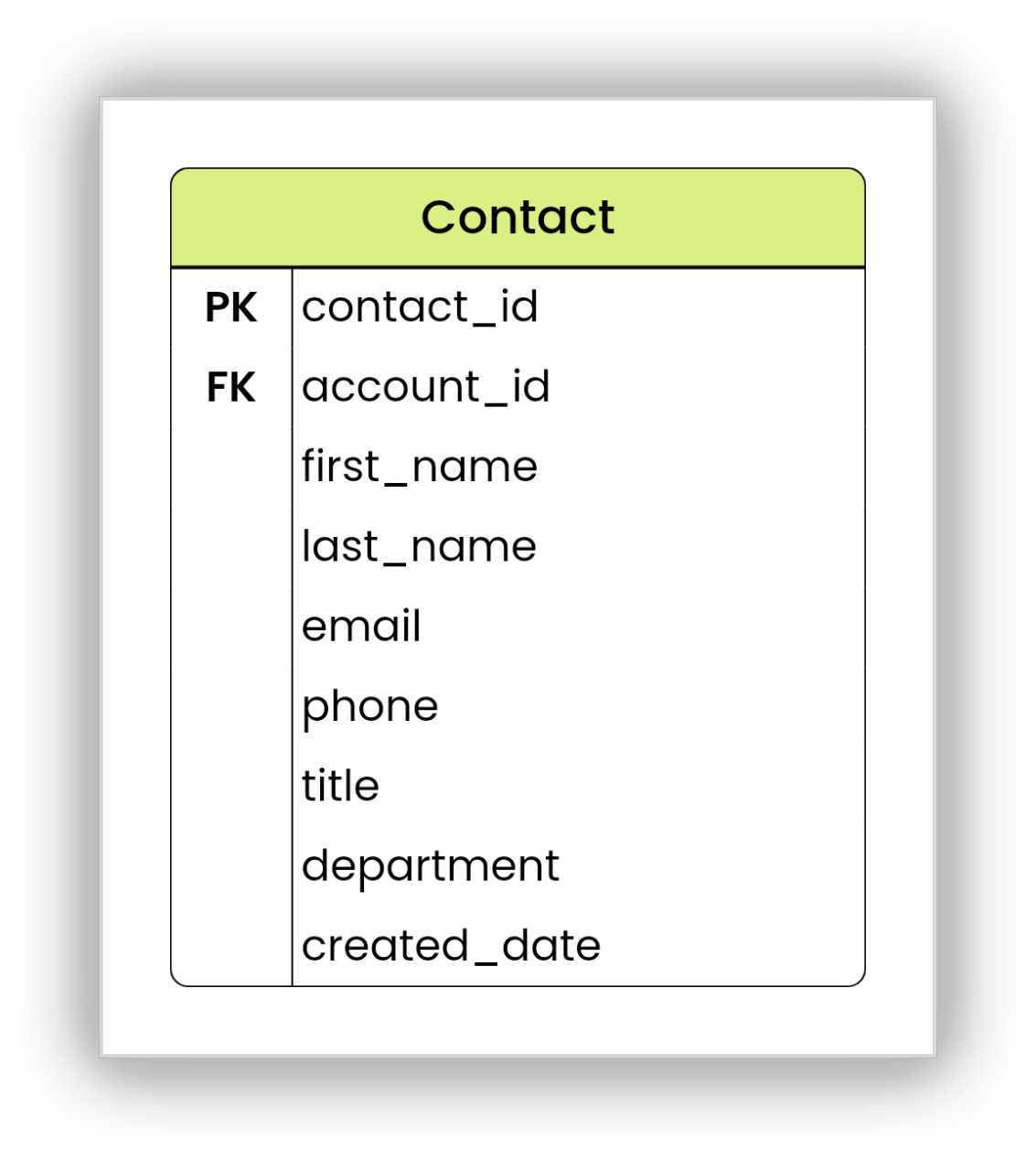
Step 4: Identify the keys.
Look for the primary key in each entity (often marked with "PK") and trace where it shows up as a foreign key ("FK") in another entity. This tells you exactly how the relationship is implemented at the database level, not just conceptually.
Step 5: Zoom out before zooming in.
If the diagram is large, resist the urge to read it left-to-right like a document. Break it into clusters around each anchor entity, understand each cluster, then look at how the clusters connect.
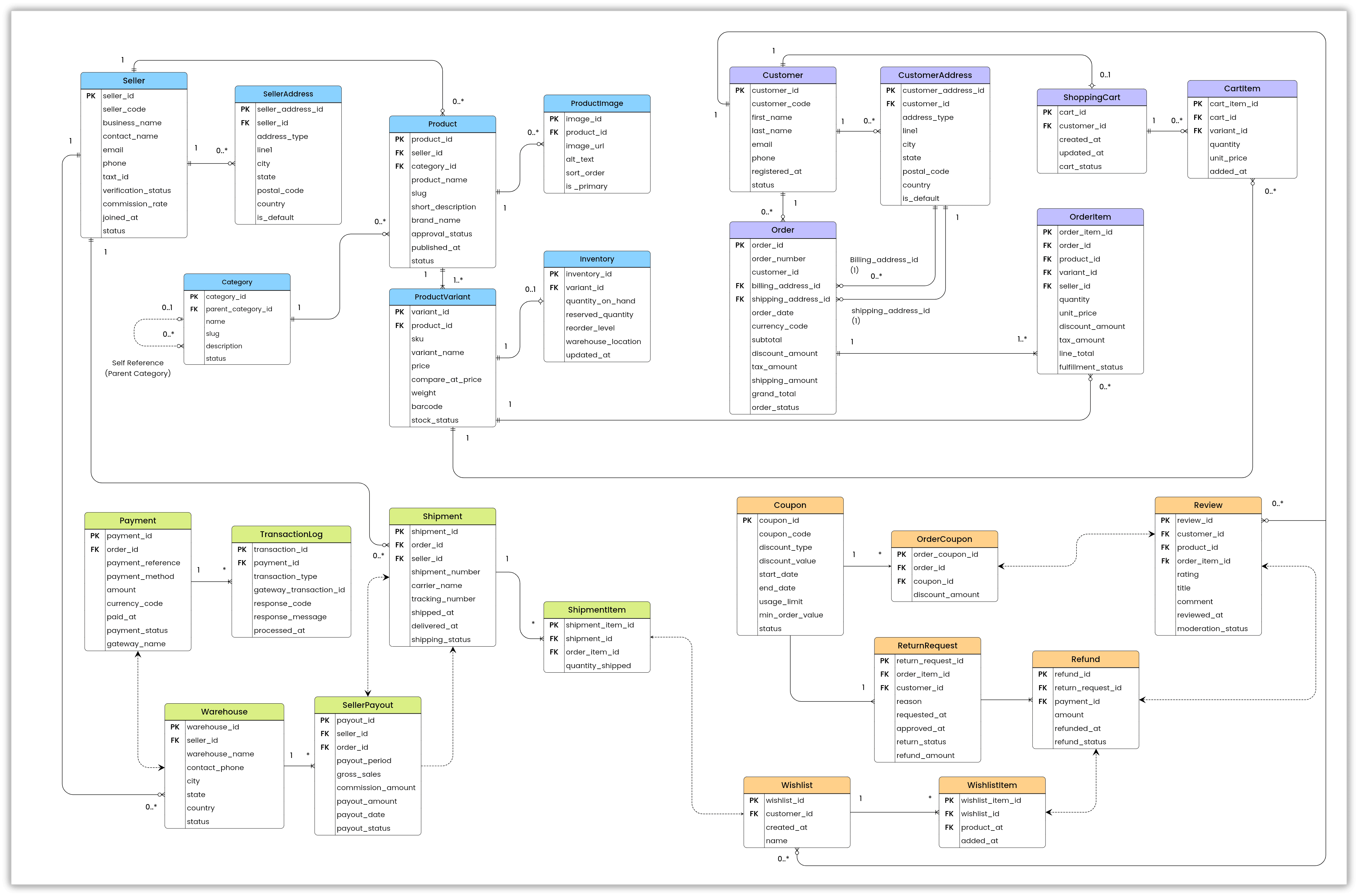
If you apply this to read someone's diagram, you can easily create your ERD without any complexity. To try creating a one, use diagramming tools like Vani with your team.
How to create an ERD in Vani
Here's the process, from a blank canvas to a systematic workflow.
Step 1: Open Vani and create a Space. From the marketplace, add the ERD Kit to the menu pane.
Note: ERD Kit is available only in Team and Business plan.
Step 2: Now design the diagram from the scratch. Brainstorm with your team to list the entities and define the attributes within the entities.
Step 3: Derive the relationship between them and add the cardinalities to each entity.
Step 4: Share the diagram with your project managers or other stakeholders, either by inviting them to the team Space to collaborate or exporting the diagram and sharing it as a PNG or PDF.
Step 5: With your flow created, you can assign people to work on the implementation by organizing them using Kanban boards and manage them on the same infinite canvas of Vani.
Common mistakes to avoid
Mixing conceptual and physical detail. Adding column data types to a diagram meant for a stakeholder conversation just adds noise nobody asked for.
Guessing at cardinality instead of confirming it. "Can a customer have multiple orders?" feels obvious until you hit an edge case like guest checkouts or shared accounts that breaks the assumption.
Skipping foreign keys. A relationship line without a clearly defined key is a relationship that exists conceptually but won't actually work in the database.
Letting the diagram go stale. An ERD that doesn't match the real schema anymore is worse than no ERD because it actively misleads anyone who trusts it.
Overcomplicating early drafts. A conceptual ERD jammed with every attribute and constraint defeats the purpose of starting conceptual in the first place.
ERDs vs. other diagrams
ERDs are often confused with—or used alongside of—a few other diagram types.
The key distinction is that an ERD tells you what data exists and how it's connected. It doesn't tell you how that data flows through a business process (that's a DFD's job) or how software objects behave (that's a UML class diagram's job). Many teams use an ERD and a DFD side by side—one for structure, one for process—rather than treating them as competing tools.
Final thoughts
An ERD is one of those tools that looks simple on the surface and gets more valuable the more rigorously you use it. Get the entities and relationships right, take cardinality seriously instead of guessing at it, and pick a notation that matches your audience, and you'll have a diagram that's still useful long after the first version of the database it describes has changed.
If you're mapping one out with a team rather than alone, doing it in a tool built for real-time collaboration like Vani means the ERD stays a living reference instead of a slide that goes stale the week after it's created.
FAQs
What is the difference between an ER diagram and an ERD?
None—"ER diagram" and "ERD" are the same thing. Both refer to an entity relationship diagram; ERD is simply the more common abbreviation.
What are the three types of cardinality in an ERD?
One-to-one (1:1), one-to-many (1:N), and many-to-many (N:N). Each describes how many records in one entity can relate to records in another.
What's the difference between Crow's Foot and Chen notation?
Crow's Foot uses compact line-end symbols to show cardinality and is the industry standard for production database work. Chen notation uses labeled diamonds for relationships and is better suited for early, conceptual modeling and teaching.
What software is used to make ERDs?
Most modern teams use collaborative diagramming tools that support real-time editing and standard ERD notation,rather than generic drawing software. The right choice depends on whether you need quick conceptual sketches or detailed, database-ready diagrams.