- HOME
- Technology & Trends
- How to create mind maps for clear and structured thinking
How to create mind maps for clear and structured thinking
- Last Updated : December 11, 2025
- 568 Views
- 9 Min Read

Clear thinking is difficult when ideas come at you all at once. You might have a plan forming in your head, a few new thoughts on top of it, and a problem you're trying to solve. Everything feels scattered, and it becomes hard to see how the pieces fit together. This is where a mind map helps by turning loose thoughts into a simple visual structure.
A mind map starts with one central idea and expands outward into branches. This layout matches the way your brain naturally works, which is why mind maps are useful for planning, studying, brainstorming, or understanding a topic in depth. They help you see connections, notice patterns, and turn complexity into clarity.
With digital tools, creating a mind map is easier than ever. Inside Vani, you can build a mind map manually using templates or generate one instantly with Vani AI. This gives you the flexibility to start from a clean structure, refine ideas visually, and collaborate with your team in one shared space.
This blog post will walk you through what a mind map is, how to create one, how to use templates effectively, and how Vani AI can generate complete mind maps from a single prompt.
What is a mind map?
A mind map is a visual diagram that organizes information around one central idea. From this central idea, you draw branches that represent major topics or components. Each of those branches breaks down into smaller sub branches, helping you see the big picture and the details all at the same time.
A mind map mirrors the way the brain naturally thinks. Instead of reading long paragraphs or scrolling through lists, you get a structured layout where ideas spread out visually. This makes it easier to remember, explore, and expand.
Key characteristics of a mind map
- A central topic placed at the center of the canvas
- Main branches representing the major themes
- Sub branches breaking each theme into smaller ideas
- Colors, icons, or shapes that help you visually categorize ideas
- A non-linear layout that keeps ideas free and flexible
Mind maps are often used for planning, problem solving, learning, preparing presentations, outlining content, and organizing information.
Why mind maps work
Mind maps work well because the brain naturally processes information visually. When you see ideas connected in a map, your mind identifies relationships faster than reading text. This is why mind maps are widely used in education, content creation, teamwork, and product planning.
Simplify complex topics
A topic that feels too large becomes easier to understand when it's broken into smaller pieces. Mind maps help you see the structure instantly.
Improve memory and recall
Visual patterns stay in the mind longer. The combination of color, structure, and connected branches improves retention.
See relationships
Branches help you understand how one idea affects another. This is powerful for planning projects, managing tasks, or analyzing problems.
Support creative thinking
Because they're open and flexible, mind maps encourage new ideas to flow without pressure. You can add branches freely as thoughts come up.
Reduce overwhelm
Instead of trying to manage long notes, a mind map shows everything in one clear space. You feel in control of the information.
How to create a mind map manually
Creating a mind map is simple and doesn't require any design skill. You can do it on paper or using digital tools like Vani. Here's the step-by-step process:
Start with the central idea
Place your main topic in the center of your canvas. This could be:
- A project
- A lesson
- A business idea
- A goal
- A problem
- A strategy
- A piece of content
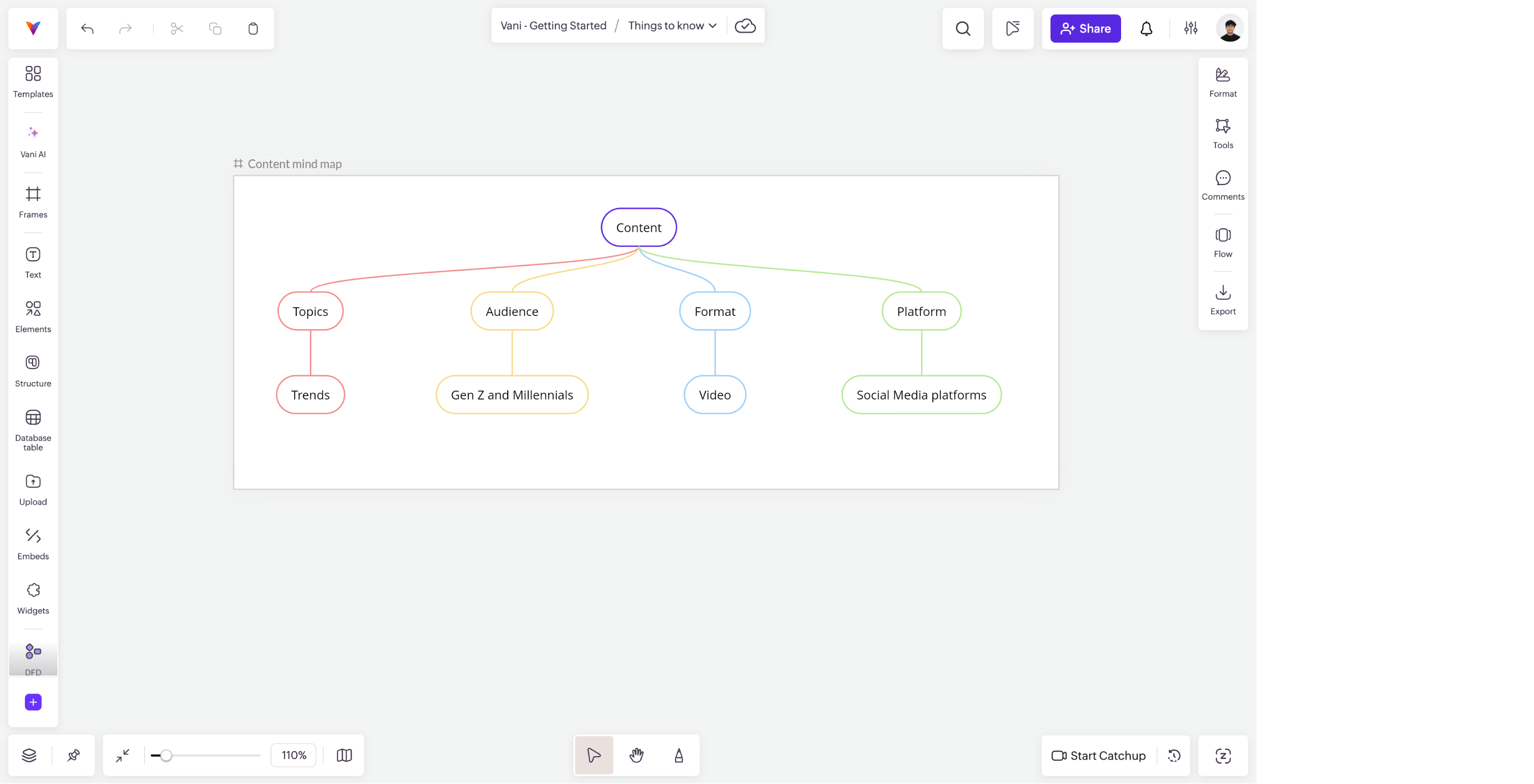
Everything in the mind map will connect back to this central idea.
Add the main branches
Draw lines from the central topic to create major categories or themes. For example, if you're creating a mind map for your marketing strategy, your main branches might be:
- Content
- Social media
- SEO
- Paid ads
- Email marketing
These are the pillars of your topic.
Create sub branches
Break each main branch into smaller ideas. For example, SEO could be broken into keywords, on-page optimization, backlinks, and technical SEO.
The more you break it down, the clearer the structure becomes.
Use short keywords
Mind maps work best when each branch contains only one short phrase or keyword. Long sentences clutter the map and reduce clarity.
Add visuals and color
Adding simple colors, icons, or shapes is not just for design. It helps your brain group ideas faster.
Keep the structure flexible
A mind map is not meant to be perfect on the first attempt. Keep moving branches, expanding ideas, and reorganizing.
How to use a mind map
Mind maps are flexible tools that adapt to almost any kind of thinking. Whether you're planning, learning, or solving a problem, a mind map helps you take everything in your head and place it in a visual structure you can understand and work with. Below are some practical ways mind maps are used and why they make a difference in each case.
Brainstorming ideas
When you're trying to generate ideas, linear thinking can limit you. A mind map opens up your thinking by allowing ideas to branch out in any direction. You can explore different angles without worrying about order or structure. This is why mind maps are great for creative sessions, naming exercises, topic generation, and early-stage concept exploration.
Studying or learning a topic
Students often deal with dense information spread across chapters or long notes. A mind map pulls the main ideas, definitions, and diagrams into one view. It helps you see how concepts connect, which makes understanding and recall much easier. Many students use mind maps as a revision tool before exams because one glance shows the entire chapter.
Planning content
Content planning usually involves a mix of formats, themes, keywords, and schedules. A mind map helps you see your content plan as a system rather than a list. You can map topics, break them into subtopics, adjust your monthly plan, and identify gaps. Creators often use mind maps to plan blogs, videos, newsletters, courses, or social media calendars because it brings structure to creative work.
Project planning
Projects move through stages, involve multiple people, and require solid coordination. A mind map helps you outline each phase clearly, from research to release. You can list tasks, milestones, team roles, and dependencies in a way that's easy to follow. Teams use mind maps at the start of a project to align on scope and ensure nothing important is missed.
Business strategy
Strategic planning needs clear thinking. A mind map helps founders and leaders explore different parts of the business in one place, such as audience insights, product opportunities, competitors, marketing channels, revenue models, and growth plans. Instead of writing long documents at the beginning, a mind map helps you see the high-level strategy and refine it visually.
Problem solving
When you're facing a problem, your first challenge is understanding its full shape. A mind map helps you break the problem into smaller parts, identify possible causes, group related issues, and explore solutions. This makes the challenge feel manageable and helps you think of answers you might not have considered.
Personal planning
Mind maps are not only for work; they're also useful for personal goals, routines, habits, travel plans, or life decisions. A mind map helps you map out what matters to you, explore options, and stay organized without feeling overwhelmed. Many people use mind maps for goal setting because they give a clear and motivating picture of what they want to achieve.
Mind map templates in Vani
Mind maps are easier to build when you start with a ready structure. Vani includes three focused mind map templates that give you a clean foundation for planning, brainstorming, or organizing information. Each template comes with pre-designed branches, clear categories, and visual styling that makes it simple to expand your ideas.
These templates are not generic; they're designed with real work scenarios in mind, so you can open one, start editing immediately, and shape your mind map without worrying about layout or structure.
Business plan mind map template
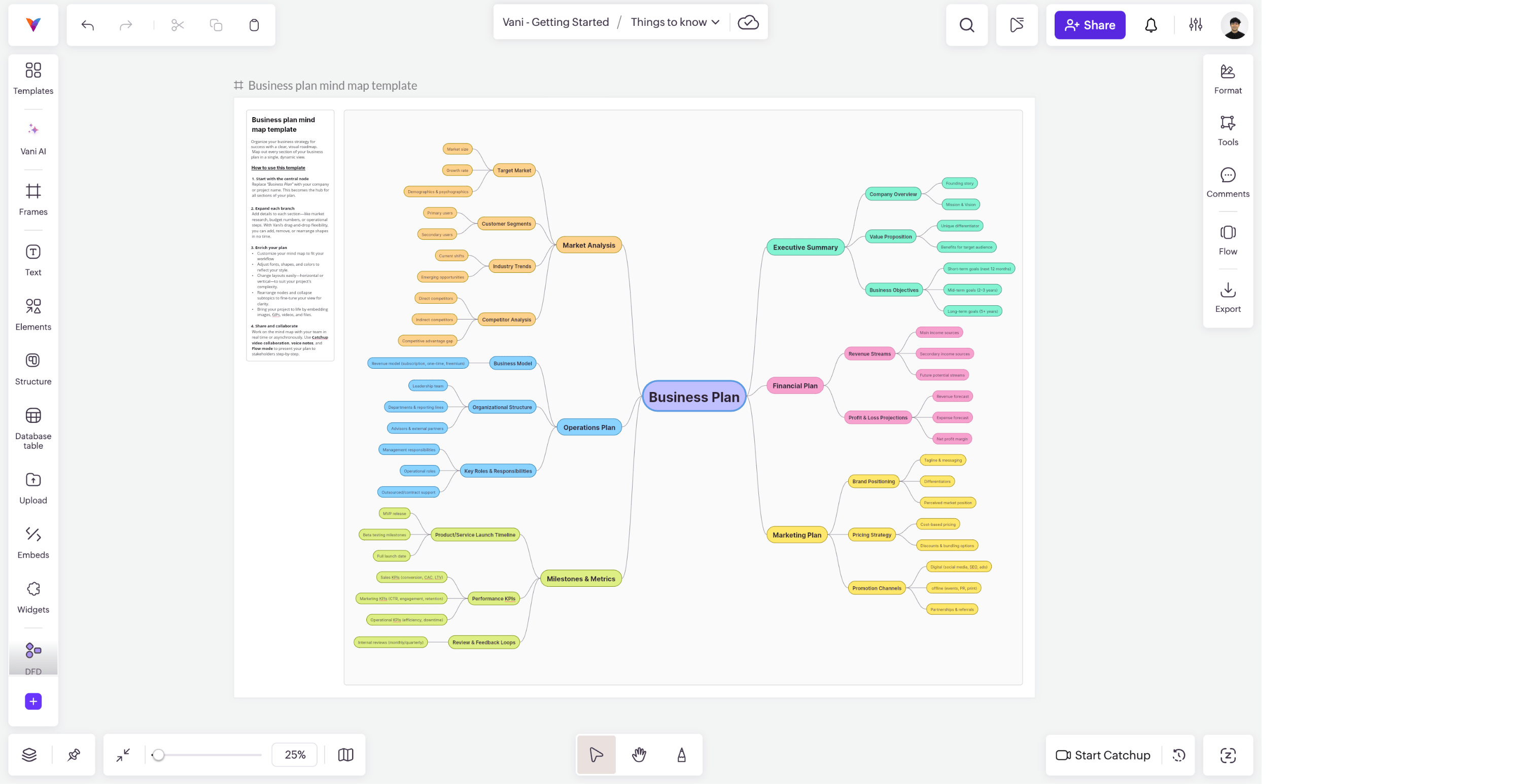
This template helps you outline a complete business plan visually. It comes with sections like:
- Executive summary
- Market analysis
- Operations plan
- Financial plan
- Marketing plan
- Milestones and metrics
Each branch already includes detailed sub branches, such as customer segments, revenue streams, competitor analysis, product launch milestones, and performance KPIs. This structure makes it easy for founders, teams, or students to develop a full business plan from top to bottom.
You can edit every node, rearrange sections, add new categories, or remove anything you don't need. The template gives you a strong starting point so your business plan develops naturally.
Project planning mind map template
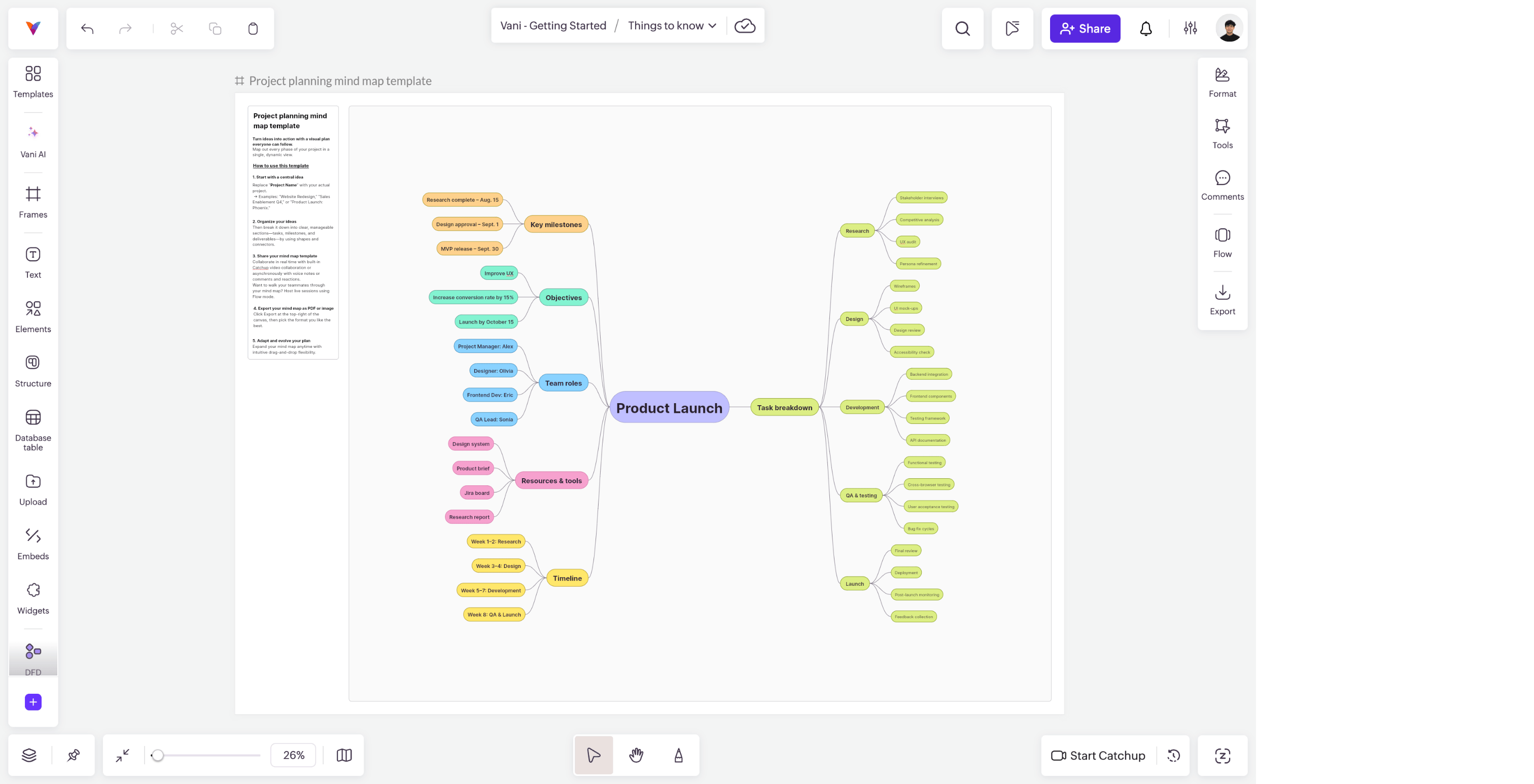
This template is designed for teams that want to break down a project into clear steps. It includes sections for:
- Objectives
- Key milestones
- Team roles
- Task breakdown
- Resources and tools
- Timeline
Each branch is populated with examples like research activities, design phases, development tasks, QA testing, and launch steps. This makes it ideal for product launches, internal initiatives, marketing campaigns, or any project that requires structured planning.
You can personalize the tasks, assign roles, adjust timelines, and drag nodes to reflect how your team actually works.
General mind map template

This flexible template is perfect for anything that doesn't fit into a predefined structure. It contains a clean central idea with open branches such as:
- Process improvements
- Automation
- Bug analysis
- User feedback
- Team collaboration
You can reuse this template for brainstorming, strategy building, learning, content planning, or problem solving. It's simple, clean, and designed to grow in whichever direction your thinking evolves.
Add your ideas, remove sections you don't need, create new branches, or reorganize the layout. This template adapts to your workflow instantly.
Why these templates help
These templates remove the pressure of starting with a blank canvas. They give you:
- A clear visual structure
- Prebuilt categories that spark ideas
- Ready-to-edit branches
- A layout that guides your thinking
- A professional visual style without any manual design work
Whether you're mapping a business plan, planning a project, or exploring ideas, Vani’s templates help you start faster and think more clearly. You can customize everything and turn each template into a fully personalized mind map inside your Space.
How to create a mind map with Vani AI
Vani AI allows you to generate a complete mind map instantly using just a short text prompt. This is helpful when you want a structured mind map without manually adding branches.
Steps to create a mind map using Vani AI
- Click the Vani AI icon in the left toolbar.
- Select the mind map option under the Create section.
- Type a short prompt describing the mind map you want to create.
Example: “Create a mind map about the stages of product development.” - Click Ask Vani AI to generate the map.
- Preview the structure by clicking the eye icon.
- If you want to make changes, type updated instructions and click Ask Vani AI again to regenerate.
- Once you're satisfied with the mind map, click Add to Zone to add it to your Space.
How to edit an AI-generated mind map in Vani
Once the mind map is added to your Space, you can fully customize it.
You can:
- Double-click any node to edit the text.
- Drag and drop nodes to change layout or structure.
- Add new branches.
- Remove unwanted branches.
- Rename sections to match your ideas.
- Adjust the visual layout to keep the map clear.
These editing options let you refine the AI-generated mind map without rebuilding it manually.
Prompt tips for better mind maps
Here are simple ways to get clearer and more accurate mind maps from Vani AI.
- Use specific prompts.
Example: “Create a mind map showing the phases of UX design.” - Mention the number of levels you want.
Example: “Make a three-level mind map for marketing strategy.” - Avoid vague prompts like “make a good mind map.”
- Describe the topic clearly and tell the AI exactly what you want.
Manual mind maps vs. AI-generated mind maps
When to use manual mind maps
- When you want full creative control
- When you're brainstorming freely
- When you want a more personal layout
- When the topic is emotional or abstract
When to use Vani AI mind maps
- When you want a fast starting point
- When you need a clean structure instantly
- When you don't know how to break down a topic
- When you want a professional layout without effort
Both approaches work well inside Vani because you can combine them. You can generate a mind map using Vani AI and then edit or expand it manually.
Simple tips for making better mind maps
Here are some simple tips that help make your mind maps better:
- Keep branch titles short.
- Avoid overcrowding the canvas.
- Use color only to separate categories.
- Start broad, then go deeper.
- Keep refining the layout for clarity.
- Let the mind map stay flexible.
- Review the entire map once the structure is done.
Why create mind maps inside Vani
Mind mapping inside Vani is powerful because your ideas, visuals, notes, and team all stay in one place.
Collaboration becomes simple
You can share the mind map with your team, comment on branches, and co-create ideas.
Everything stays connected
Notes, images, diagrams, links, and plans stay in the same Space.
Plans come easier
Turn each branch into tasks, documents, or workflows without switching tools.
Vani AI expands ideas
Ask the AI to expand a branch, generate examples, or suggest improvements.
Conclusion
A mind map is one of the most helpful tools you can use to think clearly, organize information, and plan complex ideas. With the combination of manual templates and AI-generated mind maps inside Vani, you can map out your thoughts faster and with more structure than ever. Whether you're studying, planning a project, working with a team, or building a strategy, a mind map helps you see everything.