- HOME
- Technology & Trends
- Why teams use decision trees to simplify complex decisions
Why teams use decision trees to simplify complex decisions
- Last Updated : August 7, 2026
- 71 Views
- 11 Min Read


Every day, businesses and individuals make decisions that shape projects, products, and outcomes. Should a loan application be approved? Which support solution should be recommended? Is a customer likely to churn? Which supplier offers the best value?
Some decisions are simple, while others involve multiple conditions, variables, and possible outcomes. As the complexity increases, relying on intuition alone can lead to inconsistent decisions and unnecessary delays.
That's where a decision tree becomes valuable.
A decision tree helps break down complex decisions into a sequence of logical questions, making it easier to evaluate options and arrive at consistent outcomes. By visualizing every possible path, teams can understand how decisions are made, identify different scenarios, and explain the reasoning behind every outcome.
Decision trees are widely used across business operations, customer support, finance, healthcare, manufacturing, and machine learning. They're also a valuable collaboration tool, allowing teams to map decision logic visually, review different scenarios together, and continuously improve processes over time.
With visual collaboration platforms like Vani, teams can build decision trees on an infinite canvas, discuss decision paths in context, gather feedback, and keep decision logic updated as business requirements evolve.
In this blog post, we'll explore what a decision tree is, how it works, when to use one, and how teams can collaborate more effectively using decision trees.
What is a decision tree?
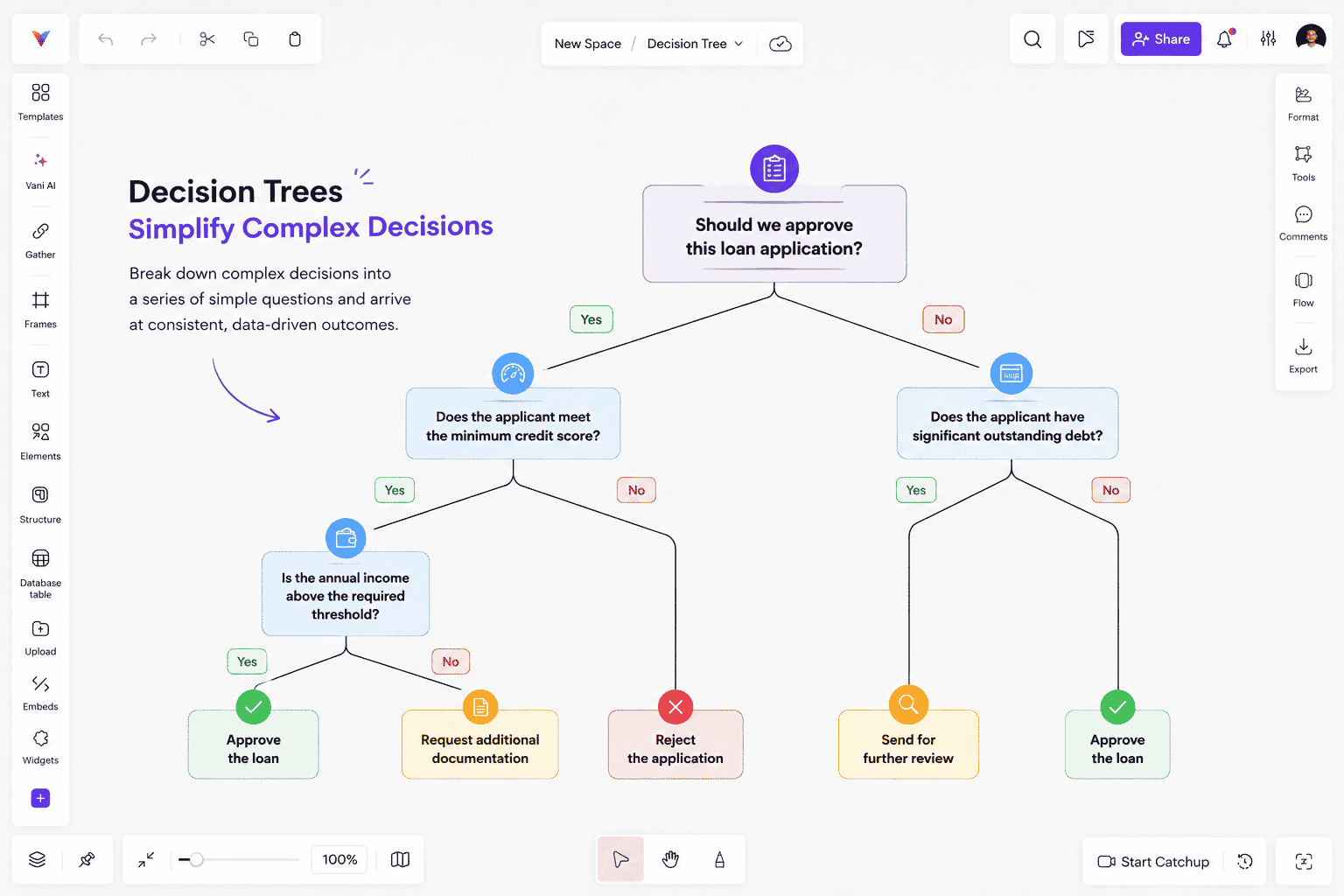
A decision tree is a visual diagram that represents a decision-making process. It starts with a single question or decision and branches into multiple possible choices, conditions, or outcomes. Each answer leads to another question until the process reaches a final recommendation or action.
Rather than evaluating every possibility at once, a decision tree guides users through one logical step at a time.
Think of it as a roadmap for making decisions. Instead of asking multiple questions simultaneously, you answer one question, follow the appropriate branch, answer the next, and continue until you reach a conclusion.
For example, imagine a bank evaluating a loan application. Instead of relying solely on individual judgment, the process can be visualized using a decision tree.
The decision might begin with questions such as:
Does the applicant meet the minimum credit score?
Is the applicant's annual income above the required threshold?
Does the applicant have significant outstanding debt?
Depending on the answers, the application may be approved, sent for further review, or rejected.
This structured approach helps organizations evaluate every application using the same decision criteria, improving both consistency and transparency.
While decision trees can be drawn on paper or traditional diagramming tools, they're often more effective when created in a collaborative workspace like Vani, where teams can review decision paths together, discuss alternative scenarios, and update the diagram as business processes change.
How does a decision tree work?
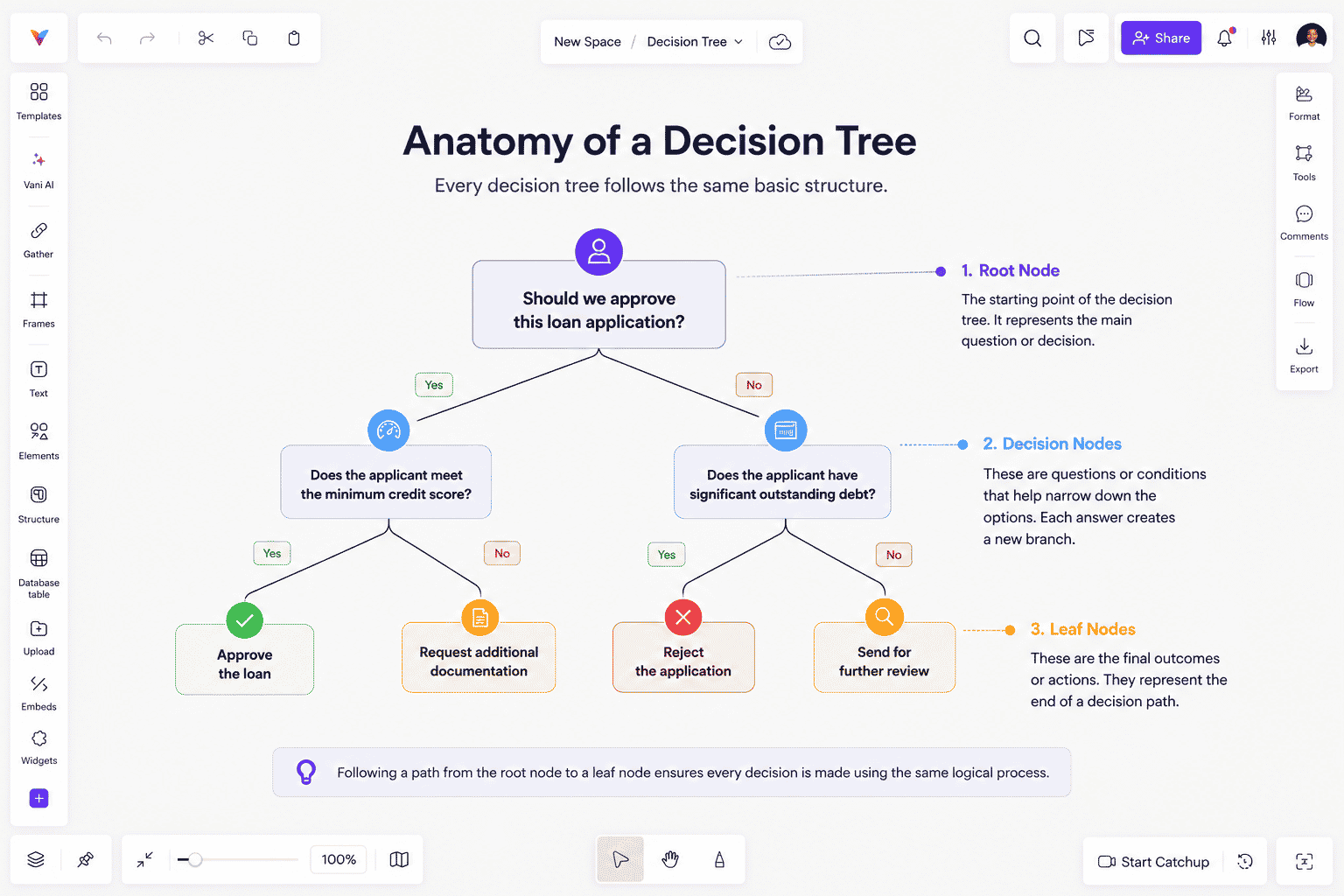
Every decision tree follows the same basic structure, regardless of whether it's used for business decisions or machine learning.
Root node
The root node is the starting point of the decision tree. It represents the primary question or decision that begins the evaluation process.
Example: Should we approve this loan application?
Everything else branches out from this initial question.
Decision nodes
Decision nodes represent additional questions or conditions that help narrow down the available options.
For example:
Does the applicant meet the minimum credit score?
Is annual income above the required threshold?
Does the applicant have existing debt?
Each answer leads to another branch, gradually eliminating possibilities until a final outcome is reached.
Leaf nodes
Leaf nodes represent the final outcomes of the decision-making process.
Examples include:
Approve the loan
Request additional documentation
Reject the application
Following a path from the root node to a leaf node ensures every decision is made using the same logical process.
How to create a decision tree
Building a decision tree is less about drawing boxes and more about organizing your thinking. A well-designed decision tree should guide users through a problem in the simplest way possible while accounting for all realistic outcomes.
A simple process for creating one looks like this:
1. Define the decision
Start by identifying the problem you're trying to solve.
Examples include:
Should this customer receive a refund?
Which vendor should we choose?
Is this feature ready for release?
A clearly defined objective makes the rest of the tree much easier to build.
2. List the factors that influence the decision
Identify the questions or conditions that affect the outcome.
For example, if you're building a customer support decision tree, your conditions might include:
Is the issue related to billing?
Has the customer already tried troubleshooting?
Is the issue reproducible?
3. Organize the questions logically
Place the most important or highest-impact questions near the top of the tree.
Doing so reduces unnecessary branching and helps users reach the correct outcome more efficiently.
4. Define the outcomes
Every branch should eventually lead to a clear action.
Examples includes:
Escalate to engineering
Approve the request
Schedule a follow-up
Close the ticket
5. Review and refine
Before using the decision tree, test it using real scenarios.
Ask questions like:
Does every possible path lead to a meaningful outcome?
Are there unnecessary branches?
Can any questions be simplified?
Decision trees should evolve alongside your business processes.
That's why many teams build and maintain them collaboratively in Vani. Instead of managing multiple versions of the same diagram, everyone works in a shared visual workspace where updates, comments, supporting documents, and discussions remain connected to the decision tree.
Decision trees in machine learning
Decision trees aren't only used as visual planning tools—they're also one of the most widely used supervised machine learning algorithms.
The key difference is how they're created.
Business decision trees are designed manually by people.
Machine learning decision trees are generated automatically by algorithms that analyze historical data and determine which questions best separate different outcomes.
For example, a machine learning model predicting customer churn might evaluate questions such as:
Is the customer on a monthly subscription?
Has customer support been contacted recently?
Has the monthly bill increased?
How long has the customer been subscribed?
By analyzing thousands of previous customers, the algorithm learns which questions provide the strongest predictions.
Many advanced machine learning algorithms are built around decision trees, including:
Decision Tree Classifier
Decision Tree Regressor
Random Forest
Gradient Boosting Trees
XGBoost
LightGBM
CatBoost
Although ensemble methods generally provide better predictive performance, individual decision trees remain popular because they're easy to understand and explain.
Advantages of decision trees
Easy to understand
Decision trees present information visually, making them accessible to both technical and non-technical users.
Instead of reading lengthy documentation, stakeholders can quickly follow the decision path and understand how a conclusion is reached.
Transparent decision-making
One of the biggest strengths of decision trees is explainability. Every recommendation can be traced back through the sequence of decisions that produced it.
This makes decision trees particularly valuable in industries such as finance, healthcare, insurance, and legal services, where decisions often need to be justified.
Flexible across different use cases
Decision trees can support a wide variety of business scenarios, including:
Customer support
Risk assessment
Loan approvals
Product recommendations
Process automation
Predictive analytics
They can also work with both numerical and categorical data, making them suitable for many machine learning applications.
Easy to update
Business rules change over time. Unlike hard-coded workflows, decision trees can be modified as policies, products, or customer requirements evolve.
When maintained in a collaborative workspace like Vani, updates become even easier because teams can review changes together, leave feedback directly on the diagram, and ensure everyone is working from the latest version.
Supports automation
Decision trees are commonly integrated into software systems to automate repetitive decision-making.
Examples include:
Chatbot responses
Customer support workflows
Insurance approvals
Loan eligibility
Product recommendation engines
By following predefined decision paths, organizations can deliver faster and more consistent outcomes.
Limitations of decision trees
Despite their many advantages, decision trees have some limitations.
Overfitting
Very large trees can become overly specific to the training data, reducing their ability to make accurate predictions for new situations.
Instability
Small changes in data can sometimes produce significantly different tree structures.
Complexity
If too many branches are added, decision trees become difficult to read and maintain. Keeping the structure simple often leads to better usability.
Lower predictive accuracy
While individual decision trees are highly interpretable, advanced ensemble algorithms such as Random Forest and Gradient Boosting generally achieve higher predictive performance for complex datasets.
When should you use a decision tree?
Decision trees are ideal whenever a problem can be solved by answering a sequence of logical questions.
They're especially useful in a few specific scenarios.
You need standardized decision-making
Decision trees ensure everyone follows the same evaluation process.
Common examples include:
HR candidate screening
Customer support troubleshooting
Insurance claims
Financial approvals
Explainability matters
If you need to justify why a decision was made, decision trees provide complete visibility into the reasoning behind every outcome.
You're solving classification problems
Decision trees work particularly well for classifying outcomes such as:
Spam vs. legitimate emails
Fraud vs. genuine transactions
Customer churn vs. retention
Equipment failure vs. normal operation
Multiple stakeholders are involved
Decision trees are collaboration tools.
When teams build them together in Vani, product managers, analysts, engineers, support teams, and business stakeholders can review the same decision logic, suggest improvements, and keep the diagram aligned with changing business requirements.
This collaborative approach ensures that everyone understands both what decisions are being made and why.
Real-world applications of decision trees
Decision trees are used across industries because they provide a consistent way to evaluate options and make decisions. Whether the goal is solving customer issues, assessing risk, or improving operational efficiency, decision trees help teams follow a structured process instead of relying on assumptions.
Customer support
Support teams often use decision trees to troubleshoot customer issues efficiently.
For example, if a customer reports that they can't log in, the decision tree might guide the support agent through questions such as:
Is the email address correct?
Has the password been reset recently?
Is two-factor authentication enabled?
Following a predefined decision path helps agents resolve issues consistently while reducing resolution time.
Teams can build and maintain these troubleshooting trees in Vani, making it easy for support managers to update workflows as products evolve and ensuring every agent always has access to the latest decision logic.
Healthcare
Healthcare professionals use decision trees to assist with diagnosis and treatment planning.
A decision tree can help evaluate symptoms, medical history, test results, and risk factors before recommending the next course of action. While clinical judgment always plays a critical role, decision trees help standardize common diagnostic pathways and improve consistency.
Banking and finance
Banks use decision trees to evaluate loan applications, detect fraudulent transactions, and assess financial risk.
Instead of manually reviewing every application, financial institutions can evaluate factors such as:
Credit score
Employment status
Annual income
Existing liabilities
This creates a consistent approval process while reducing manual effort.
Product and engineering teams
Product and engineering teams frequently use decision trees to map feature releases, prioritize bug fixes, and evaluate technical approaches.
For example, a release readiness decision tree might include questions such as:
Has QA approved the feature?
Are all critical bugs resolved?
Has documentation been completed?
Has stakeholder approval been received?
Creating these decision trees in Vani allows cross-functional teams to review the release process together, discuss dependencies, and keep supporting documentation alongside the diagram.
Manufacturing
Manufacturing teams use decision trees to identify equipment failures and improve maintenance processes.
By evaluating machine conditions, sensor readings, and operational data, technicians can quickly determine the most likely cause of a problem and identify the appropriate corrective action.
Best practices for building decision trees
A decision tree is only effective if it's easy to understand and maintain. The following best practices help ensure your decision trees remain useful as your processes evolve.
Start with the primary decision
Begin with the most important question. This creates a logical starting point and helps users navigate the decision process naturally.
Keep the structure simple
Avoid adding unnecessary branches or questions. Every additional branch increases complexity, making the tree more difficult to understand and maintain. Whenever possible, simplify decision paths without losing important information.
Use clear decision criteria
Questions should be specific and objective.
Instead of asking "Does this request need immediate attention?", ask "Is the issue classified as Critical priority?"
Specific criteria produce more consistent decisions.
Make outcomes actionable
Every branch should end with a clear action.
Examples include:
Escalate to engineering
Approve request
Schedule follow-up
Reject application
Request additional information
Users should always know what to do next.
Validate using real scenarios
Before adopting a decision tree, test it using actual business situations. This helps identify missing branches, confusing questions, or edge cases that may not have been considered during design.
Review and update regularly
Business processes rarely remain unchanged. Products evolve, policies change, and customer expectations shift over time. Decision trees should evolve alongside them.
Because Vani provides a shared visual workspace, teams can update decision trees collaboratively, gather feedback through comments, and keep discussions connected to the diagram itself. This reduces version conflicts and helps everyone work from the latest decision logic.
Decision tree vs. flowchart
Decision trees and flowcharts are often confused because both use boxes and connectors to visualize information. However, they serve different purposes.
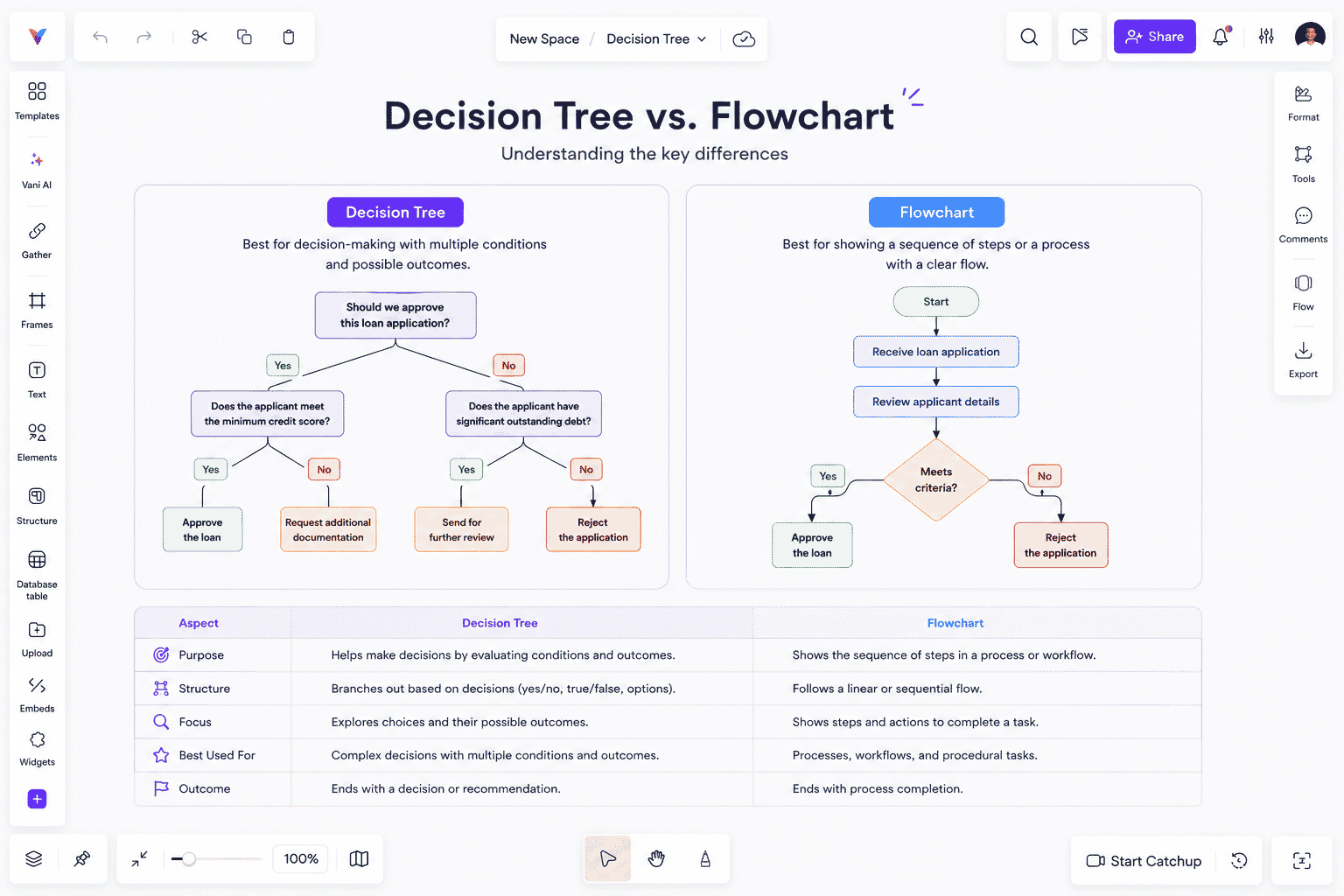
A flowchart describes how a process works by showing the sequence of actions needed to complete a task.
A decision tree focuses on how decisions are made, branching into different outcomes based on conditions or questions.
Decision tree | Flowchart |
Helps make decisions | Documents a process |
Branches based on conditions | Follows sequential steps |
Can produce multiple outcomes | Usually follows one workflow |
Used for analysis and recommendations | Used for process documentation |
For example, a flowchart might illustrate the steps involved in processing a customer order, while a decision tree determines whether an order qualifies for expedited shipping.
Both diagrams are valuable, and many teams use them together to visualize both workflows and decision logic.
Why build decision trees in Vani?
Decision trees are most valuable when they become living resources that teams can continuously improve.
Instead of creating static diagrams that quickly become outdated, teams can build decision trees in Vani and collaborate on them throughout the entire decision-making process.
With Vani, teams can:
Create decision trees on an infinite visual canvas.
Collaborate in real time with teammates, regardless of location.
Add notes, documents, links, images, and supporting information directly alongside the decision tree.
Leave contextual comments and feedback on specific branches.
Brainstorm alternative decision paths before finalizing a workflow.
Present decision trees during meetings without switching between multiple tools.
Keep every version of the decision tree in one shared workspace.
Whether you're documenting customer support workflows, planning product releases, mapping business processes, or designing machine learning logic, Vani provides a central workspace where teams can create, discuss, and refine decision trees together.
Instead of treating a decision tree as a static diagram, Vani helps teams turn it into a collaborative source of truth that evolves with the business.
Final thoughts
Decision trees simplify complex decisions by breaking them into a series of logical questions and clearly defined outcomes. Their visual structure makes decision-making easier to understand, explain, and improve over time.
From customer support and healthcare to finance, manufacturing, and machine learning, decision trees help organizations make more consistent, transparent, and data-informed decisions.
As businesses become increasingly collaborative, the way decision trees are created matters just as much as the decisions they represent. Building them in a shared visual workspace allows teams to review decision paths together, capture feedback, document supporting information, and keep decision logic aligned as processes evolve.
With Vani, teams can collaborate around decision trees, connect them to the rest of their work, and keep them up to date in one shared visual workspace.
Whether you're solving operational challenges, documenting business rules, or designing intelligent systems, a well-structured decision tree can bring clarity to complex decisions—and with Vani, your team can build and improve those decisions together.
FAQs
What is a decision tree?
A decision tree is a visual diagram that represents a decision-making process. It starts with a question and branches into different choices or conditions until it reaches a final outcome or recommendation.
When should I use a decision tree?
Decision trees are ideal when decisions involve multiple conditions or possible outcomes. They're commonly used for customer support, risk assessment, loan approvals, troubleshooting, business process automation, and machine learning.
What's the difference between a decision tree and a flowchart?
A flowchart illustrates the sequence of steps in a process, while a decision tree focuses on evaluating conditions to reach different outcomes. Flowcharts tell you how a process works, while decision trees tell you what decision should be made.
Are decision trees only used in machine learning?
No. While decision trees are widely used in machine learning for classification and regression, they're also commonly used in business operations, healthcare, finance, customer support, manufacturing, and project planning to standardize decision-making.
How can teams collaborate on decision trees?
Teams can collaborate on decision trees by creating them in a shared visual workspace like Vani, where they can edit diagrams together, add supporting documentation, leave comments, review decision paths, and keep the decision tree updated as business processes evolve.