- HOME
- Technology & Trends
- Flowchart symbols 101: Meanings, uses, and examples
Flowchart symbols 101: Meanings, uses, and examples
- Last Updated : October 13, 2026
- 18 Views
- 10 Min Read


You look at a flowchart and can usually tell where a process begins, where a decision happens, and what comes next. That clarity comes from something surprisingly simple: shapes.
A rectangle represents an action. A diamond signals a decision. An oval marks the beginning or end. An arrow shows what happens next.
These shapes are more than visual decoration. Flowchart symbols create a common visual language for explaining how a process works.
Whether you're mapping a business workflow, explaining an algorithm, documenting a customer journey, or planning a project, understanding these symbols makes flowcharts easier to create and follow.
Let's take a closer look at the most common flowchart symbols, what they mean, and when to use them.
What are flowchart symbols?
Flowchart symbols are shapes used to represent different steps or elements within a process. Each shape acts as a visual cue, helping readers recognize an action, decision, input, stored record, or delay before they even read its label.
Although certain meanings are widely recognized, teams may adapt symbols to suit their workflows. What matters most is consistency. Use familiar shapes wherever possible, give each symbol one clear purpose, and apply it the same way throughout the diagram.
The practical rule is simple: use familiar conventions where possible, and use every symbol consistently within the same diagram.
Flowchart symbols quick reference
Symbol | Shape | What it means | When to use it |
Start and end | Oval or rounded rectangle | The entry point or final outcome | Mark the beginning and finish of a process |
Process | Rectangle | An action, task, or operation | Show a step that changes, creates, checks, or handles something |
Decision | Diamond | A question or condition that creates branches | Use when the next step depends on an answer |
Input and output | Parallelogram | Data or materials entering or leaving a process | Show an input provided or an output produced |
Flowline | Arrow | Direction and sequence | Connect symbols and show what happens next |
Predefined process | Rectangle with double vertical lines | A named process defined elsewhere | Reuse a subprocess without showing every internal step |
Document | Rectangle with a wavy bottom | A document used or produced | Show a form, report, invoice, or other document |
Multiple documents | Stacked document shapes | A group of documents | Represent several forms, files, or reports together |
Database or stored data | Cylinder | Information stored for later use | Show data being read from or written to storage |
Manual input | Trapezoid with a slanted top | Information entered by a person | Use when someone types, selects, scans, or submits data |
Manual operation | Trapezoid | Work completed manually | Show a physical or nonautomated task |
Preparation | Hexagon | Setup or initialization | Show configuration that must happen before another step |
Delay | D-shaped symbol | A waiting period or pause | Show time, approval, or availability delays |
Display | Screen-shaped symbol | Information presented on a screen | Use when the visual display itself matters |
On-page connector | Small circle | A jump to another point on the same page | Reduce long or crossing arrows |
Off-page connector | Pentagon | The process continues on another page or diagram | Split a large process into readable sections |
Annotation | Bracket or note connector | Supporting information | Add a definition, exception, assumption, or source note |
Common flowchart symbols and when to use them
Each symbol below follows the same structure: what it means, when to use it, and what to watch out for. The third field is only included where there's a genuine pitfall worth flagging.
Start and end symbol
Meaning: The start and end symbol, also called a terminator, marks where a process begins or finishes. It is usually drawn as an oval, pill shape, or rounded rectangle.
Use it when: You need to define the boundaries of the workflow clearly. Every flowchart should have at least one starting point and one ending outcome. For example: "Start," "Order received," "Application submitted," or "Request closed."
Watch out for: Using a terminator for ordinary actions in the middle of the process. Those steps should normally use rectangles.
Process symbol
Meaning: A rectangle represents an action, task, operation, or activity. It is the most common symbol in a flowchart.
Use it when: Someone or something performs a step, such as reviewing an application, calculating a total, updating a record, or packaging an order.
Watch out for: Vague labels. Begin with a clear verb: "Review request" is easier to scan than "Request review."
Decision symbol
Meaning: A diamond represents a question, test, or condition that determines which path the process follows.
Use it when: The next step depends on an answer such as yes or no, approved or rejected, valid or invalid, or above or below a threshold. For example, a diamond labeled "Payment approved?" could branch into a "Yes" path that completes the order and a "No" path that requests another payment method.
Watch out for: Placing an ordinary action inside a diamond. If the step doesn't create a meaningful branch, use a process rectangle instead.
Input and output symbol
Meaning: A parallelogram shows data, information, or materials entering or leaving a process.
Use it when: A user submits details, a system receives a file, a machine accepts material, or the process generates a result.
Watch out for: Reaching for this shape by default. If a person manually enters the data, a manual input symbol may be more precise; if the output is specifically a document, use the document symbol instead.
Flowline symbol
Meaning: An arrow, or flowline, connects symbols and shows the direction of the process.
Use it when: You need to show sequence, movement, or the relationship between two steps. Every connected path should be easy to follow.
Watch out for: Crossing or backtracking lines. Keep the primary flow moving top-to-bottom or left-to-right, and label decision branches directly on the arrows.
Predefined process or subprocess symbol
Meaning: A rectangle with double vertical lines represents a named process whose internal steps are documented elsewhere.
Use it when: A routine appears several times, is managed by another team, or would make the main flowchart too detailed.
Watch out for: Using this symbol for a subprocess with no clear name or separate definition. If the reader needs to understand the internal steps immediately, expand it in the current diagram instead.
Document and multiple documents symbols
Meaning: A rectangle with a wavy lower edge represents a document. Stacked versions represent multiple documents.
Use it when: The process creates, receives, reviews, approves, or updates an invoice, report, contract, form, letter, or other document.
Watch out for: Mixing the two up. Use the single-document symbol for one named item, and the multiple-documents symbol only when a bundle or collection matters to the process.
Database or stored data symbol
Meaning: A cylinder represents information stored in a database, repository, or other persistent system.
Use it when: A step reads stored information, writes a new record, retrieves account details, or updates a system of record.
Watch out for: Using the database symbol for information that only passes briefly between two steps. A standard input/output symbol is usually clearer there.
Manual input symbol
Meaning: A trapezoid with a slanted top shows data entered by a person.
Use it when: Someone types information, selects an option, scans a code, fills out a digital form, or submits a command.
Watch out for: Reaching for this shape when the broader task matters more than the fact that entry is manual. A process rectangle may be the better fit.
Manual operation symbol
Meaning: A trapezoid represents a task completed by a person rather than by an automated system.
Use it when: The workflow includes physical handling, visual inspection, handwritten approval, manual assembly, or another nonautomated activity. For example: "Inspect package," "Sign form," "Count inventory," or "Attach shipping label."
Watch out for: Over-distinguishing manual input from manual operation. Many modern diagramming tools (like Lucidchart, draw.io, and Miro) merge them into a single trapezoid. Use both shapes only if you're following strict ISO 5807 conventions or your organization requires the distinction.
Preparation symbol
Meaning: A hexagon represents setup, initialization, or preparation before another activity begins.
Use it when: The process requires configuration, calibration, resource allocation, or the establishment of an initial condition.
Watch out for: Reaching for the hexagon when the preparation is really just another ordinary action. A rectangle is enough unless setup is a distinct type of step that readers need to recognize.
Delay symbol
Meaning: A D-shaped symbol represents a wait, pause, or delay in the process.
Use it when: Work must stop for a defined period, an external response, an approval, a scheduled event, or the availability of a resource.
Watch out for: Leaving delays out to save space. Doing so can hide the bottlenecks a process map is supposed to reveal.
Display symbol
Meaning: The display symbol represents information presented on a monitor, device, dashboard, or screen.
Use it when: The fact that information appears visually to a user is important to the process.
Watch out for: Using this symbol when a general output symbol would do. Reach for it only when the visual display itself is what matters.
On-page connector symbol
Meaning: A small circle links two points on the same page without drawing a long or crossing arrow.
Use it when: A direct line would make the diagram difficult to read. Match connectors using letters, numbers, or short labels.
Watch out for: Adding connectors unnecessarily. A direct arrow is usually easier to follow when the steps are close together.
Off-page connector symbol
Meaning: A pentagon indicates that the process continues on another page, section, or related diagram.
Use it when: A large workflow must be divided into smaller, readable views. For example: "Continue to page 2" or "Go to fulfilment process."
Watch out for: Connectors with no clear destination. Label each one with the page or diagram it leads to, and use a matching label where the process continues.
Annotation symbol
Meaning: An annotation adds explanatory information without becoming part of the process flow.
Use it when: A step needs a definition, policy rule, exception, assumption, data source, or additional context.
Watch out for: Long annotations. If a note requires a full paragraph, place the detailed explanation below the diagram or in supporting documentation instead.
Swimlanes
Meaning: Swimlanes aren't a symbol. They're horizontal or vertical bands that divide a flowchart by who or what is responsible for each step (a person, a role, a department, or a system).
Use it when: A process crosses multiple owners and readers need to see handoffs at a glance. For example, where a request moves from "Employee" to "Manager" to "Finance."
Watch out for: Adding lanes to a process with only one owner. Swimlanes earn their space when handoffs between roles are the point; otherwise they add structure without adding information.
How to choose the right flowchart symbol
Choose a symbol based on what the step does, not how important it feels. Ask these questions in order:
Does this mark the beginning or end? Use a start and end symbol.
Is someone or something performing an action? Use a process rectangle.
Does a condition change the route? Use a decision diamond.
Is data or material entering or leaving? Use an input/output symbol.
Is information stored for later use? Use a database or stored-data symbol.
Is the step a reusable process defined elsewhere? Use a predefined process symbol.
Is the step a document, delay, manual activity, or connection? Use the appropriate specialized symbol.
A specialized symbol should make the process easier to understand. If it adds complexity without clarifying anything, use a basic process shape and a precise label.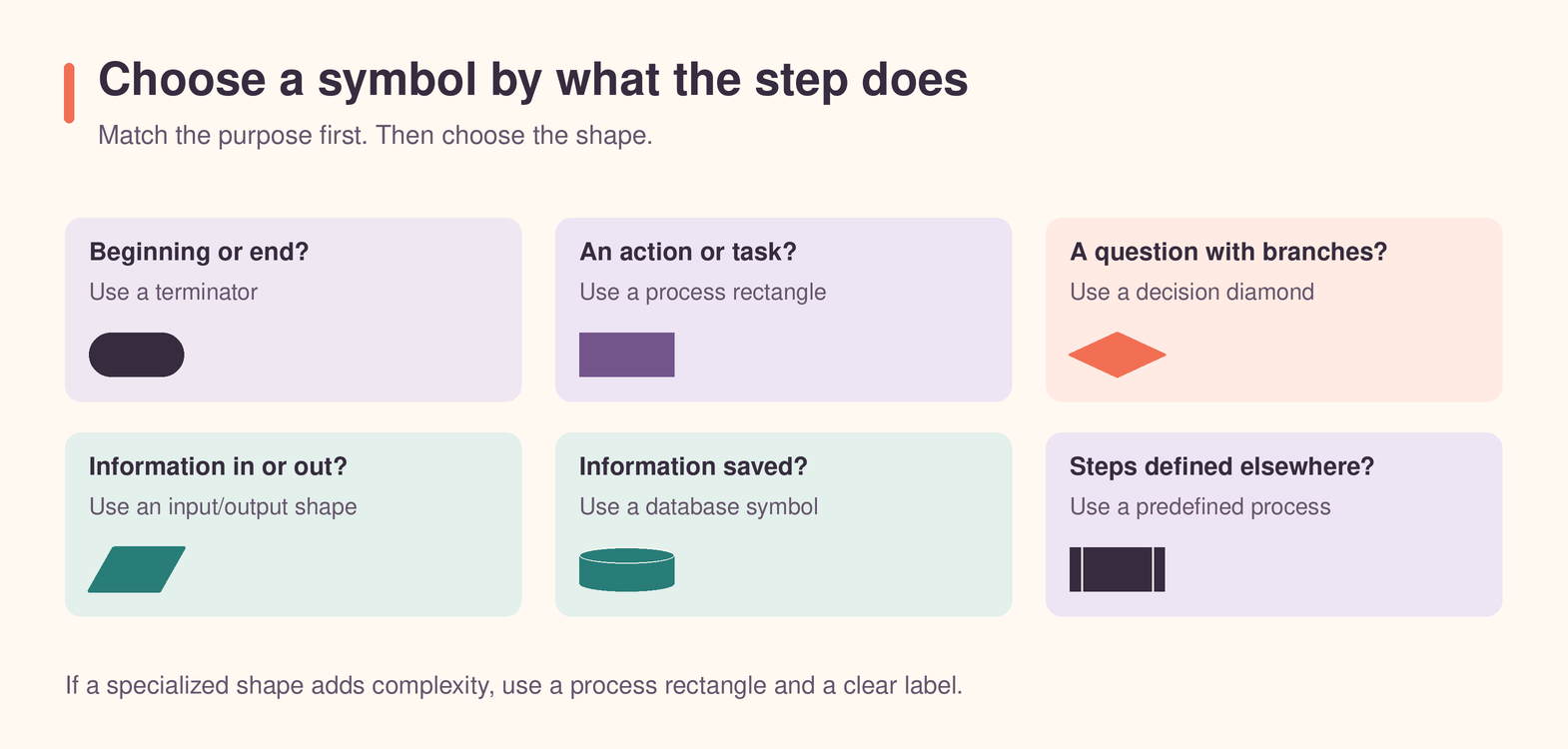
Flowchart example using common symbols
Consider a simple employee expense approval process:
Step | Symbol | Example label | Purpose |
1 | Start and end | Expense report submitted | Defines the trigger |
2 | Input | Employee enters expense details | Shows information entering the process |
3 | Process | Manager reviews report | Shows an action |
4 | Decision | Is the report complete? | Creates yes and no paths |
5 | Process | Request missing information | Sends the no path back for correction |
6 | Predefined process | Run finance approval | Refers to a separate review routine |
7 | Database | Update expense records | Shows approved information being stored |
8 | Document | Send payment confirmation | Shows a document being produced |
9 | Start and end | Expense reimbursed | Marks the successful outcome |
This example uses specialized symbols only where they provide meaningful information. The reader can see where data enters, where a decision changes the route, where a separate approval routine occurs, and where the result is stored.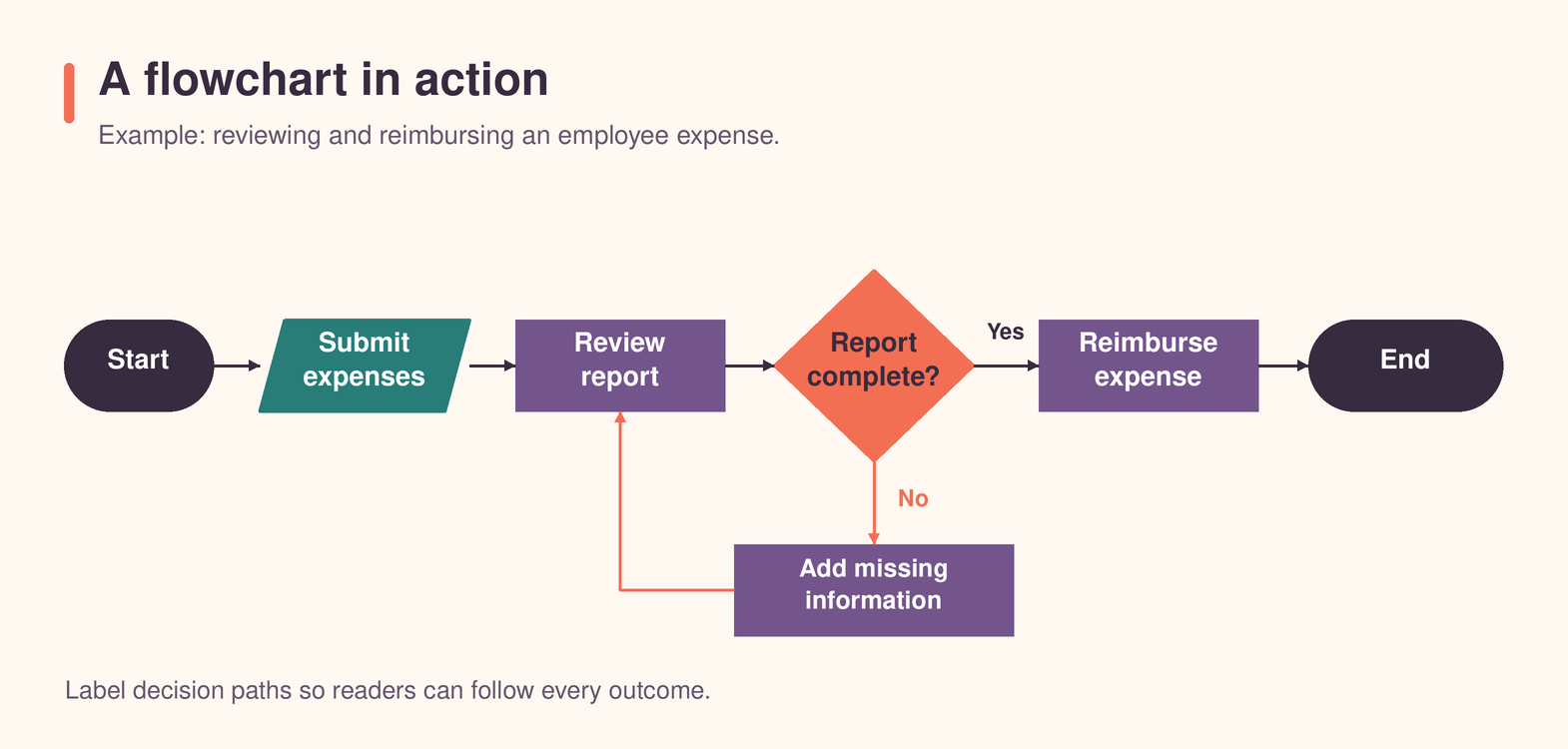
Best practices for using flowchart symbols
Start with the basic symbols: Most flowcharts can be built with start and end symbols, process rectangles, decision diamonds, and arrows. Add specialized shapes only when they improve understanding.
Use one symbol for one meaning: If a rectangle means an action in one part of the diagram, do not use the same rectangle to represent stored data somewhere else.
Write concise labels: Use short verb phrases such as "Verify account," "Calculate fee," or "Send confirmation."
Label every decision branch. A decision should not force readers to guess which route represents "Yes," "No," "Approved," or "Rejected."
Keep the flow direction consistent: A predictable top-to-bottom or left-to-right layout makes the diagram easier to scan.
Avoid crossing lines: Reposition shapes or use labeled connectors when arrows begin to overlap.
Match the level of detail to the audience: Executives may need a high-level overview, while operations teams may need exceptions, handoffs, and system interactions.
Add a legend when conventions differ: If your organization uses custom symbols or colors, explain them near the diagram.
Flowchart symbols compared with other diagram notations
Flowcharts are useful for explaining processes, but they are not the only type of workflow diagram. The right notation depends on the purpose and required level of detail.
Diagram type | What it emphasizes | Best used for |
Basic flowchart | The sequence of actions and decisions | Business processes, instructions, troubleshooting, and simple logic |
BPMN | Detailed events, gateways, messages, and participants | Formal business-process modeling, governance, and automation |
Data flow diagram | How information moves between processes, stores, and external entities | System analysis and information architecture |
UML activity diagram | System behavior, activities, decisions, and concurrent paths | Software design and technical workflows |
Use a basic flowchart when clarity and accessibility are the main goals. Choose a more formal notation when readers need to understand technical behavior, message exchanges, data movement, or compliance requirements.
FAQs
What are the five basic flowchart symbols?
The five basic flowchart symbols are the start and end symbol, process rectangle, decision diamond, input/output parallelogram, and flowline arrow. These are enough to represent many simple processes.
What does a diamond mean in a flowchart?
A diamond represents a decision, question, or condition. It creates two or more possible paths based on the result, such as yes or no.
What does a rectangle mean in a flowchart?
A rectangle represents a process, action, task, or operation. Examples include reviewing a form, calculating a total, or sending an email.
What does a circle mean in a flowchart?
A small circle usually represents an on-page connector. It links two points on the same page and helps avoid long or crossing arrows.
What does a parallelogram mean in a flowchart?
A parallelogram represents input or output. It may show information entering a process, a user providing data, or a result leaving the process.
What does a cylinder mean in a flowchart?
A cylinder represents stored data, most commonly a database. It shows that information is saved, retrieved, or updated in persistent storage.
Are flowchart symbols universal?
Many symbols are widely recognized, but usage can vary between industries, organizations, and diagramming tools. Use established conventions and include a legend when your meanings differ from common practice.
How many flowchart symbols should I use?
Use only the symbols needed to communicate the process clearly. A small diagram may require four or five symbol types, while a detailed technical workflow may need several specialized shapes.
Can a flowchart have more than one end?
Yes. A flowchart may have several valid outcomes, such as approved, rejected, canceled, completed, or escalated. Label each ending clearly.
What is the difference between a flowchart and a process map?
A flowchart usually focuses on the sequence of actions and decisions. A process map may include broader operational details such as roles, departments, handoffs, performance measures, risks, and systems. Adding swimlanes to a basic flowchart is often the simplest way to bridge the two.