- HOME
- Technology & Trends
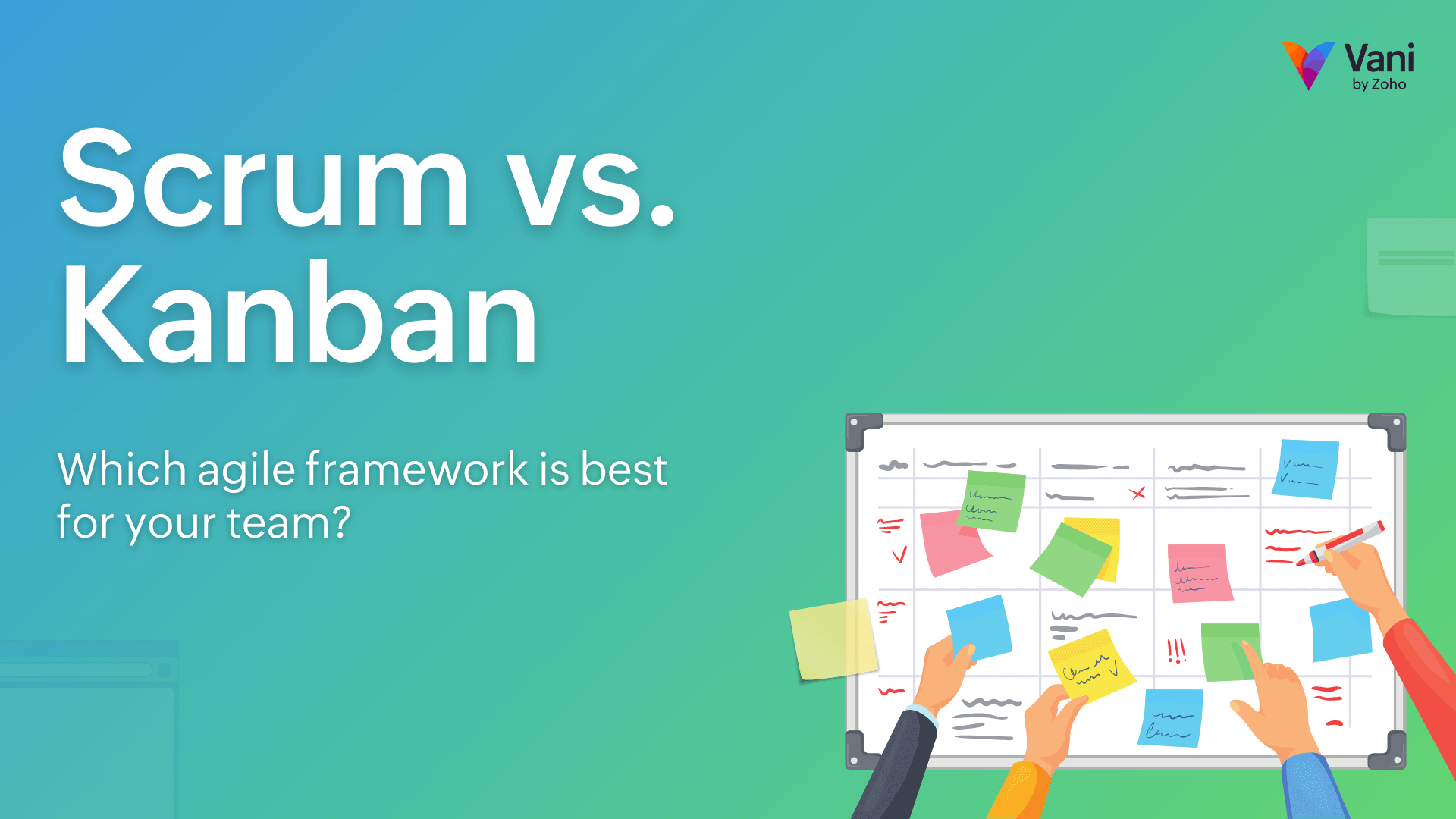
- Scrum vs. Kanban: Which agile framework is best for your team?
Scrum vs. Kanban: Which agile framework is best for your team?
- Last Updated : March 9, 2026
- 172 Views
- 9 Min Read

Key takeaways: Scrum vs. Kanban at a glance
- Agile project management helps teams handle changing requirements without losing clarity by delivering work in smaller steps and learning continuously.
- Scrum works best when teams need structured cycles, clear goals, and regular checkpoints to stay aligned.
- Kanban fits better when work arrives unpredictably, and teams need flexibility while maintaining visibility into progress.
- Visual collaboration platforms often help teams keep Agile workflows clearer, especially when multiple stakeholders are involved.
Say a product team starts building a feature where all the requirements seem clear. Halfway through development, a stakeholder asks for a small tweak, another team raises a dependency issue, and customer feedback changes priorities. Suddenly, work overlaps, timelines slip, and nobody is fully sure what should ship first.
This situation is exactly why Agile project management exists. It helps teams adapt to continuous change without creating chaos.
Within Agile, two frameworks are especially common: Scrum and Kanban. Both help teams structure work, move forward with clarity, and deliver value incrementally, but they do it differently.
Understanding those differences helps teams decide what fits their workflow best.
Understanding the core: What is Agile project management?
Agile project management is an approach to planning and executing work where teams build in small steps, gather feedback frequently, adjust direction as they learn, and deliver value in incremental releases instead of planning everything up front and waiting for a single final release.
Instead of locking plans early, Agile teams prioritize flexibility while still maintaining clarity around goals.
Traditional planning methods like the waterfall model often try to define everything up front and assume requirements will remain stable. That works in predictable environments, but modern work rarely behaves that way. Requirements constantly evolve in fields like software development, digital products, or fast-moving businesses. Customer needs shift, competitors release new features, internal priorities change, and new insights emerge during execution.
Agile favors:
- Incremental delivery instead of a single final release
- Continuous feedback and priority adjustments
- Flexible planning over rigid roadmaps
- Collaborative visibility so the entire team understands shared goals
Think about launching a new product feature. If you wait years to release everything at once, you risk discovering too late that users don't actually need or want parts of it. Agile reduces that risk by delivering smaller pieces earlier and learning from real usage.
That mindset shaped frameworks like Scrum and Kanban. Each helps teams apply Agile thinking in slightly different ways.
In practice, many teams use visual collaboration tools like Vani to map sprint plans, organize backlogs, and track Kanban workflows in a shared workspace. Keeping everything visible in one place often makes Agile processes easier to follow and maintain.
What is the Scrum framework?
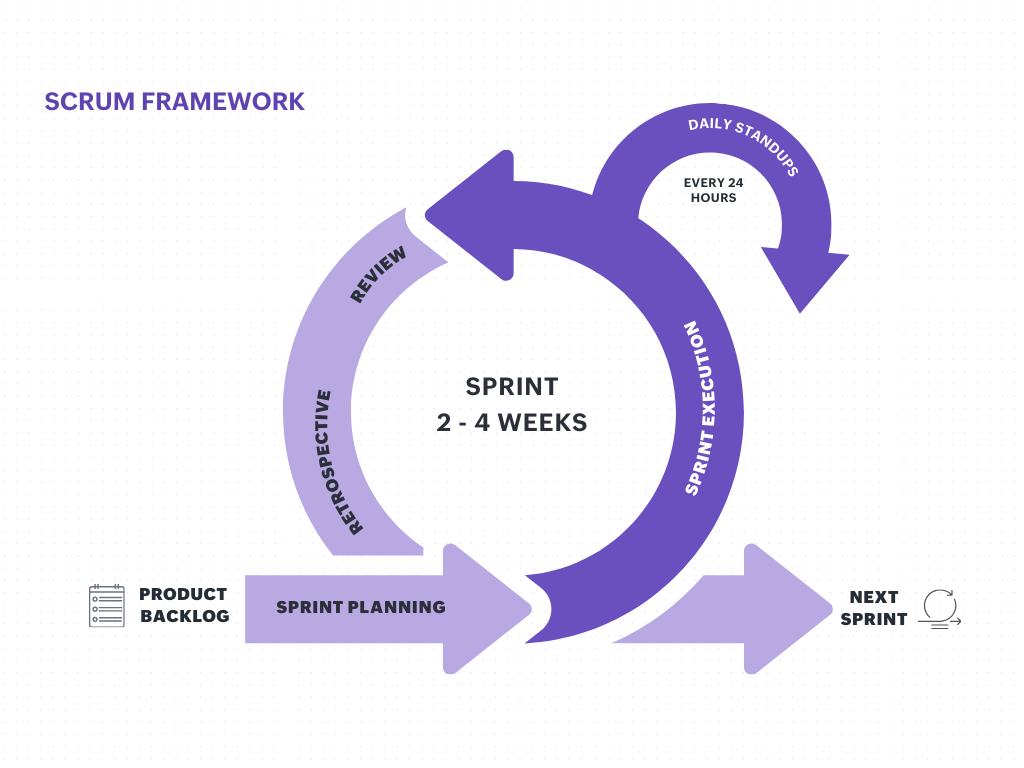
The Scrum framework is an Agile project management approach where teams organize work into short, focused cycles called sprints. A sprint is a fixed time period, usually two to four weeks, during which a team works toward a specific goal. With each sprint, teams deliver incremental product improvements while adapting to feedback and changing priorities.
Instead of trying to complete an entire project in one stretch, Scrum encourages teams to break work into manageable pieces, prioritize what delivers the most value, and review progress regularly. This structured rhythm helps teams stay aligned while still remaining flexible when requirements evolve.
Core roles in the Scrum framework
Scrum usually defines three roles:
Product Owner
The Product Owner is responsible for prioritizing work based on business value and user needs. They maintain the product backlog.
Scrum Master
The Scrum Master facilitates the Scrum process, removes blockers, and helps the team stay aligned. They are not a traditional project manager.
Development Team
The Development Team is made of the people building the product. This might be engineers, designers, QA, analysts, product marketers, or technical writers, depending on the context.
How a Scrum sprint works in practice
A typical Scrum cycle includes several recurring activities.
Sprint planning
The team selects items from the product backlog that they believe can be completed during the sprint. The product backlog is simply a list of features, improvements, fixes, or tasks ranked by importance.
The items selected for the current sprint become the sprint backlog.
They also define a sprint goal. This goal keeps the team focused even if individual tasks shift slightly.
Example sprint goal: Users can securely reset their password without contacting support.
Daily Scrum
Every day, a short sync meeting keeps everyone aligned. This is generally under 15 minutes. It usually covers:
- What was completed recently
- What is next
- Whether there were any blockers
The purpose is transparency and early identification of bottlenecks, not status reporting.
Sprint review
At the end of the sprint, completed work is demonstrated to stakeholders. Feedback is gathered and added to the backlog.
Sprint retrospective
The team reflects on how the work went and identifies areas for improvement. This rhythm helps teams stay focused while continuously improving their process.
Velocity in Scrum
Scrum teams often track a concept called velocity. Velocity measures how much work a team typically completes within a sprint, usually based on story points or effort estimates rather than the number of tasks. Story points are simply a way teams estimate effort by considering complexity, time, and uncertainty instead of counting hours.
It helps teams plan future sprints more realistically. If a team consistently completes a certain amount of work each sprint, they can forecast timelines and commitments with better accuracy.
It's important to note that velocity is not a performance metric. It shouldn't be used to compare teams or evaluate individual productivity. Its purpose is forecasting and improving planning, not judging output.
For example, if a development team usually completes around 30 story points per sprint, planning significantly more in the next sprint may create unnecessary pressure or unfinished work. Tracking velocity helps teams maintain a sustainable pace while still adapting to changing priorities.
Scrum example in software development
Consider a SaaS product team building new collaboration features.
- Sprint 1 goal: Basic commenting system
- Sprint 2 goal: Notifications and mentions
- Sprint 3 goal: Emoji reactions
Midway through Sprint 2, a major client requests that file attachments be included in comments. Instead of interrupting ongoing work, the request goes into the backlog and is evaluated during the next sprint planning. If needed, it can replace a lower-priority item in Sprint 3.
This protects team focus while still responding to customer needs.
Where Scrum works best
Scrum tends to work well when:
- Teams build products incrementally.
- Stakeholders and the team communicate regularly.
- Work can be reasonably planned in advance.
Many software product teams prefer Scrum for these reasons.
Pros and cons of the Scrum framework
Pros
- Clear short-term goals
- Regular checkpoints with stakeholders
- Predictable planning cycles
- Frequent opportunities to improve team processes
- Stronger accountability and alignment
Cons
- Teams can struggle when requests arrive unpredictably
- Larger teams may find coordination more complex without scaling practices
- Changes in team structure can affect sprint consistency
- Frequent priority changes can disrupt sprint goals
- Teams handling many small operational tasks may find sprint cycles restrictive
In those cases, a continuous flow model like Kanban might fit better.
What is the Kanban workflow?
The Kanban workflow is an Agile approach that focuses on managing work through continuous flow rather than fixed sprint cycles. Tasks move steadily from request to completion based on team capacity.
Kanban helps teams visualize ongoing tasks, limit how much work happens at once, and improve delivery efficiency over time. Unlike Scrum, there are no time-bound cycles. Work moves steadily through defined stages. The goal is not speed alone but smoother workflow, better predictability, and fewer bottlenecks.
Kanban is widely used in software development, operations teams, support environments, and any situation where work arrives continuously rather than in planned batches.
Kanban workflow vs. Kanban boards
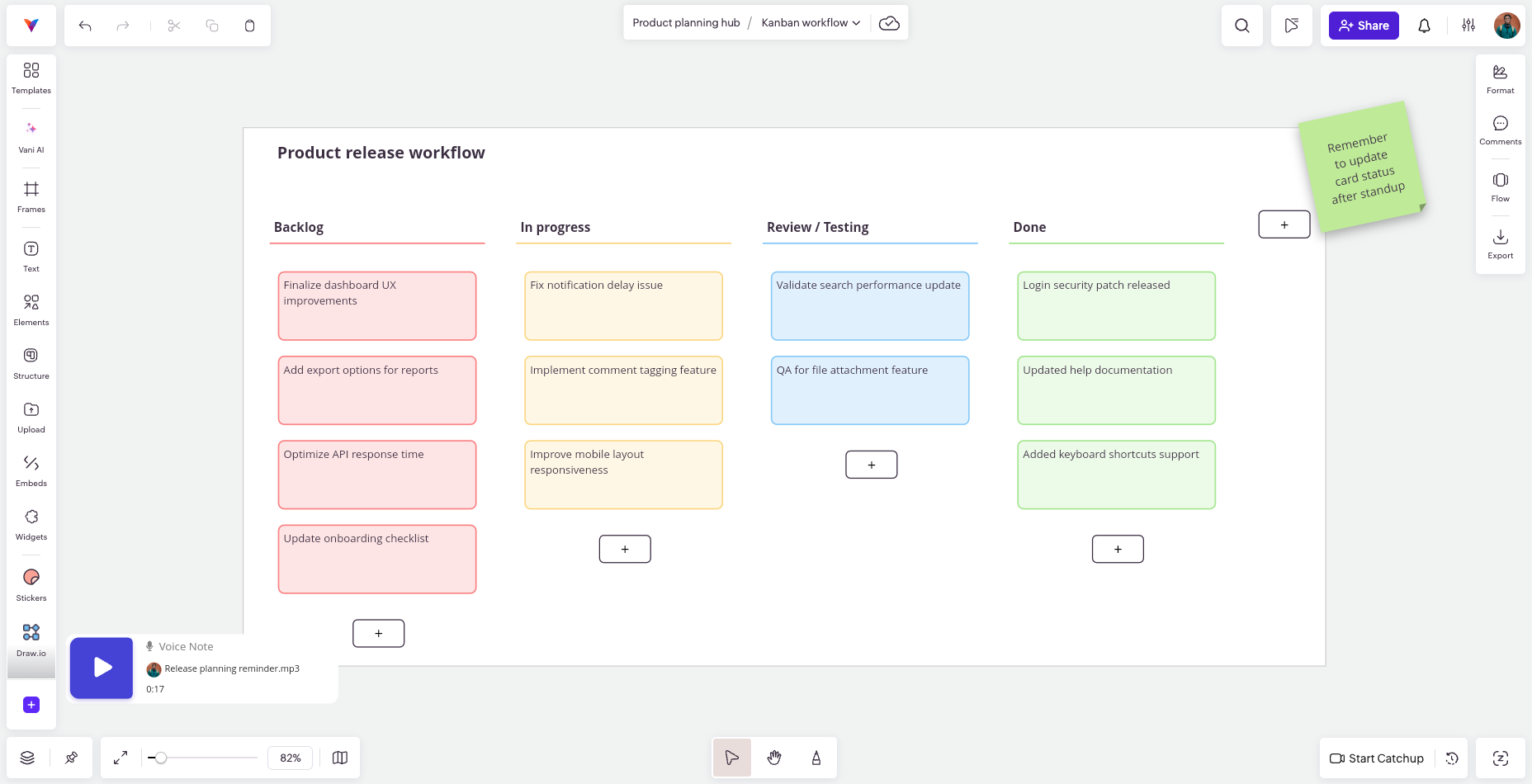
People often associate Kanban only with boards full of cards. While Kanban boards are commonly used within the Kanban workflow, they are primarily visualization tools. The workflow itself includes practices like managing work-in-progress limits, improving flow, and continuously optimizing how tasks move through the system.
In simple terms, the board shows the work, but the workflow defines how the work moves.
How the Kanban workflow typically works
Most teams visualize and track work using a Kanban board where stages are organized as columns and tasks move from left to right. Work usually enters a prioritized backlog then progresses through these stages.
Teams can use built-in Kanban boards in Vani to visualize workflows or ready-made templates to get started faster without building everything from scratch.
A typical board might include columns like:
- To do
- In progress
- Review or testing
- Done
The exact stages vary depending on team needs. This visibility helps everyone understand what is being worked on, what is blocked, and where delays occur.
Each stage may have a work-in-progress limit to prevent teams from taking on more than they can handle. This encourages completion before starting new tasks and helps identify bottlenecks early.
The importance of work-in-progress limits
One defining feature of the Kanban workflow is limiting how many tasks can be active at the same time. Many teams assume starting more work increases productivity, but too many parallel tasks usually slow progress.
Without limits, multitasking increases, context switching rises, and delivery slows down.
For example, if a development team limits active tasks to five, they must complete or move one task forward before starting another. This encourages completion rather than accumulation.
Kanban example in software teams
Consider a product development team handling ongoing bug fixes, small feature requests, UI improvements, and performance tweaks alongside their usual roadmap work. These tasks often arrive unpredictably and vary widely in effort.
Using strict sprint cycles for this type of work can lead to constant reshuffling, especially when urgent fixes appear mid-cycle. A Kanban workflow allows tasks to enter continuously while keeping the workload visible and manageable. The team pulls new work only when capacity is available, helping maintain steady delivery without overwhelming the team.
Where the Kanban workflow works best
Kanban tends to work well when:
- Work arrives continuously rather than in planned releases.
- Task sizes vary significantly.
- Teams want flexibility without heavy process structure.
Customer support teams are a classic example. Tickets arrive throughout the day. Some take minutes; others take hours. Fixed sprint cycles can feel artificial. Kanban allows teams to pull work based on capacity while maintaining visibility and prioritization.
Pros and cons of the Kanban workflow
Pros
- Flexible prioritization
- Clear visibility into workflow and bottlenecks
- Continuous delivery without waiting for sprint cycles
- Reduced multitasking through work-in-progress limits
- Easier adaptation to changing requirements
Cons
- Less structured planning compared to Scrum
- Requires discipline to maintain prioritization
- May need additional planning for large time-bound projects
- Without clear rules, work can linger in intermediate stages
These challenges usually stem from process discipline rather than limitations of the framework itself.
Scrum vs. Kanban: Key differences that matter
Understanding Scrum vs. Kanban becomes easier when you compare how they handle real work.
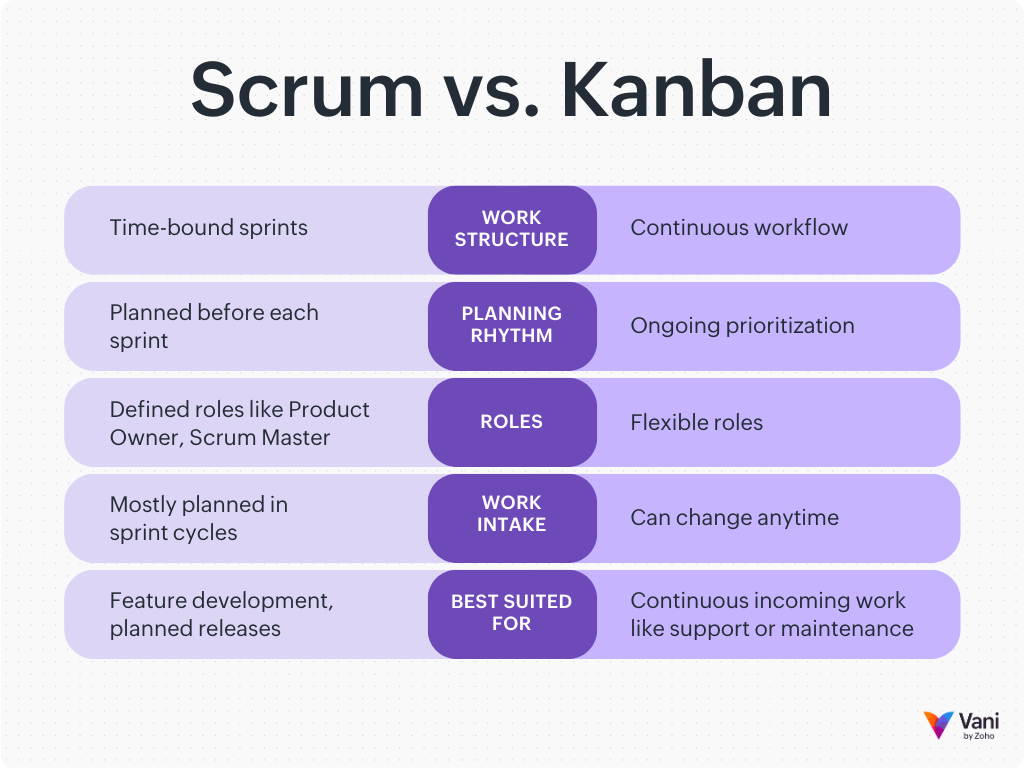
1. Structure
Scrum uses time-bound sprints with defined goals.
Kanban keeps work flowing continuously without fixed cycles.
2. Planning rhythm
Scrum planning typically happens before every sprint.
Kanban prioritization is ongoing as work moves through the workflow.
3. Delivery
In Scrum, a sprint cycle usually lasts two to four weeks, after which a usable increment is delivered.
Kanban focuses on a continuous workflow, where work is completed and released as capacity allows.
4. Changes in work
Scrum generally discourages changes during an active sprint unless they are critical. Most new requests are handled in the next sprint cycle.
Kanban allows changes to be incorporated at any time based on priority and capacity.
5. Roles
Scrum defines roles like Product Owner and Scrum Master.
Kanban allows more flexible team structures without mandatory roles.
6. Fits best in
Scrum works well when teams build products incrementally and incoming work can be planned in cycles.
Kanban works well when tasks vary widely, arrive unpredictably, or require continuous handling.
7. Work visibility
Scrum boards typically reset each sprint.
Kanban boards usually persist, showing ongoing workflow and long-term progress.
Choosing between Scrum and Kanban
There is no single approach that is universally better. The right choice depends on your work environment.
Choose Scrum when:
- Projects have clear milestones.
- Stakeholders need regular review cycles.
- Teams benefit from structured, timeboxed work.
- Product development and feature launches require focused delivery periods.
Choose Kanban when:
- Work arrives continuously.
- Task sizes vary widely.
- You want maximum flexibility.
- Support, operations, content, or marketing workflows require ongoing handling.
Some organizations combine both approaches. For example, a product team might use Scrum for roadmap features and a Kanban workflow for bug fixes or maintenance tasks.
Choose Kanban when:
- Work arrives continuously.
- Task sizes vary widely.
- You want maximum flexibility.
- Support, operations, content, or marketing workflows require ongoing handling.
Choose Kanban when:
- Work arrives continuously.
- Task sizes vary widely.
- You want maximum flexibility.
- Support, operations, content, or marketing workflows require ongoing handling.
In summary
Agile project management exists to help teams respond to change without losing clarity. Scrum and Kanban are two proven ways to apply that philosophy.
Scrum helps teams maintain focus through structured cycles. Kanban helps teams optimize continuous workflows. Both aim to improve collaboration, visibility, and delivery outcomes.
Choosing the right framework starts with understanding your work patterns, not industry trends. When teams align their approach with actual workflow realities, productivity usually improves naturally.
Often, the most effective solution is not strict adherence to one framework but thoughtful adaptation of both.
If your team prefers visual collaboration around Scrum or Kanban workflows, Vani can help map processes, organize ideas, and keep Agile planning visible in one shared space. You can explore Vani at vanihq.com to see how visual collaboration supports Agile workflows.