- HOME
- Technology & Trends
- What is a swimlane diagram? Template, example, and uses
What is a swimlane diagram? Template, example, and uses
- Last Updated : June 5, 2026
- 154 Views
- 7 Min Read


Key takeaways
- A swimlane diagram is a type of flowchart that shows both the process steps and who is responsible for each step.
- It's useful when a process involves multiple people, teams, departments, roles, or systems.
- Swimlane diagrams work well for approvals, handoffs, reviews, product fulfillment, onboarding, and other cross-functional workflows.
- A good swimlane diagram usually includes lanes, start and end points, process steps, decision points, and connectors.
- You can start faster with Vani’s swimlane diagram template and customize it for your team’s workflow.
Processes are easy to follow when one person or team handles everything. The steps move in order, the next action is obvious, and a simple flowchart is often enough to understand or explain the flow.
But many real processes are not linear. A request may start with one team, move to another for review, wait for approval, and return for changes before it can move forward. In these cases, seeing the steps alone may not be enough. You also need to see how the work moves between people, teams, or systems.
That's where a swimlane diagram helps. It gives the process a clearer structure by separating responsibilities into lanes, making it easier to understand the flow without reading a long explanation.
What is a swimlane diagram?
A swimlane diagram is a type of flowchart that maps a process by showing both the sequence of steps and the person, team, department, role, or system responsible for each step. It does this by dividing the process into separate lanes, so readers can see how work moves from one owner to another.
For example, if a purchase request moves from an employee to a manager, then to finance, and finally to procurement, each of those roles can have its own lane. The steps are placed inside the relevant lane, while arrows show how the process moves forward.
This makes swimlane diagrams useful for workflows that involve approvals, reviews, handoffs, or multiple contributors. Instead of seeing only a chain of steps, the reader can understand how the process is shared across different owners.

Swimlane diagram vs. flowcharts
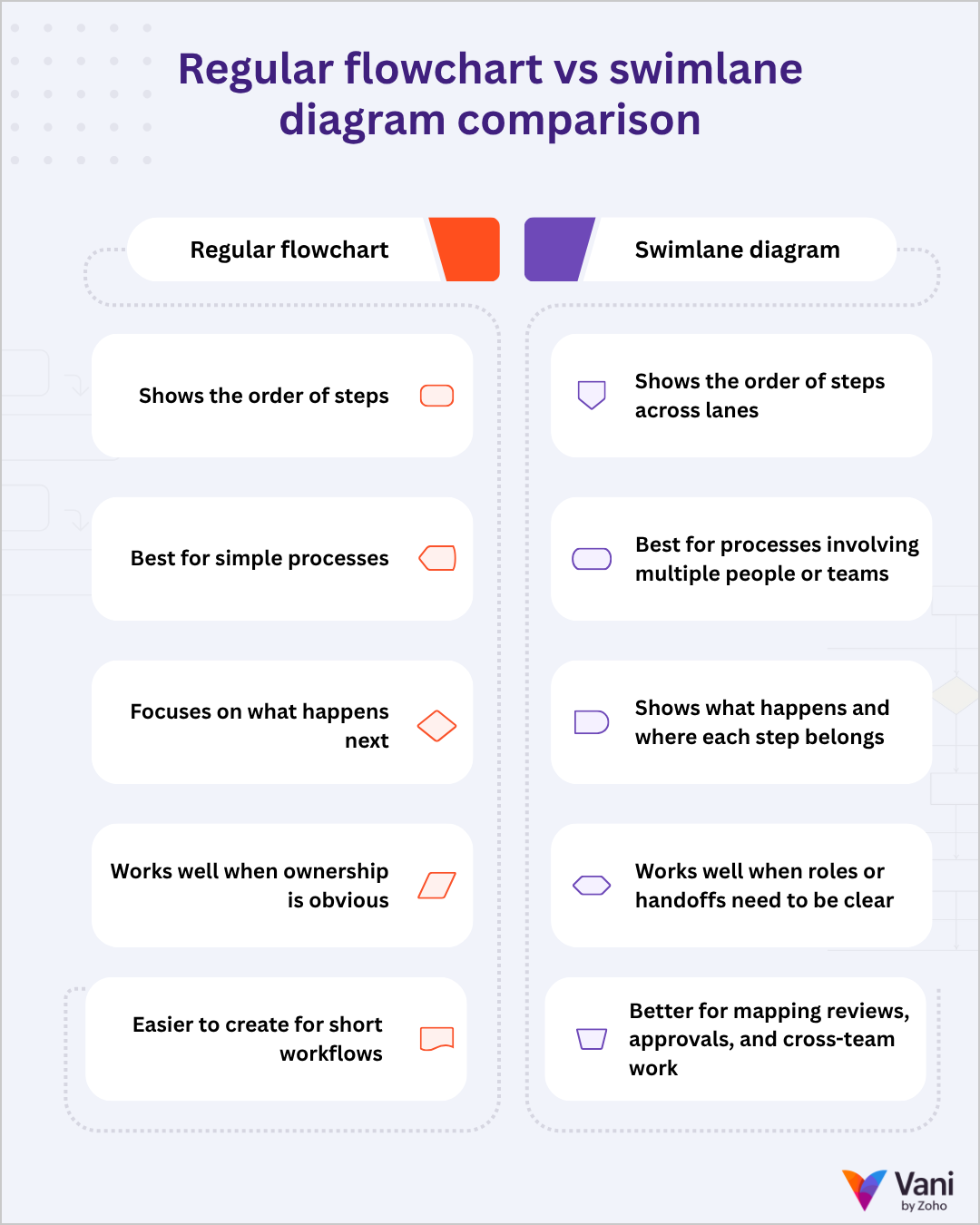
A regular flowchart shows the order of steps in a process. It's useful when the process is short, simple, or mostly handled by one person or team. If the main question is what happens next, a regular flowchart is usually enough.
A swimlane diagram is useful when the process moves across different people, teams, departments, roles, or systems. It uses the same basic flowchart logic but separates the steps into lanes. This helps the reader see not just the order of steps but also where each step belongs in the process.
For example, a regular flowchart can show that a request is submitted, reviewed, approved, and completed. A swimlane diagram can show who submits the request, who reviews it, who approves it, and who completes the final step. This makes swimlane diagrams better for workflows with handoffs, reviews, approvals, or cross-team work.
In simple terms, use a regular flowchart when you need a quick view of the process. Use a swimlane diagram when you need to understand both the process and how it moves across different owners.
When should you use a swimlane diagram?
Use a swimlane diagram when a process involves multiple people, teams, departments, or systems. It's especially useful when the process has approvals, review loops, dependencies, or handoffs that need to be clearly shown.
Common use cases include:
- Approval workflows
- Product fulfillment processes
- Employee onboarding
- Purchase requests
- Customer support escalation
- Content review workflows
- Product release processes
- eCommerce operations
- Internal service requests
- Cross-functional project workflows
For example, a content review process may involve a writer, editor, designer, marketing lead, and legal reviewer. A regular flowchart can show the order of review, but a swimlane diagram can show how the work moves between each contributor.
Let’s take a product fulfillment process as an example.
In a regular flowchart, the process may look like this: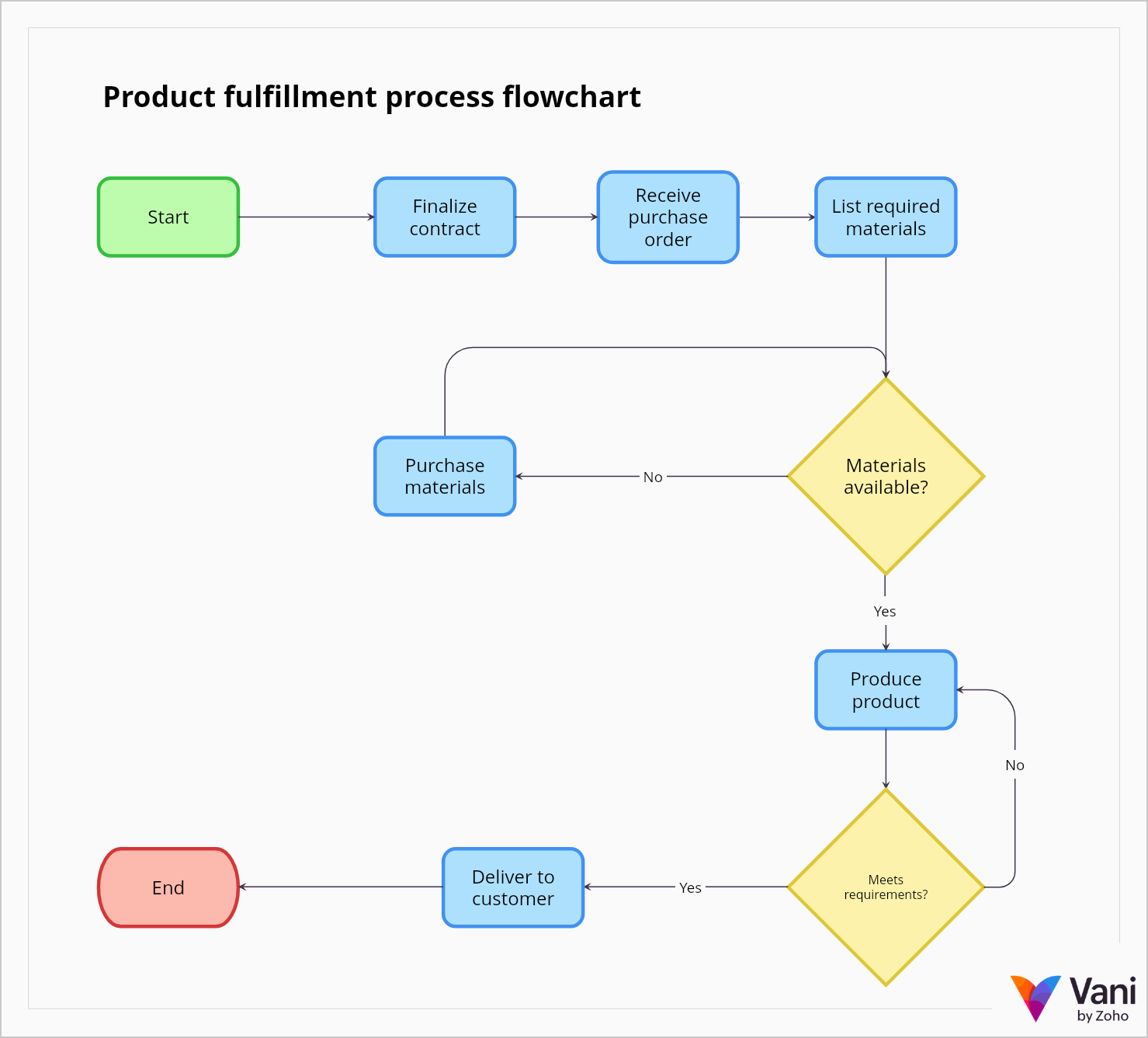
This gives a simple view of the sequence. It's useful, but it doesn't show how the work moves between different teams.
Now let’s turn the same process into a swimlane diagram.
In the swimlane version, the process is divided across four lanes:
- Sales
- Production
- Stores
- Procurement
Sales finalizes the contract and receives the purchase order. Production lists the materials required to create the product. Stores checks whether the materials are available. If the materials are not available, Procurement purchases them. Once the materials are ready, Production creates the product and checks whether it meets the requirement. If it does, the product is delivered to the customer. If it does not, the product goes back for correction.
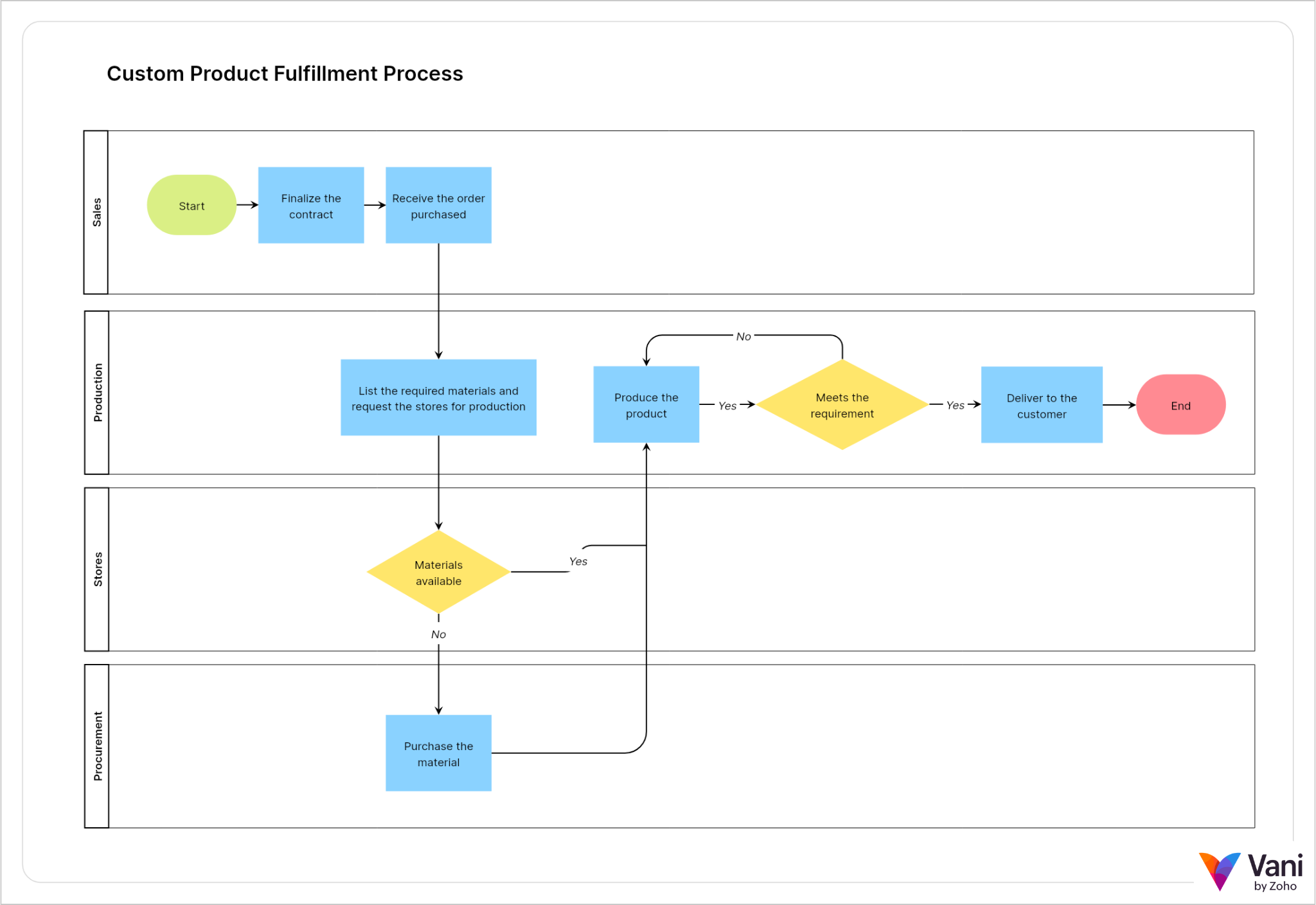
Both images explain the same process, but they serve slightly different purposes. The regular flowchart is better for quickly understanding the sequence. The swimlane diagram is better when the reader also needs to understand how the process is divided across teams.
What does a swimlane diagram usually include?
A swimlane diagram doesn't need many elements to be useful. At its core, it should show who is involved, what steps happen, where the process begins and ends, where decisions are made, and how the work moves between lanes.
Most swimlane diagrams include:
Lanes
Lanes are the main structure of a swimlane diagram. Each lane represents a person, team, department, role, or system involved in the process.
Note: Keep the lane logic consistent. If your lanes are departments, use departments throughout. If your lanes are roles, use roles throughout. Mixing teams, tools, and stages as lanes can make the diagram harder to understand.
Start and end points
Start and end points show where the process begins and where it finishes. These are usually shown as rounded rectangles.
For example, a purchase request may start with “Request submitted” and end with “Request approved” or “Request rejected.” Clear start and end points keep the diagram focused.
Process steps
Process steps are the actions that happen inside the workflow. These are usually shown as rectangles.
Each step should be placed in the lane of the person, team, department, role, or system responsible for it. Keep the labels short and action based, such as “Review request,” “Check inventory,” or “Send approval.”
Decision points
Decision points show where the process can move in different directions. These are usually shown as diamonds.
Common decision points include:
- Approved?
- Materials available?
- Changes needed?
- Issue resolved?
Each decision should have clear paths coming out of it, such as “Yes” and “No.”
Connectors
Connectors are the arrows or lines that show how the process moves from one step to another. In a swimlane diagram, connectors are especially useful because they show when work moves from one lane to another.
These cross-lane connectors are often where handoffs happen.
A good swimlane diagram doesn't need every possible flowchart symbol. In most cases, lanes, start/end points, process rectangles, decision diamonds, and connectors are enough to make the process clear.
How to use Vani’s swimlane diagram template
Vani’s swimlane diagram template gives you a ready-made structure with lanes, flowchart shapes, decision points, connectors, and a symbols reference. You can use it as a starting point and customize it for your own process.
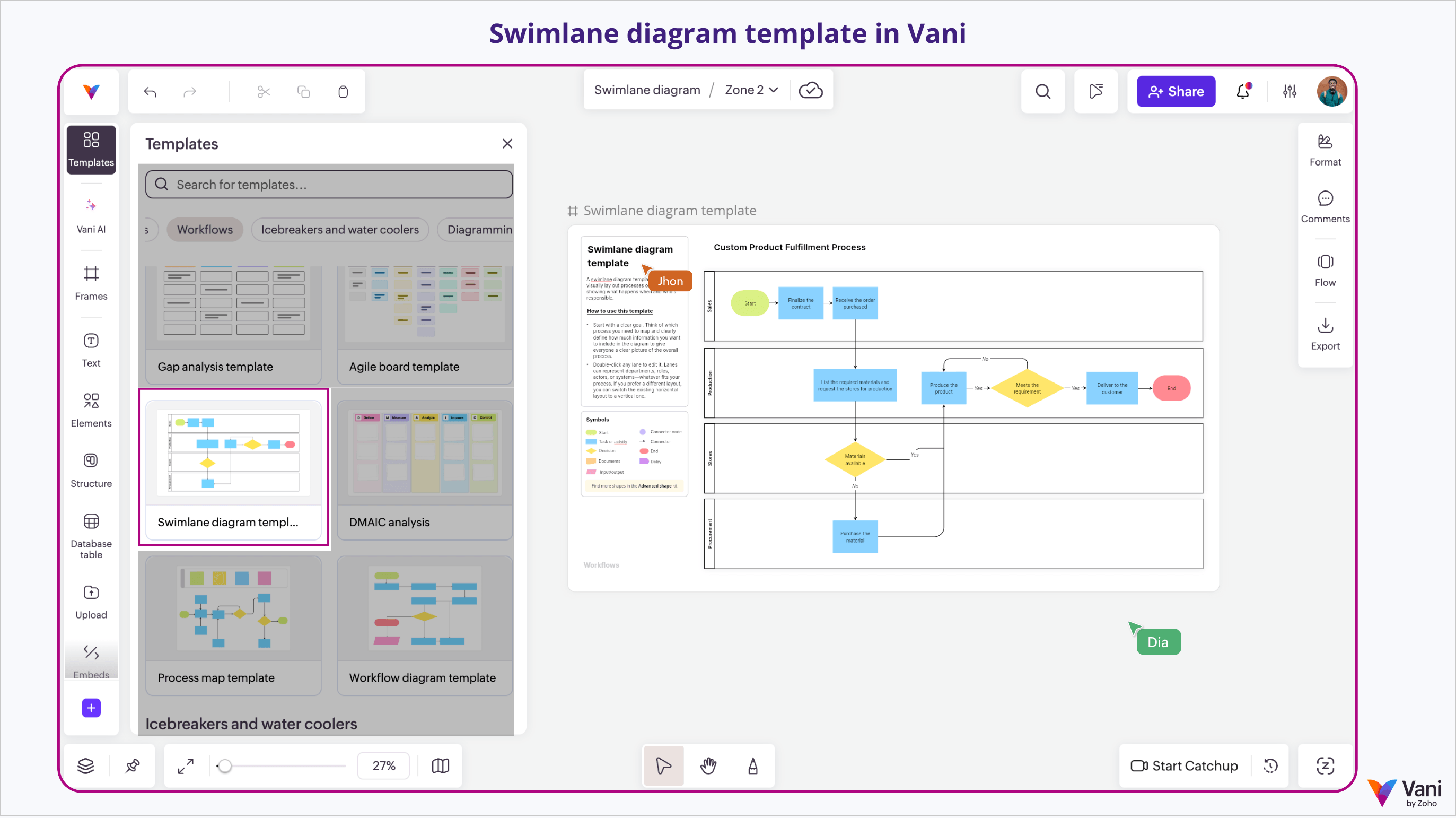
To use the swimlane diagram template:
- Open the Swimlane diagram template from Templates in Vani.
- Rename the lanes based on your process.
- Replace the sample steps with your own workflow.
- Add decision points where the process can branch.
- Use connectors to show how the process moves across lanes.
- Add comments where a step needs extra context.
- Review the final diagram with your team.
For example, an approval workflow may use lanes like Requester, Manager, Finance, and Final approver. A content workflow may use lanes like Writer, Editor, Designer, and Marketing lead. A support process may use lanes like Support agent, Technical team, Customer success, and Customer.
Keep the text inside each shape short. Instead of writing “The manager reviews the request and checks if all required information has been provided,” use a clear label like “Manager reviews request.” If the step needs more detail, add it as a comment or note instead of crowding the diagram.
Once the diagram is ready, your team can use it as a shared reference in the Space. They can add comments, clarify unclear steps, and walk through the process together using Catchups when needed.
Common swimlane diagram mistakes to avoid
- Adding too many lanes: Not every person needs a separate lane. Use lanes only when they make the process easier to understand.
- Mixing different lane types: Avoid using a team, a tool, a stage, and a role as lanes in the same diagram. Keep the lane logic consistent.
- Leaving out alternate paths: If a request can be rejected, revised, retried, or sent back, show that path clearly.
- Hiding handoffs inside one step: If a step involves multiple teams, split it into smaller steps and place each one in the right lane.
- Writing long sentences inside shapes: Use short labels inside the diagram. Add extra explanation through notes or comments.
- Making the diagram too detailed: A swimlane diagram should make the process easier to follow. If every tiny action is included, the main flow may get lost.
- Not updating the diagram later: Processes change. Update the swimlane diagram when teams, approval rules, or workflow steps change.
Swimlane diagram FAQs
What is the purpose of a swimlane diagram?
The purpose of a swimlane diagram is to show how work moves across different people, teams, departments, roles, or systems. It helps teammates understand the steps involved and how responsibilities are divided.
Is a swimlane diagram a flowchart?
Yes. A swimlane diagram is a type of flowchart. It uses flowchart elements like process steps, decision points, arrows, start points, and end points, but it organizes them into lanes.
What is the difference between a swimlane diagram and a regular flowchart?
A regular flowchart shows the sequence of steps in a process. A swimlane diagram shows the same sequence, but it separates the steps into lanes based on roles, teams, departments, or systems.
When should I use a swimlane diagram?
Use a swimlane diagram when a process involves multiple contributors, handoffs, approvals, reviews, or dependencies. It's useful for processes like product fulfillment, employee onboarding, content review, purchase approvals, and customer support escalation.
What should a swimlane diagram template include?
A swimlane diagram template should include lanes, start and end points, process steps, decision points, and connectors for revisions or retries. These elements help you map the workflow clearly.