
Mind map tools: Organize ideas visually with clarity
The main points
The average person has over 6,000 thoughts a day, but most ideas get lost before they become action. A mind map tool helps capture and organize those ideas visually so your brain can process connections faster than plain text notes. Studies have shown that visual learning can improve understanding and memory retention, which is why mind maps are widely used for brainstorming, planning, studying, and problem-solving.
Instead of juggling messy notes, spreadsheets, or scattered documents, you can place one idea at the center and build connected branches around it for instant clarity.
In this guide, you'll learn what mind maps are, how they work, the best online mind map tools available today, and how Vani helps teams turn ideas into execution with AI-powered mind mapping, collaboration, templates, and an infinite canvas.
What is a mind map?
A mind map is a visual diagram that organizes ideas and information around a single central topic. Think of it like a tree. Your core idea sits at the trunk, and everything related to it branches outward from there.
Unlike a bulleted list (which is linear and rigid), a mind map reflects how your brain actually thinks:
- Jumping between related ideas
- Making connections
- Brainstorming freely
- Prioritizing ideas faster
- Breaking complex topics into parts
- Branching out in multiple directions naturally
The term "mind map" itself is pretty self-explanatory: you're mapping out what's in your mind.
Example: Here is a simple mind map example showing how to launch a product. 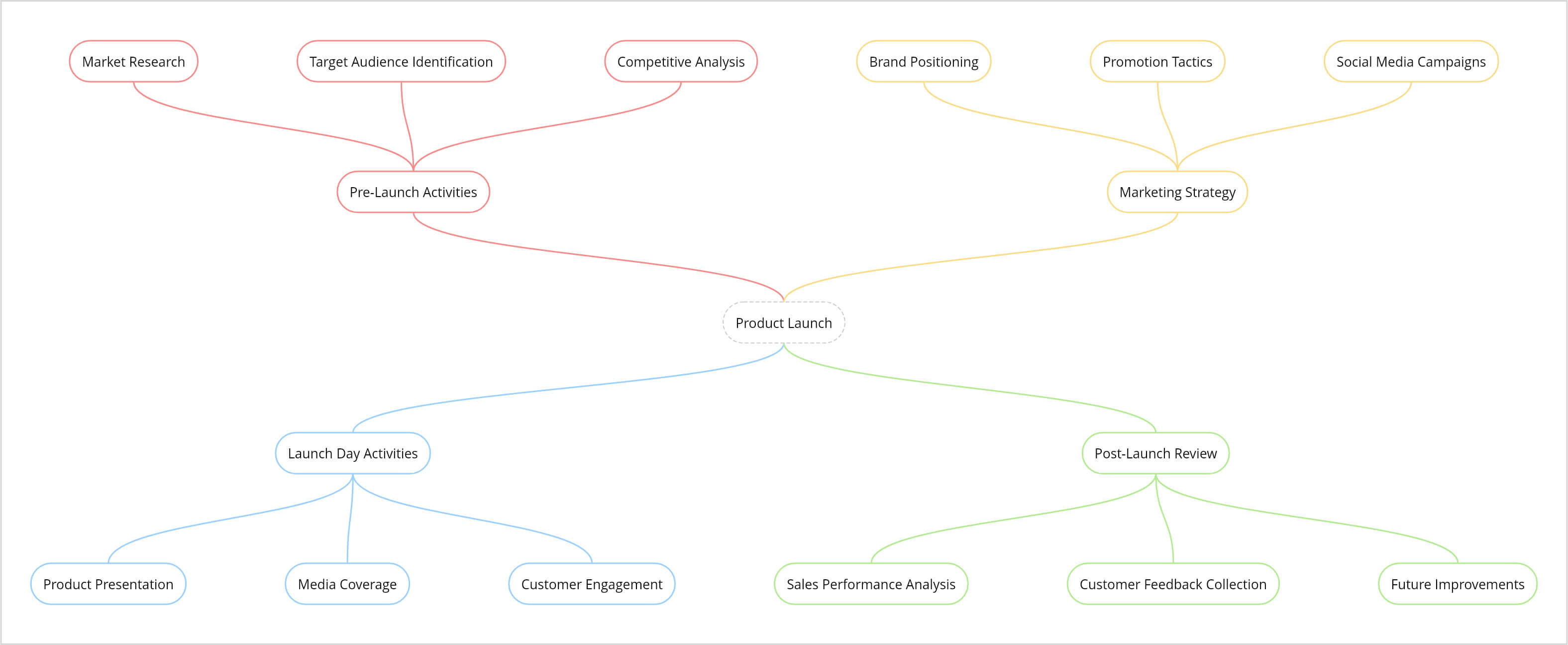
Types of mind map structures
There's no single "right" way to draw a mind map. Different structures work better for different goals. Here's a breakdown of the most common ones:
Radial mind map: The most classic and flexible format. Your core idea sits at the center, and branches radiate outward in all directions, like spokes on a wheel. It's best for free-form brainstorming where ideas don't follow a fixed order.
Tree structure: A hierarchical layout that flows from top to bottom (or left to right). Sub-topics branch out from the main idea, and sub-sub-topics branch from those. It's the most commonly used structure and is especially useful for project planning and organizational charts.
Flowchart structure: A linear structure that maps out a sequence of steps in a specific order, either top to bottom or left to right. It's best suited for processes, workflows, and decision paths.
Free-form map: A structure-free layout where you can place and connect ideas in any direction from the central node. It's great when you don't want any structural constraints.
Multi-flow map: Built around cause and effect. Your central idea sits in the middle, causes are mapped on one side, and effects are on the other. It's particularly useful for problem analysis and decision-making.
Concept map: Similar to a mind map with a key difference. The connecting lines between nodes are labeled with words that describe the relationship between them (e.g., "leads to," "is a type of," "depends on"). It's best for understanding complex topics and showing how concepts relate to each other.
Bubble map: Uses a central bubble surrounded by connected outer bubbles (hence the name). It's ideal for describing and expanding on a single concept. It is commonly used in education and brainstorming sessions.
Key components of a mind map
Every mind map, whether it's simple or complex, is built from the same core components.
Central node: The starting point of your mind map. This is where you place your core idea, problem, theme, or topic. Everything else on the map exists to expand on this one thing.
Branches: The first layer of ideas radiating from the central node. These are your main subtopics—the broad categories your central idea breaks into.
Sub-branches: The second, third, or even fourth level of detail. Each sub-branch expands on the branch above it, getting more specific as it goes deeper.
Labels or keywords: Short words or phrases that describe what each node or branch represents. The key here is brevity—one to five words is ideal. If a label is too long, it defeats the purpose of visual clarity.
Links or connectors: Arrows or lines that connect related nodes and even ones that aren't on the same branch. These help show relationships and dependencies that cut across the map.
Visual elements: Colors, icons, images, or sticky notes that make your map easier to read and remember. Visual cues help people process and retain information faster, and that makes the map far more engaging to look at.
Characteristics of a mind map
What makes a mind map different from other diagramming shapes isn't just how it looks; it's how it works with the way humans think.
Central focus: Everything in a mind map points back to one core idea. No matter how many branches you add or how deep you go, the central node keeps you anchored. You won't lose the thread, even on the fifth level of detail.
Non-linear layout: A mind map doesn't force you to think in a straight line. Ideas can connect to each other from any direction, just like how thoughts actually occur to us.
Flexibility: You can add, remove, rearrange, or color-code branches at any point. There's no rigid format to follow the structure. The map grows with your thinking.
Clarity and simplicity: Because mind maps use short labels and visual hierarchy instead of dense paragraphs, you can take in a lot of information at once without feeling overwhelmed.
Engaging and creative: Mind maps give your brain permission to explore. When you're not constrained by bullet points or rigid formats, you tend to make more unexpected connections—and that's often where the best ideas come from.
What are the common uses of mind maps?
Mind maps are popular and useful across a surprisingly wide range of situations. Here are the most common ones:
- Brainstorming ideas: Quickly generate and explore ideas without worrying about structure or order. Just branch it out.
- Project planning: Break a large project into smaller, manageable pieces: tasks, sub-tasks, owners, and dependencies.
- Studying: Summarize an entire chapter or subject visually, condensing complex material into something you can review at a glance. It helps improve the academic performance of students and aids in exam preparation.
- Decision making: Map out your options, the pros and cons of each, and the potential outcomes, making it much easier to compare and commit to a direction.
- Creative writing: Organize characters, plot lines, themes, and research for a story, script, or blog post—all before you write a single word.
- Personal planning: Whether it's a trip, a party, a home renovation, or a life goal, anything with multiple moving parts becomes clearer when mapped out visually.
Why use a mind map tool?
A mind map tool, also called a mind map maker or online mind map generator, is a digital platform where you can create, edit, and collaborate on mind maps on a shared digital canvas.
The advantage over pen and paper is significant:
- Easy editing: Add, move, or remove branches without starting over.
- Real-time collaboration: Your whole team works on the same canvas simultaneously.
- Infinite canvas: No running out of space.
- Easy sharing: Share a link with stakeholders instead of scanning a whiteboard or taking snaps.
- AI assistance: Some tools can generate mind maps from a prompt in seconds.
If you're looking for a mind mapping tool that goes beyond just maps—covering full visual collaboration, diagramming, flowcharts, and team workflows—then you're in the right place to learn about Vani.
Best five online mind map tools
There are several popular online mind map makers or mind map tools available. We sorted through them to show you five of the best. Each tool caters to a different kind of user or workflow.
1.Vani
An emerging visual collaboration platform launched in 2025. Vani is built for end-to-end work—from brainstorming a raw idea all the way to execution—on a single infinite canvas. It includes mind mapping, diagramming, flowcharts, AI-powered generation, presentation mode, database tables, and a library of templates and Kits. Vani's AI (VaniAI) can generate a full mind map from a prompt, summarize existing maps, and help you develop concepts further. Best for teams that want one tool for everything.
2.Miro
A popular digital whiteboard platform known for its robust real-time collaboration features and tight integrations with tools like Jira, Slack, and Google Workspace. Miro supports mind maps, diagrams, sticky notes, timelines, and more. Best for larger teams doing complex collaborative workshops.
3.MindMeister
A dedicated mind mapping tool with a clean, focused interface. It does one thing and does it well: create, share, and present mind maps. Best for teams that only need mind maps and nothing else.
4.XMind
A powerful option for users who need deep, structured maps. XMind offers advanced layouts, templates, and formatting options, making it ideal for detailed thinking, structured study, and complex planning. Best for power users.
5.Coggle
A lightweight, browser-based tool that's perfect for beginners or quick solo brainstorming sessions. It has a simple interface, it's easy to get started, and there's no steep learning curve. Best for teams that want the basics.
6.Comparison table
Here is the comparison between Vani with other mind mapping tools available online.
| Feature | Vani | Miro | MindMeister | XMind | Coggle |
|---|---|---|---|---|---|
| Best suited for | End-to-end workflows | Large teams and workshops | Mind mapping | Structured mind mapping | Simple mind maps |
| Mind mapping depth | Strong | Very strong | Limited | Limited | Limited |
| Visual workspace flexibility | Mind maps, diagrams, stacks, templates, and Kits | Mind maps, diagrams, stacks, templates, and more | Only mind map | Limited | Only mind map |
| Pricing | Starts at $4/user/month | Starts at $8/user/month | Starts at $3.50/user/month | Starts at $4.92/user/month | Starts at $4/user/month |
Pricing is indicative and subject to change. Check each tool's official website for current plans.
How to choose the right mind map tool for your team
With AI tools now capable of generating a mind map in seconds from a single prompt, the real question isn't "which tool makes the best-looking map?"—it's "what do you need to do after the map is made?"
If all you need is a clean mind map to print, share, or present, then dedicated tools like MindMeister, XMind, or Coggle are perfectly capable options.
But if you need to turn that map into action—collaborating with a team, building workflows, creating diagrams, running presentations, and tracking decisions—all in one place, then Vani or Miro are better fits.
And if budget is a constraint, Vani offers the more comprehensive feature set at the most competitive price point.
Key features of Vani's mind map tool
- Infinite canvas: Create as many maps as you need without running out of space.
- Real-time collaboration: Work with teammates live from anywhere.
- VaniAI: Turn prompts into structured mind maps in seconds.
- Templates: Start faster with ready-made frameworks.
- Drag-and-drop editing: Move branches instantly as ideas evolve.
- Presentation mode: Present your thinking directly to clients or teams.
- Export options: Download your mind map as an image or PDF, or share via a link.
How to create a mind map with Vani
Getting started in Vani is straightforward—no learning curve required. Here's how to go from zero to your first mind map:
Step 1: Create your account
Sign up for free at Vani (no credit card needed). Once you're in, you'll land on a dashboard with your organization's Spaces, templates, and a quick-start guide.
Step 2: Open a Vani Space
Click the Create Space button in the top-right corner of your dashboard. Rename your Space (your project) and your Zone (your task or session within the project). A Space holds multiple Zones. Think of it as a project folder with multiple working boards inside.
Step 3: Draw your first mind map
Before jumping into the canvas, spend a minute defining your central idea: the theme, problem, or concept you want to map. You can also start from a brainstorming template in Vani if you need a head start.
Once your idea is clear, choose your structure (radial, top-to-bottom, or left-to-right) from the left panel and insert it onto the canvas.
Step 4: Edit and expand
Start filling in your nodes with labels. Customize colors, adjust branch lengths, and expand sub-branches as your ideas develop. Use VaniAI to generate entire mind map sections instantly. Just describe what you want, and it builds it for you.
Step 5: Collaborate with your team
Invite teammates to your Space and let them contribute in real time. Vani's collaboration features—live cursors, comments, emoji reactions, Catchups (online video meeting feature), and Flow—make it feel like you're all in the same room.
Use built-in widgets like polls, timers, and dice rolls to make collaborative decisions without leaving the canvas.
Step 6: Export your work
When your mind map is ready, export it as an image or PDF to share with stakeholders or add to a report.
What are the mind mapping templates available in Vani?
Vani comes with a set of ready-made mind map templates to help you hit the ground running:
1.Mind map template: Get a blank, structured starting point for brainstorming and ideation.
2.Business plan mind map template: Visualize your strategy, roadmap, and goals in one organized map.
3.Project planning mind map template: Plan tasks, action items, milestones, and team goals visually.
Why use a template?
If you're new to mind mapping, templates remove the "where do I even start?" friction. They show you what a good mind map looks like in practice, so you can model yours on a working example rather than figuring it out from scratch. Even experienced users use templates to speed things up.
Think of them as a cheat code—not because they do the thinking for you but because they give your thinking a place to start.